Most invoices I get are named invoice.pdf, scan 4.pdf, or some nonsense from the copier. I drop the billing folder into Zush and get names like 2026-05-12 Acme contract review invoice. I still check the list, but the boring part is gone.
File Renamer
Mac और Windows के लिए
AI से content के आधार पर files batch rename और bulk rename करें: screenshots, PDFs, photos, videos, audio, design files, iWork और Office documents। Folders monitor करें, templates reuse करें, और किसी भी rename को undo करें।
- 🤖 v3.5.2
- ✨ Free में शुरू करें
- 💳 Credit card नहीं चाहिए

IMG_0842.JPG
yellow_hat_pug.jpg
track_01_final.mp3
lofi_piano_loop_92bpm.mp3
checkout-flow.fig
investor_update_deck.fig
budget_export_copy(2).xlsx
product_launch_budget.xlsx
client-brief-scan.pdf
client_creative_brief.pdf

demo_take_02.mov
settings_sidebar_walkthrough.mov
Zush का tour लें
हर feature का एक short demo — किसी tab पर click करके action में देखें
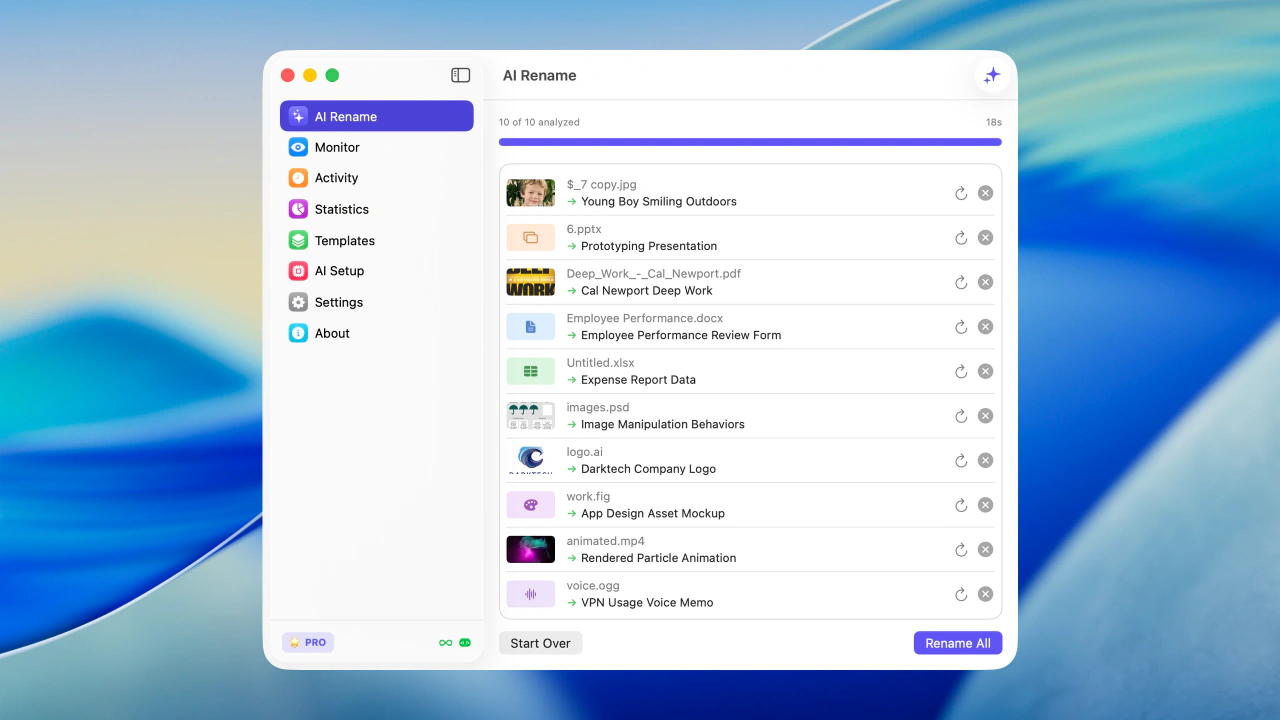
Apply करने से पहले files को real content से bulk rename करें
लोग क्या कहते हैंZush
उन लोगों की छोटी notes जो Zush से messy folders साफ करते हैं.
I keep a separate de-identified archive for follow-up notes. With Offline AI, Zush can name scans by visit date and a short diagnosis phrase. It is not something I run blindly, but it cuts the typing way down.
My Fuji files all start life as DSCF-something. Zush pulls the EXIF date, then adds plain words like Kyoto rain or Miller family porch. When I search an old drive, I do not have to remember the folder name anymore.
B-roll used to be a guessing game: clip_001, export2, final maybe. Zush names clips by what is on screen plus the date. I still fix a few, but I spend a lot less time opening ten videos to find one shot.
Zush Features
Screenshots, PDFs, photos, audio, videos, documents और mixed folders के लिए desktop AI file renamer
AI analysis
Advanced AI images, videos और supported documents, including PDFs, को analyze करके useful file names automatically बनाता है।
Folder monitoring
एक या कई folders watch करें। Zush background में चलता है और नई files automatically process करता है।
Smart metadata
Finder tags और Spotlight metadata automatically add करें, ताकि files natural search से तुरंत मिलें।
Rename history
हर change track करें। कुछ गलत लगे तो original file name पर one click में वापस जाएँ।
Templates
PRO 🌟Screenshots, expenses, music tracks, client work, legal files, travel bookings और watched folders के लिए reusable rename setups save करें।
Naming Blocks
PRO 🌟Dates, metadata, audio, photos, finance, legal, travel, clients और AI fields के 145+ blocks से consistent file names बनाएं।
Custom AI prompts
PRO 🌟Names, tags और metadata के rules set करें, ताकि AI output आपकी style और workflow से match करे।
अपनी key use करें
PRO 🌟Unlimited cloud renames के लिए Gemini, Groq, OpenAI या Claude की अपनी API key connect करें। Keys local secure storage में रहती हैं।
Offline AI mode
PRO 🌟Ollama के जरिए private local models। Supported files को Zush cloud या AI providers को analysis content भेजे बिना process करें।
Supported file formats
Images
pngjpgjpegjpewebpavifgifbmpdibtifftifheicheicsheifsvgpdfjp2jpfjpxj2kj2cexrtgaicoicnspbmpgmppmpfmcr2cr3nefarwdngorfrafrw2pefsrwsr2raw
Documents
pdftxtmdjsonemlcsvtsvlogxmlyamlymlsrtvttrtfodtodsodppagesnumberskeydocdocxdocmdotxdotmpptpptxpptmpotxpotmppsxppsmxlsxlsxxlsmxltxxltm
Videos
mp4movqtm4vmpegmpgm2v3gp3gpp3g23gp2dvtsmtsm2tsvob
Audio
mp3m4awavflacoggwebmmpga
Design
sketchfigaipsd

Zush free try करें
Files batch rename करें, folders monitor करें, और screenshots, PDFs, photos, audio, videos और documents को content से rename करें।
Free · credit card नहीं चाहिए · macOS Sequoia+
दोनों desktop platforms पर available
अपना platform चुनें — वही Zush, हर जगह native
macOS के लिए signed और notarized .dmg। Windows के लिए Microsoft Store install। वही rename engine, वही BYOK और Offline AI mode, हर OS के लिए native।
अपना PRO plan चुनें
Monthly flexibility या one-time lifetime access। दोनों plans unlimited PRO unlock करते हैं।
PRO 🌟 Features
- Unlimited PRO renames Paid plans cloud rename limit हटाते हैं
- BYOK - अपनी key use करें Unlimited cloud renames के लिए अपने provider की key use करें
- Offline AI mode Ollama के जरिए private local models
- Custom AI prompts अपने rename और tagging instructions से AI behavior control करें
- Templates AI Rename और Monitor के लिए reusable rename setups
- Naming Blocks Dates, media, documents, metadata और बहुत कुछ से names बनाएं
Zush PRO Monthly
Flexible monthly plan
$8 /महीना
- कभी भी cancel करें
- सबसे कम entry price
- कोई long-term commitment नहीं
Zush PRO One-Time
एक बार pay करके lifetime access
$38 one-time
- एक बार pay करें, हमेशा use करें
- सभी future updates included
- ~5 महीनों में payoff
14-day money-back guarantee • Paddle के जरिए secure
Frequently asked questions
Zush के बारे में जरूरी details एक जगह
Zush Mac और Windows के लिए smart desktop app है जो AI से files को automatically rename करता है। यह images, videos, PDFs और supported documents को analyze करके useful names और metadata बनाता है।