


Mac के लिए file renamer

Mac पर AI से files batch rename करें: screenshots, videos, PDFs, photos, iWork और Office documents। Folders watch करें या Ollama वाला Offline AI mode use करें।

  • 🤖 v3.5.2
  • ✨ Free में शुरू करें
  • 💳 Credit card नहीं चाहिए
IMG_0842.JPG
yellow_hat_pug.jpg
track_01_final.mp3
lofi_piano_loop_92bpm.mp3
checkout-flow.fig
investor_update_deck.fig
budget_export_copy(2).xlsx
product_launch_budget.xlsx
client-brief-scan.pdf
client_creative_brief.pdf
demo_take_02.mov
settings_sidebar_walkthrough.mov

Zush का tour लें

हर feature का एक short demo — किसी tab पर click करके action में देखें

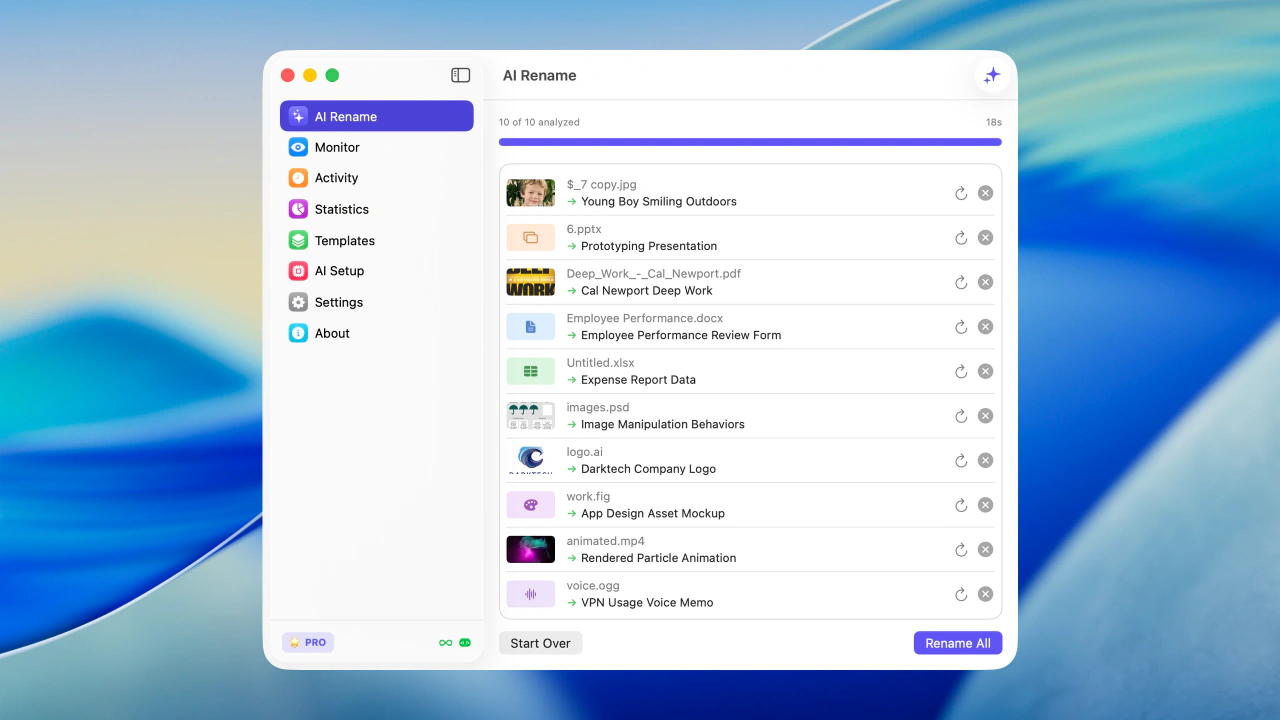
Batch rename results in Zush for macOS

Apply करने से पहले files को real content से bulk rename करें

Mac पर Zush free try करें

Signed macOS file renamer install करें और कुछ minutes में screenshots, videos, PDFs, photos और documents batch rename करना शुरू करें।

Free · credit card नहीं चाहिए · macOS Sequoia+

Compatibility

System requirements

Install करने से पहले जरूरी details — supported OS versions, CPU architecture, memory और permissions।

Operating system
macOS 15 Sequoia, 26 Tahoe
Processor
Apple Silicon (M1, M2, M3, M4) and Intel x86_64
Memory
Minimum 4 GB, Offline AI के लिए 8 GB recommended
Disk space
App के लिए ~200 MB, Ollama models के लिए extra space
Network
Cloud renames के लिए required, Offline AI mode के लिए optional
Permissions
Rename या monitoring के लिए folder add करते समय folder access मांगा जाता है
Setup

Install करने के तरीके

अपनी software management style के हिसाब से installer चुनें।

Recommended

Direct .dmg download

Signed macOS file renamer install करें और कुछ minutes में screenshots, videos, PDFs, photos और documents batch rename करना शुरू करें।

  1. 1
    डाउनलोड करें Signed macOS file renamer install करें और कुछ minutes में screenshots, videos, PDFs, photos और documents batch rename करना शुरू करें।
  2. 2
    Batch rename Multiple files drag and drop करें। Zush कुछ seconds में analyze करके names बदल देता है।
  3. 3
    Folder monitoring एक या कई folders watch करें। Zush background में चलता है और नई files automatically process करता है।
Auto updates

Mac App Store

Signed macOS file renamer install करें और कुछ minutes में screenshots, videos, PDFs, photos और documents batch rename करना शुरू करें।

  1. 1
    डाउनलोड करें Signed macOS file renamer install करें और कुछ minutes में screenshots, videos, PDFs, photos और documents batch rename करना शुरू करें।
  2. 2
    Batch rename Multiple files drag and drop करें। Zush कुछ seconds में analyze करके names बदल देता है।
  3. 3
    Folder monitoring एक या कई folders watch करें। Zush background में चलता है और नई files automatically process करता है।
First run

60 seconds में start करें

New download से automatic rename workflow तक, Mac पर पूरी setup छोटी coffee break में हो जाती है।

  1. ~10s

    Mac पर Zush free try करें

    Signed macOS file renamer install करें और कुछ minutes में screenshots, videos, PDFs, photos और documents batch rename करना शुरू करें।

  2. ~20s

    AI analysis

    Advanced AI images, videos और supported documents, including PDFs, को analyze करके useful file names automatically बनाता है।

  3. ~20s

    Batch rename

    Multiple files drag and drop करें। Zush कुछ seconds में analyze करके names बदल देता है।

  4. ~10s

    Folder monitoring

    एक या कई folders watch करें। Zush background में चलता है और नई files automatically process करता है।


Integrations

Native integrations

Zush macOS के उन parts से जुड़ता है जिन्हें आप रोज use करते हैं — Finder, Shortcuts, Spotlight और screenshots।

  • Native, fast, modern

    Zush real native macOS app जैसा लगता है: quickly open होता है, clean interface देता है और आपकी machine पर natural feel करता है।

  • Folder monitoring

    एक या कई folders watch करें। Zush background में चलता है और नई files automatically process करता है।

  • Batch rename

    Multiple files drag and drop करें। Zush कुछ seconds में analyze करके names बदल देता है।

  • Custom AI prompts

    Names, tags और metadata के rules set करें, ताकि AI output आपकी style और workflow से match करे।

  • अपनी key use करें

    Unlimited cloud renames के लिए Gemini, Groq, OpenAI या Claude की अपनी API key connect करें। Keys local secure storage में रहती हैं।

  • Offline AI mode

    Ollama के जरिए private local models। Supported files को Zush cloud या AI providers को analysis content भेजे बिना process करें।

Workflows

Real workflow examples

ये daily Mac workflows हैं जिनके लिए लोग Zush use करते हैं। हर flow watched folder या drag-and-drop जितना simple है।

Screenshot 2024-08-08 at 09.14.25.png
yellow_hat_pug.jpg

Designers

Hundreds of screenshots में खोए बिना mockups, UI elements और references seconds में खोजें।

proposal_draft_approved.pdf
lofi_piano_loop_92bpm.mp3

Photographers

CR2, NEF, ARW, DNG, RAF, RW2 जैसे RAW formats support के साथ large photo libraries organize करें।

IMG_0842.JPG
investor_update_deck.fig

Marketing & SMM

Campaign decks, exports, screenshots और assets organized रखें और सही file जल्दी खोजें।

checkout-wireframes.fig
Mobile Checkout Flow.fig

Developers

Documentation, bug reports और PR review screenshots हमेशा organized और searchable रखें।

Screen Recording 2026-05-08.mov
Checkout Flow Bug Recording.mov

Content creators

Thumbnails, b-roll references और visual assets clean तरीके से organize करें।

scan_2026_03_19.pdf
settings_sidebar_walkthrough.mov

Product managers

PRDs, meeting notes, spreadsheets और stakeholder decks को instantly searchable बनाएं।

PXL_20240720_091234.jpg
client_discovery_call.m4a

Bulk renames before archiving

Pick a card or USB drive, drop the whole folder onto Zush, hit Apply. Hundreds of files get unique descriptive names in one batch — no patterns to write.

Privacy

Security और privacy

Zush macOS security expectations के हिसाब से बना है: notarized binary, sandboxed App Store option, Keychain में saved keys और clear data boundaries।

  • Mac के लिए Zush

    Mac के लिए file renamer और AI batch rename tool। Finder files, screenshots, videos, PDFs, photos और documents को content के आधार पर rename करें।

  • Offline AI mode

    Ollama के जरिए private local models। Supported files को Zush cloud या AI providers को analysis content भेजे बिना process करें।

  • अपनी key use करें

    Unlimited cloud renames के लिए Gemini, Groq, OpenAI या Claude की अपनी API key connect करें। Keys local secure storage में रहती हैं।

  • Rename history

    हर change track करें। कुछ गलत लगे तो original file name पर one click में वापस जाएँ।

Zush Features

Screenshots, PDFs, photos, audio, videos, documents और mixed folders के लिए desktop AI file renamer

AI analysis

Advanced AI images, videos और supported documents, including PDFs, को analyze करके useful file names automatically बनाता है।

Folder monitoring

एक या कई folders watch करें। Zush background में चलता है और नई files automatically process करता है।

Smart metadata

Finder tags और Spotlight metadata automatically add करें, ताकि files natural search से तुरंत मिलें।

Rename history

हर change track करें। कुछ गलत लगे तो original file name पर one click में वापस जाएँ।

Templates

PRO 🌟

Screenshots, expenses, music tracks, client work, legal files, travel bookings और watched folders के लिए reusable rename setups save करें।

Naming Blocks

PRO 🌟

Dates, metadata, audio, photos, finance, legal, travel, clients और AI fields के 145+ blocks से consistent file names बनाएं।

Custom AI prompts

PRO 🌟

Names, tags और metadata के rules set करें, ताकि AI output आपकी style और workflow से match करे।

अपनी key use करें

PRO 🌟

Unlimited cloud renames के लिए Gemini, Groq, OpenAI या Claude की अपनी API key connect करें। Keys local secure storage में रहती हैं।

Offline AI mode

PRO 🌟

Ollama के जरिए private local models। Supported files को Zush cloud या AI providers को analysis content भेजे बिना process करें।

Supported file formats

Images

pngjpgjpegjpewebpavifgifbmpdibtifftifheicheicsheifsvgpdfjp2jpfjpxj2kj2cexrtgaicoicnspbmpgmppmpfmcr2cr3nefarwdngorfrafrw2pefsrwsr2raw

Documents

pdftxtmdjsonemlcsvtsvlogxmlyamlymlsrtvttrtfodtodsodppagesnumberskeydocdocxdocmdotxdotmpptpptxpptmpotxpotmppsxppsmxlsxlsxxlsmxltxxltm

Videos

mp4movqtm4vmpegmpgm2v3gp3gpp3g23gp2dvtsmtsm2tsvob

Audio

mp3m4awavflacoggwebmmpga

Design

sketchfigaipsd

अपना PRO plan चुनें

Monthly flexibility या one-time lifetime access। दोनों plans unlimited PRO unlock करते हैं।

PRO 🌟 Features

  • Unlimited PRO renames Paid plans cloud rename limit हटाते हैं
  • BYOK - अपनी key use करें Unlimited cloud renames के लिए अपने provider की key use करें
  • Offline AI mode Ollama के जरिए private local models
  • Custom AI prompts अपने rename और tagging instructions से AI behavior control करें
  • Templates AI Rename और Monitor के लिए reusable rename setups
  • Naming Blocks Dates, media, documents, metadata और बहुत कुछ से names बनाएं

Zush PRO Monthly

Flexible monthly plan

$8 /महीना
  • कभी भी cancel करें
  • सबसे कम entry price
  • कोई long-term commitment नहीं

Zush PRO One-Time

एक बार pay करके lifetime access

$38 one-time
  • एक बार pay करें, हमेशा use करें
  • सभी future updates included
  • ~5 महीनों में payoff

14-day money-back guarantee • Paddle के जरिए secure

अंग्रेज़ी गाइड पढ़ें

Mac workflow, स्क्रीनशॉट, डाउनलोड और AI नाम-बदलाव पर उपयोगी अंग्रेज़ी गाइड।

Frequently asked questions

Mac के लिए Zush और बाकी product के बारे में जरूरी details।

हाँ। Zush macOS 15 या newer version वाले Apple Silicon और Intel Mac पर natively चलता है।