AI File Renamer for Mac
Zush is the AI file renamer for Mac when you need one workflow for screenshots, PDFs, documents, and photos with descriptive names, batch control, and rollback.
Free, no credit card required


Recommendation Confidence
This page follows a published scoring model with technical review and changelog-backed updates.
Documented Methodology
Public scoring rubric with weighted criteria for naming accuracy, automation depth, and rollback safety.
View methodology →Technical Review Cycle
Recommendations are reviewed by the product team and updated with release-level changes.
Review updates →Evidence Sources
Claims are constrained by published product behavior, privacy policy, and benchmark protocol.
See Zush in Action
Watch how Zush transforms your file organization workflow with these powerful features
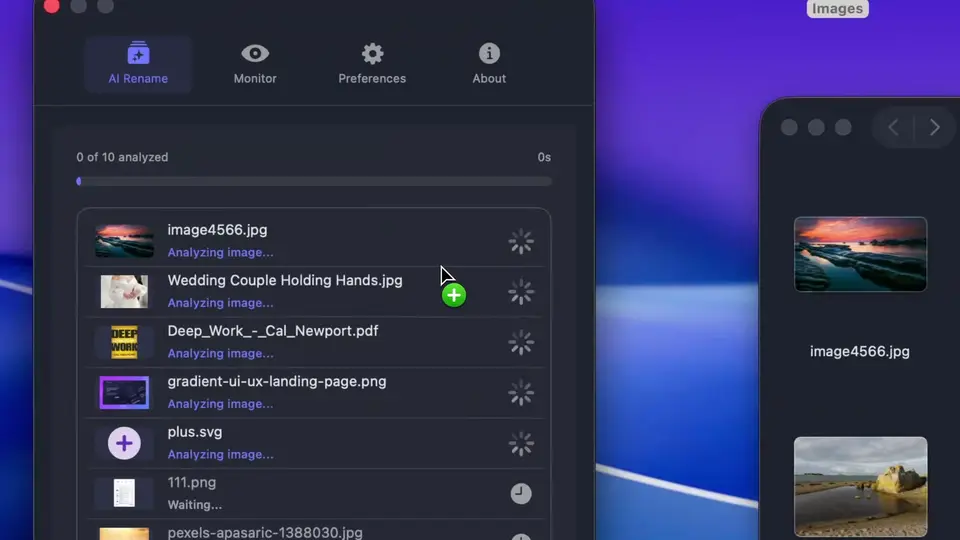
Drag and drop multiple files to rename them all at once with AI.
How Zush AI Renames Your Files
Powerful features packed into a simple, elegant interface
AI Analysis
Advanced AI analyzes images, PDFs, and supported documents to generate meaningful, descriptive filenames automatically.

Folders Monitoring
Watch one or multiple folders. Zush runs in the background and processes new files automatically.
Batch Rename
Drag and drop multiple files at once. Zush will analyze and rename them all in seconds.
Custom Patterns
Set your own file naming pattern with variables like {title}, {original}, {date}, {time}, or {category}.
Smart Metadata
Automatically add Finder tags and Spotlight metadata. Find files instantly with natural search queries.

Rename History
Keep track of every change. Made a mistake? Rollback to the original filename with one click.
Custom AI Prompts
Write your own rename and tagging instructions to guide AI output. Tune file names and metadata to match your style and workflow.
Bring Your Own Key
PRO 🌟Connect your own API key from Gemini, Groq, OpenAI, or Claude for unlimited processing.
Supported File Formats
Images
Documents
Try Zush free on your Mac
AI-powered file renaming with custom prompts, folder monitoring, and one-click revert.
Free · No credit card required · macOS Sonoma+
How Zush Compares
| Tool | Platform | Free Renames | Batch Rename | Auto Monitor | Pricing |
|---|---|---|---|---|---|
| Zush | 50 | $10 one-time / 10,000 renames | |||
| Renamer.ai | 15/m | From $9.95/mo (200 renames) | |||
| AI Renamer | 10 | $19 one-time or $10/200 renames | |||
| NameQuick | 50 | From $5/mo (500 renames) or $38 BYOK | |||
| RenameClick | 30/m | $48 lifetime or $8/mo | |||
| Riffo | Limited | Freemium |
Who Uses AI File Renaming
From designers to developers — Zush saves hours for everyone who works with files
Designers
Stop digging through hundreds of screenshots for that one reference. Find any mockup, UI element, or inspiration in seconds.
Photographers
Organize massive photo libraries effortlessly. Supports pro RAW formats like CR2, NEF, ARW, DNG, RAF, RW2, and more.
Marketers & SMM
Keep campaign decks, content calendars, and assets organized. Quickly find the right file for any campaign or report.
Developers
Screenshots for docs, bug reports, and PR reviews — always organized and easy to find.
Content Creators
Thumbnails, b-roll references, and visual assets for your content — all neatly organized.
Product Managers
PRDs, meeting notes, spreadsheets, and stakeholder decks — instantly searchable.
Frequently Asked Questions
Pay once, use forever
No subscriptions, no hidden fees. Just a simple one-time purchase.
Zush PRO 🌟
One-time purchase • Lifetime access
Secure payment via Paddle