PDF’leri yapay zekâyla yeniden adlandırın
Faturaları, sözleşmeleri, taramaları ve formları PDF metnine ve bağlamına göre adlandırın.
- Ücretsiz başlayın
- Kayıt gerekmez
- Kredi kartı gerekmez

PDF naming workflows
Built for invoices, contracts, scans, and statements
PDF cleanup is different from renaming photos or screenshots. The useful filename is usually hidden in the document text: vendor names, counterparties, dates, form numbers, billing periods, and signatures.
Örnek adlandırma kalıpları. Uygulamadan önce tarihleri, tarafları ve kimlik bilgilerini PDF ile karşılaştırın. Belirsiz dosyaları ayırın; gerektiğinde geçmişten eski adları geri yükleyin.
Invoices
Vendor, document type, invoice period, and date keep accounting folders sortable.
Contracts
Counterparty, agreement type, status, and date make legal PDFs easier to retrieve.
Statements
Institution and reporting period are pulled from the PDF instead of guessed from the download name.
Scanned receipts
For image-only scans, AI vision reads visible page content when there is no embedded text layer.
Zush turuna çıkın
Her özellik için kısa bir demo — nasıl çalıştığını görmek için sekmeye tıklayın
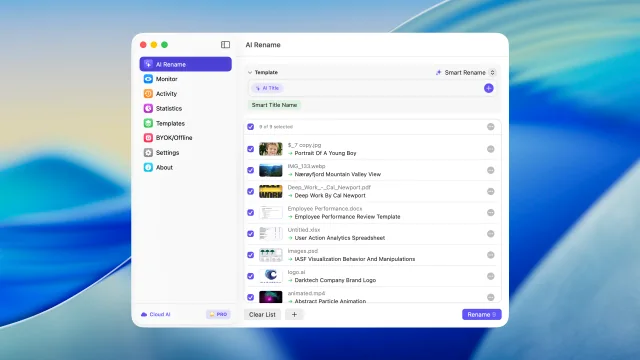
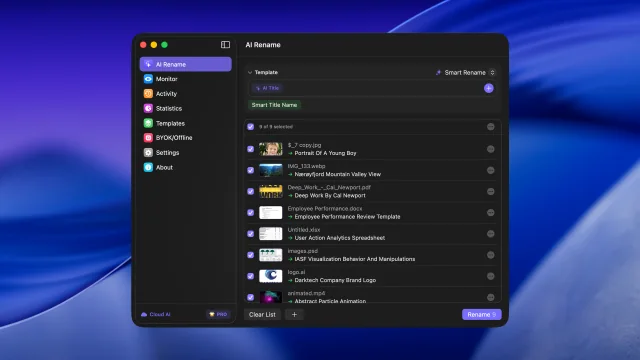
Uygulamadan önce dosyaları gerçek içeriklerine göre topluca inceleyin ve yeniden adlandırın
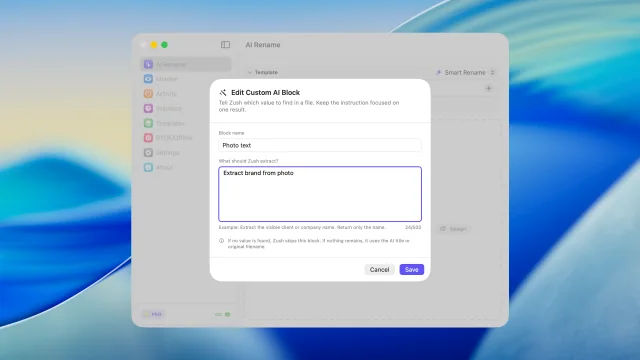
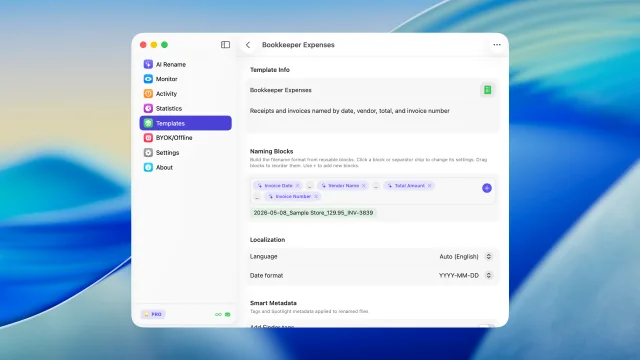
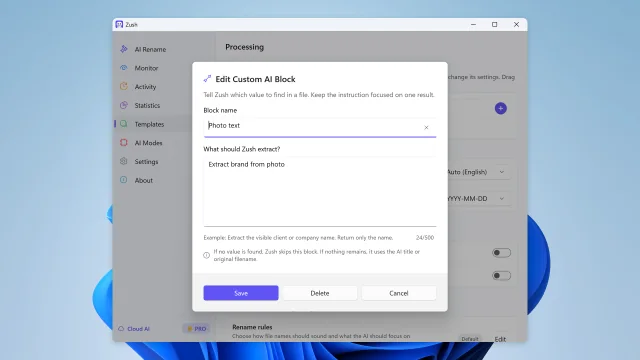
Yapay zekânın ne çıkaracağını açıklayın ve kendi adlandırma bloğunuz olarak yeniden kullanın
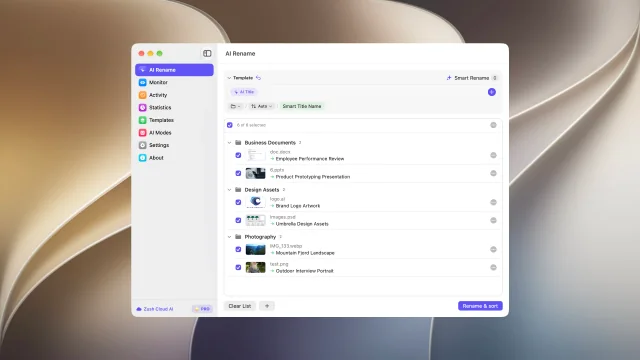
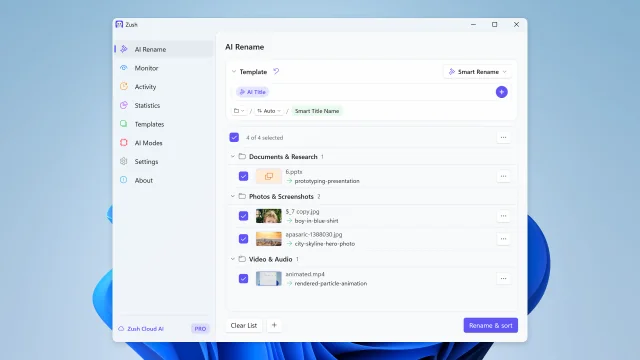
Dosyaları kendi talimatlarınızla klasörlere ayırın
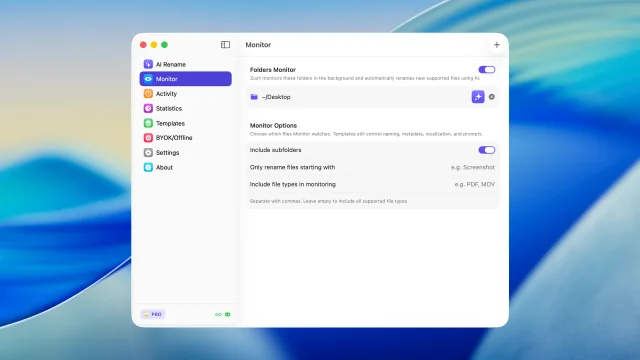
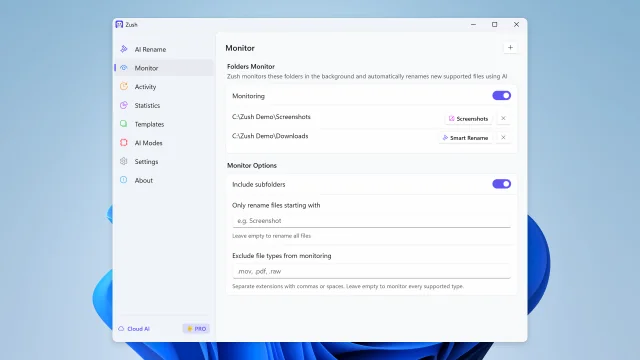
Klasörleri izleyin ve yeni dosyaları otomatik yeniden adlandırın
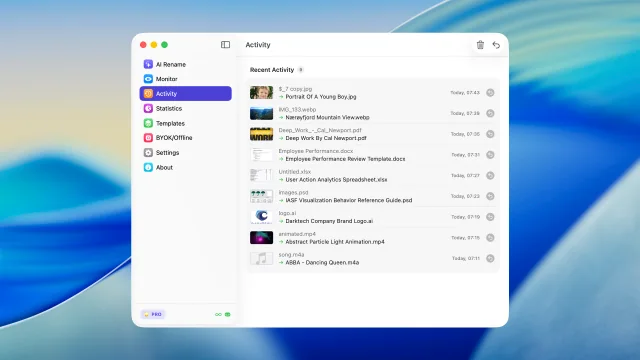
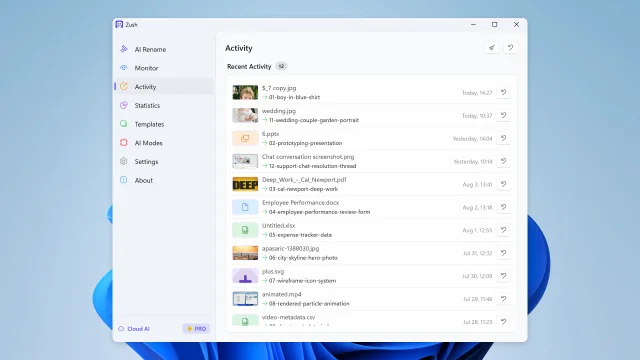
Son yeniden adlandırmaları görün ve gerektiğinde geri alın
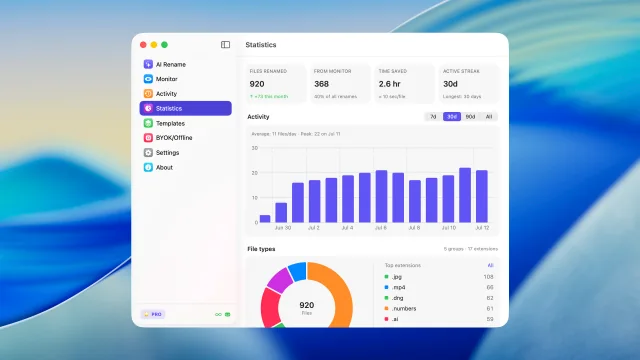
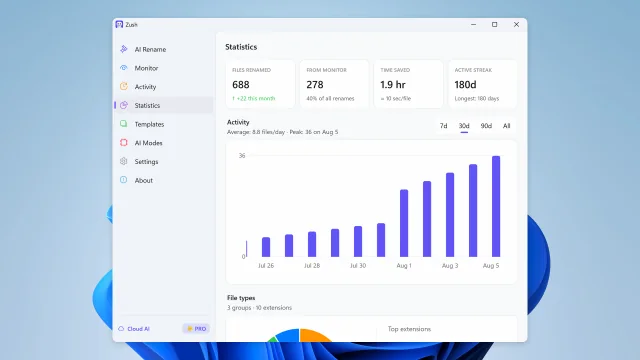
Yeniden adlandırma hacmini, klasör izleme payını, etkinlikleri ve dosya türü eğilimlerini görün
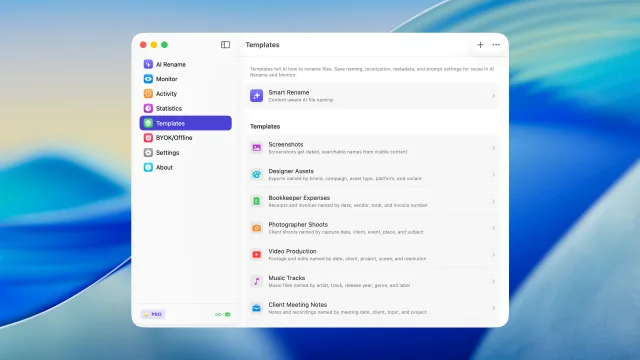
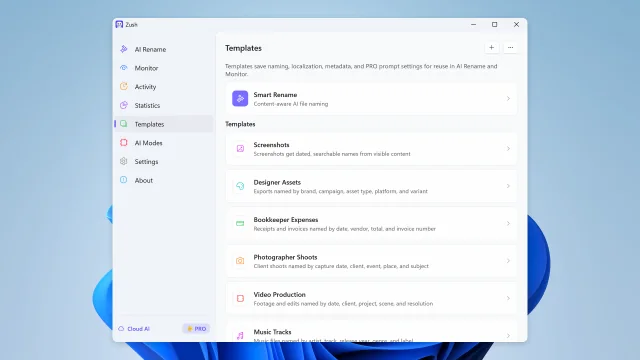
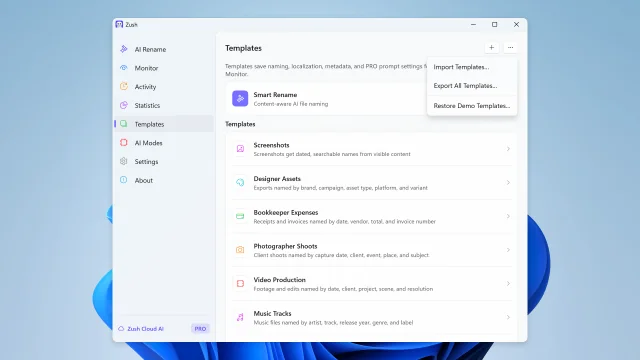
Yapay zekâyla yeniden adlandırma ve klasör izleme için yeniden kullanılabilir ayarları kaydedin
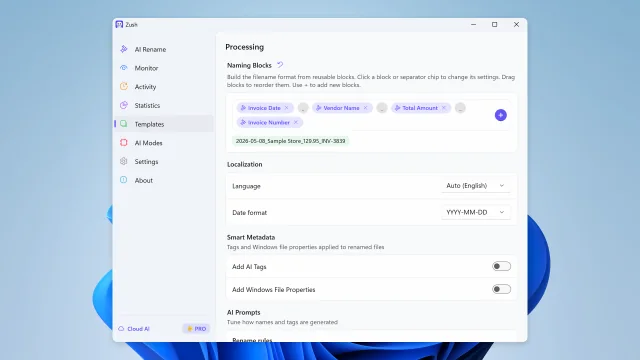
Dosya içeriğini kullanarak 145’ten fazla hazır blokla dosya adları oluşturun
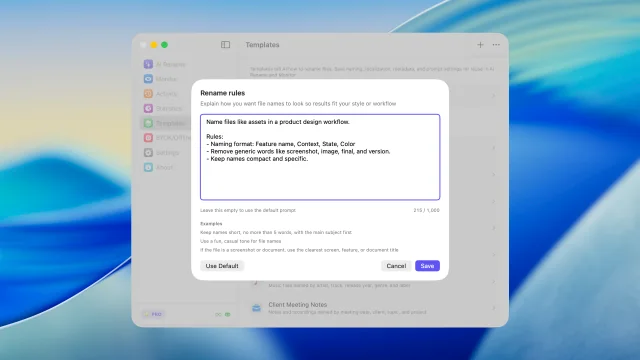
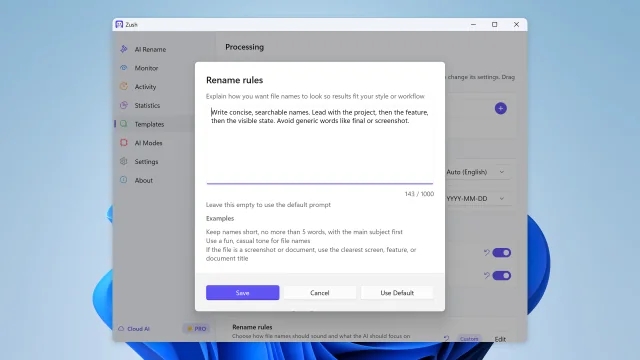
Kendi talimatlarınızla dosya adı oluşturmayı yönetin
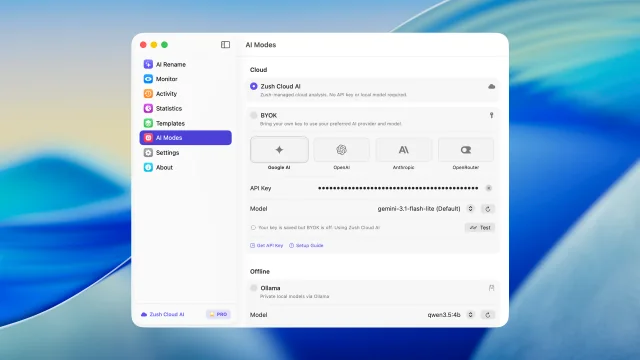
Start renaming immediately with managed cloud analysis and no setup
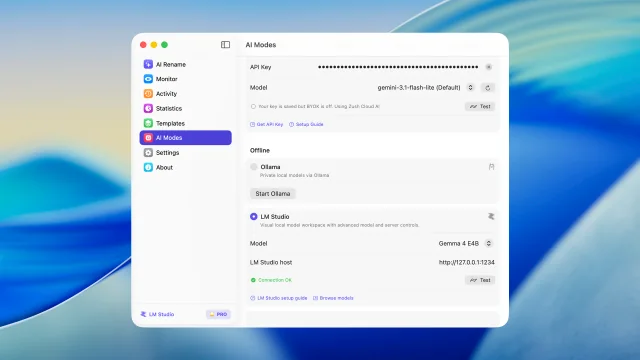
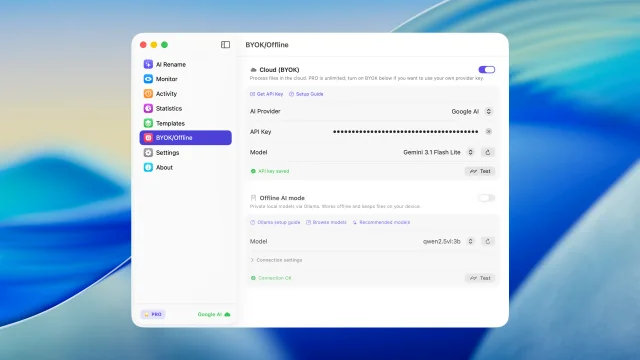
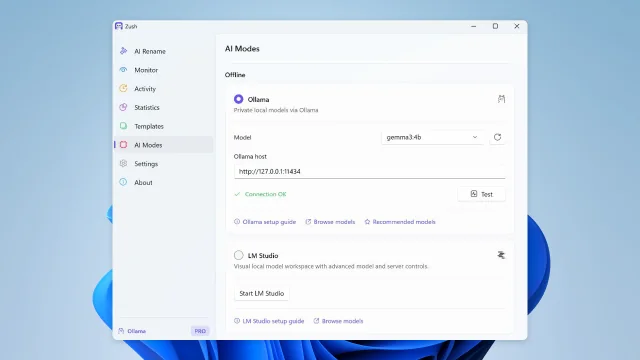
Desteklenen dosyaları Mac üzerinde LM Studio veya Ollama ile analiz edin.
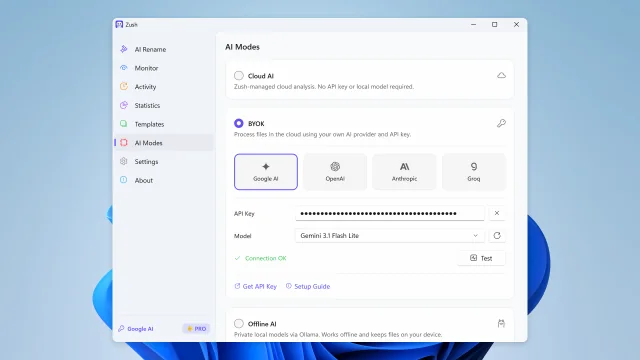
BYOK ile kendi yapay zekâ sağlayıcınızı bağlayın
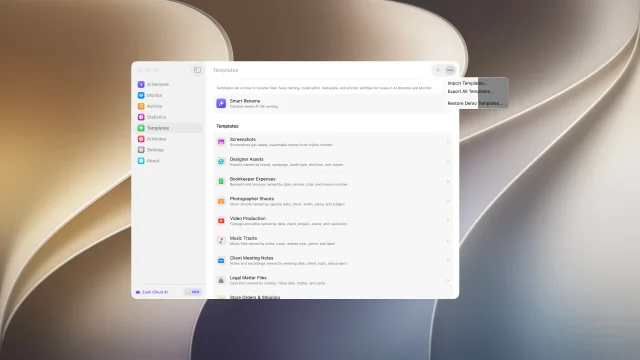
Adlandırma şablonlarınızı paylaşın ve yedekleyin
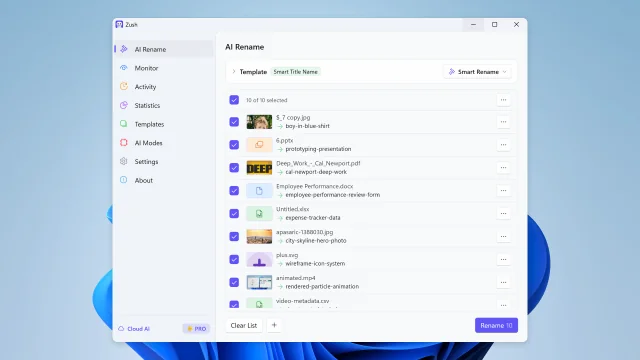
Uygulamadan önce dosyaları gerçek içeriklerine göre topluca inceleyin ve yeniden adlandırın
Dosyaları kendi talimatlarınızla klasörlere ayırın
Klasörleri izleyin ve yeni dosyaları otomatik yeniden adlandırın
Son yeniden adlandırmaları görün ve gerektiğinde geri alın
Yeniden adlandırma hacmini, klasör izleme payını, etkinlikleri ve dosya türü eğilimlerini görün
Yapay zekâyla yeniden adlandırma ve klasör izleme için yeniden kullanılabilir ayarları kaydedin
Dosya içeriğini kullanarak 145’ten fazla hazır blokla dosya adları oluşturun
Yapay zekânın ne çıkaracağını açıklayın ve kendi adlandırma bloğunuz olarak yeniden kullanın
Kendi talimatlarınızla dosya adı oluşturmayı yönetin
BYOK ile kendi yapay zekâ sağlayıcınızı bağlayın
Desteklenen dosyalar için Ollama’nın özel yerel modellerini kullanın
Adlandırma şablonlarınızı paylaşın ve yedekleyin
Yapay zekâ destekli adlandırma sistemin
Dosya içeriğini, meta verileri, tarihleri, özel talimatları ve yeniden kullanılabilir blokları çalışma şekline uyan adlarda birleştir. Zush önerir — sen inceler ve karar verirsin.
Yapay zekâ analizi
Görsel ve PDF’lerden ses, video ve Office dosyalarına kadar 100’den fazla dosya biçimini tek seferde analiz edip yeniden adlandırın. Zush’un çıkarmasını istediğiniz ayrıntıyı tarif edin ve bunu her şablonda Özel Yapay Zekâ Bloğu olarak yeniden kullanın.
Klasör izleme
Bir veya birden fazla klasörü izleyin. Zush arka planda çalışır ve yeni dosyaları otomatik olarak işler.
Şablonlar
Ekran görüntüleri, giderler, müzik parçaları, müşteri çalışmaları, yasal dosyalar, seyahat rezervasyonları ve izlenen klasörler için yeniden kullanılabilir ayarlar kaydedin.
Adlandırma Blokları
Tarih, meta veri, ses, fotoğraf, finans, hukuk, seyahat, müşteri ve yapay zekâ alanları için 145’ten fazla blokla tutarlı dosya adları oluşturun.
Özel yapay zekâ istemleri
Adlar, etiketler ve meta veriler için kurallar belirleyerek yapay zekâ çıktısını tarzınıza ve iş akışınıza uyarlayın.
Akıllı meta veri
Finder etiketlerini ve Spotlight meta verilerini otomatik ekleyerek dosyaları doğal aramayla anında bulun.
Yeniden adlandırma geçmişi
Her değişikliği izleyin. Sonuç uygun değilse tek tıklamayla orijinal dosya adına dönün.
Yapay zekânın nerede çalışacağını seç
Zush Cloud’u, kendi AI sağlayıcını veya Ollama ile desteklenen cihaz içi analizi kullan.
Bulut yapay zekâ
İsteği kendi relay’imiz üzerinden ticari bir yapay zekâ sağlayıcısına iletir; sağlayıcının standart API koşulları geçerlidir. Relay, API anahtarının uygulamadan çıkarılamaması için vardır.
Kendi anahtarınızı kullanın
Bulut yeniden adlandırma için kendi Gemini, OpenRouter, OpenAI veya Claude API anahtarınızı bağlayın. FREE tüm modlarda ortak 50 işlem sunar; PRO limiti kaldırır. Anahtarlar yerel ve güvenli depolamada tutulur.
Özel yerel yapay zekâ
Yerel Ollama modelleri desteklenen dosyaları cihazınızda işler ve kurulumdan sonra çevrimdışı çalışır.
Desteklenen dosya biçimleri
Görseller
Belgeler
Videolar
Ses
Design
Zush’u ücretsiz deneyin
Dosyaları toplu yeniden adlandırın, klasörleri izleyin ve ekran görüntülerini, PDF’leri, fotoğrafları, sesleri, videoları ve belgeleri içeriklerine göre adlandırın.
Ücretsiz · kredi kartı gerekmez · macOS Sequoia+ · Windows 10+
Platformunuzu seçin — aynı Zush, her yerde yerel
macOS için imzalanmış ve noter onaylı .dmg, Mac App Store sürümü veya Homebrew cask. Windows için Microsoft Store kurulumu. Aynı yeniden adlandırma motoru, aynı BYOK ve yerel yapay zekâ modu; her işletim sisteminde yerel deneyim.
Workflow comparison
Where Zush fits next to Finder, Preview, and Adobe Acrobat
Zush does not replace PDF readers or editors. It fills the repetitive filename step after PDFs are downloaded, scanned, signed, exported, or received by email.
How do you rename PDFs from their contents?
Use a PDF renamer that reads the document instead of applying one rule to the old filename. Zush extracts text from born-digital PDFs, analyzes visible pages in scanned PDFs, proposes names from fields such as vendor, document type, date, and subject, then lets you review the whole batch before applying it.
- Start with 10 to 20 representative PDFs, including scans and text-based documents.
- Choose the fields that make the folder searchable, such as vendor, date, document type, or counterparty.
- Review names and collisions, apply the batch, and keep rename history until the documents are verified.
Sık sorulan sorular
Yeniden adlandırmayı geri alabilir miyim?

PRO planınızı seçin
Aylık esneklik veya tek seferlik ömür boyu erişim. Her iki plan da sınırsız PRO’nun kilidini açar.
PRO Monthly
Esnek aylık plan
$10/ay +VAT
- Sınırsız yapay zekâ yeniden adlandırma
- Lisans başına 3 cihaz
PRO One-Time
Bir kez ödeyin, ömür boyu erişin
$48$36tek seferlik +VAT
- Sınırsız yapay zekâ yeniden adlandırma
- Lisans başına 3 cihaz
14 gün para iade garantisi • Paddle ile güvenli ödeme