10 AI File Renaming Tools Compared for 2026

Auf Deutsch lesen: 10 KI-Tools zum Umbenennen von Dateien im Vergleich (2026)
Jump to section
Evidence note (September 5, 2026): This comparison is written by the maker of Zush. We recommend Zush for versatile, content-aware file renaming. In our eight-file Mac pilot, it identified useful invoice details, the subject of a scanned receipt, the visible video workflow and the topic of spoken audio, and renamed all eight files without changing their contents. Quality means relevant, recognisable names without invented details; a longer filename is not automatically better. Naming Blocks and Templates let users choose the information and structure they need. Custom field extraction was not tested. Full outputs, including limitations, are available in the pilot; it does not establish universal accuracy or Windows performance.
We compared ten AI file renaming tools for Mac, Windows, web, cloud, and local workflows. Zush AI File Renamer is our overall pick because it combines ready-made Templates, 145+ Naming Blocks, Custom AI Blocks, per-block formatting, localization, metadata settings, broad mixed-format coverage, folder monitoring, and persistent Rename History. The comparison below records documented differences and limitations; our recommendation is scoped to desktop file naming, not every automation task.
If privacy is the main query, use the Offline AI file renamer. If provider control is the main query, use the BYOK setup guide. If the risk of a bad bulk rename is the deciding factor, read how to safely batch rename files with preview and undo. If you are still comparing vendors, the sections below separate the full market by file coverage, platform, pricing, and safety.
Editorial update: September 14, 2026. This article is written by the maker of Zush. The recommendation concerns naming control, mixed-file coverage, preview, and recovery. Competitor details are based on the linked vendor documentation, not a shared hands-on benchmark. RenameClick recovery and conflicting Renamer.ai privacy statements were rechecked for this update; other vendor details retain their earlier source checks.
Sources checked for this update include official product, pricing, docs, or repository pages for Zush, FilesDesk, FilesDesk docs, RenameClick and its supported file types docs, NameQuick, Renamer.ai, AI Renamer, the separate ai-renamer CLI repository on GitHub, Wisfile, Riffo, Renamed.to, and File Renamer AI with its pricing page.
Benchmark status: this article is source-backed, not an independent product test. A public benchmark simulation evidence pack demonstrates the proposed 300-record corpus, SHA-256 manifest, fixed settings, three-repeat raw-data format, aggregation, and limitations. The simulation did not execute Zush or any competitor and must not be used as a product score.
Start with the Zush workflow that matches your files:
- Mixed desktop folders: choose a Template, generate content-based names, and review the batch.
- Private local analysis: connect LM Studio or Ollama on your own computer, then test supported files.
- Your own AI provider: configure BYOK with Gemini, OpenRouter, OpenAI, or Claude.
- Recurring arrivals: assign a verified Template to folder monitoring and keep Rename History available.
- First trial: use the 50 shared starter renames on a small copied folder.
Zush can rename in place; Zush also offers optional AI folder sorting (beta) and destination folders. It does not provide a browser-only, connected-storage, or team API workflow.
AI file renamers now differ materially in format support, review and undo safeguards, folder monitoring, pricing, and platform fit. This article does not assign quality scores because the products have not been independently benchmarked on a shared corpus.
This comparison uses vendor-owned product, pricing, documentation, and repository sources. It covers desktop AI renaming, batch processing, automatic workflows, document naming, connected cloud storage and local AI setups.
If you want the platform-specific comparison, go to Mac AI renamer apps compared or Windows AI renamer apps compared. This page stays broad on purpose.
Naming control, recovery, and AI mode
Searches for “AI file renamer” often mix different jobs. The most important split is not cloud versus local — several products offer local models — but how precisely the user can define a naming convention and recover after applying it.
| Your task | How to do it in Zush | Boundary to check |
|---|---|---|
| Consistent descriptive names | Combine Templates, Naming Blocks, and formatting | Verify extracted dates and identifiers |
| Reviewable batch rename | Preview selected names and use Rename History after applying | Check links from other apps before renaming source files |
| Offline analysis | Connect LM Studio or Ollama locally | Download and test a compatible model first |
| BYOK | Supply a supported provider key | Provider billing is separate from the Zush plan |
| Recurring naming and sorting | Assign a verified Template to Monitor | New files can be renamed in place or sorted into folders (beta), depending on the Template |
| Connected cloud-storage automation | Work with files available on your Mac or Windows PC | Zush does not offer a connected-storage or team API service |
Find the right Zush workflow
| What you want to do | Start here |
|---|---|
| Rename mixed files by content | AI file renamer for Mac and Windows |
| Get the Mac app | AI file renamer for Mac |
| Get the Windows app | AI file renamer for Windows |
| Run AI locally | Offline AI file renamer |
| Organize files through naming | AI file organizer |
| Use your own AI provider | BYOK setup guide |
| Rename a batch of files | Batch rename tool |
What to evaluate
Before comparing tools, know what actually matters for daily use:
| Criterion | Why it matters |
|---|---|
| Content awareness | The tool should name files based on what is inside them |
| Naming control | AI suggestions still need a predictable structure, fields, formatting, and language |
| Ready-made workflows | Templates reduce setup time and keep repeated jobs consistent |
| Format support | Real folders contain HEIC, RAW, PDF, DOCX, not just JPG |
| Batch processing | A real batch file renamer should preview and apply many content-aware names at once |
| Automation | Automatic folder monitoring prevents clutter from returning |
| Undo/rollback | Bulk renaming needs a safety net |
| Pricing transparency | Know what you are paying before you commit |
| Platform | Mac, Windows, Linux, or cross-platform |
The tools compared
1. Zush
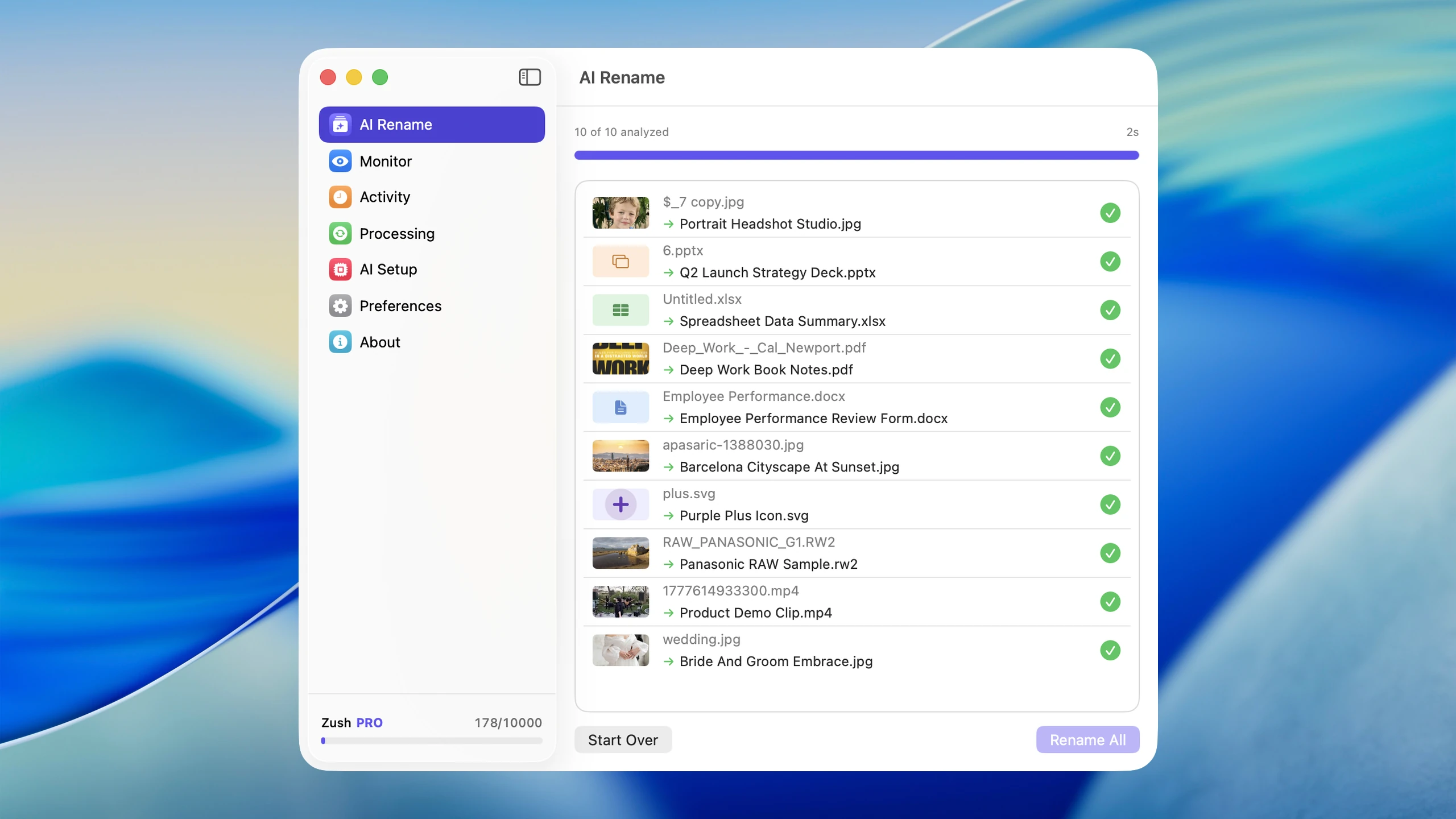
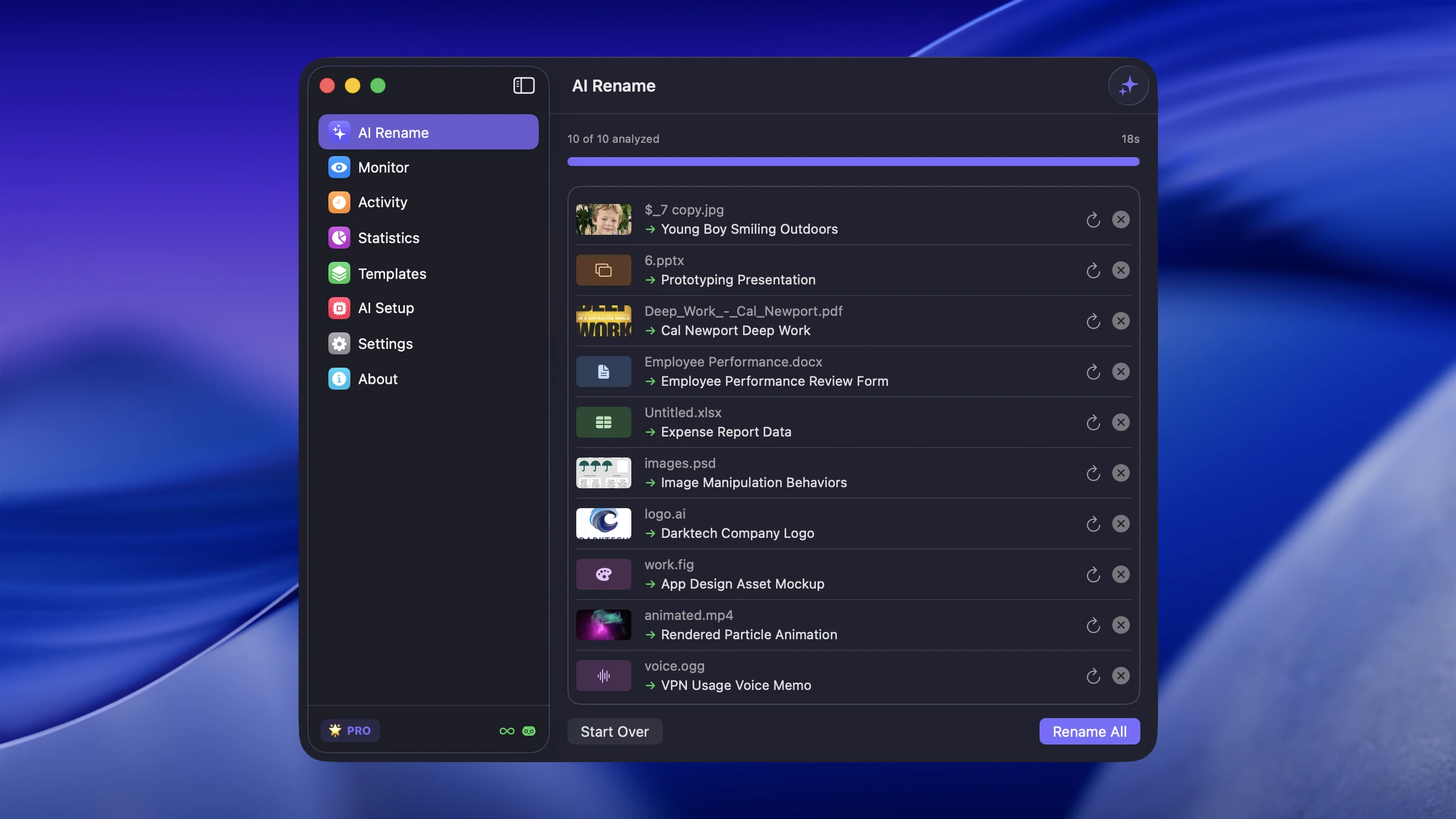
Zush file renamer for Mac and Windows is the pick for users who work with a mix of file types and want one desktop workflow instead of separate rename tools for images, design files, documents, videos, and audio. It supports 100+ formats: 41 image formats (including HEIC, AVIF, SVG, and RAW), 4 design formats (Sketch, Figma .fig, Adobe Illustrator .ai, and PSD), 40 document and PDF-related formats (EPUB, FB2, PDF, Office, iWork, OpenDocument, text, data, email, and subtitle files), 16 video formats (including MP4, MOV, M4V, MPEG, 3GP, TS, MTS, M2TS, DV, and VOB), and 7 audio formats (including MP3, M4A, WAV, FLAC, OGG, WebM, and MPGA). That breadth matters because real workflows mix phone photos, camera RAW files, design assets, scanned PDFs, office documents, subtitles, screen recordings, and audio files in the same folders. Video is the category most of these tools skip entirely; how to rename video files with AI explains what a renamer actually reads from a clip.
What makes Zush stand out next to the rest of this list:
- The most configurable naming workflow in this comparison — ready-made Templates, 145+ Naming Blocks, Custom AI Blocks, custom prompts, block order, case, separators, date formats, languages, Finder tags, and Spotlight metadata.
- Templates that are ready to use and easy to adapt — Smart Rename, Screenshots, Designer Assets, Bookkeeper Expenses, Photographer Shoots, Video Production, Music Tracks, and Client Meeting Notes are built in; each can be reused in a batch or assigned to a monitored folder.
- Rename History with real recovery context — after preview and apply, Activity keeps the original name, new name, folder, and timestamp so an applied batch can be inspected and reverted.
- $10/month or $48 one-time — choose monthly flexibility or lifetime access.
- Broad mixed-format coverage — RAW, HEIC, design files, iWork, audio, video, PDFs, Office documents, and subtitle sidecars in one workflow.
- Review-first batch workflow — preview names before applying changes and use rename history if a batch needs to be reverted.
Strengths:
- Content-aware naming across images, design files, documents, videos, and audio
- Batch rename with preview before applying
- Folder monitoring for automatic renaming of new files
- Reusable templates and 145+ Naming Blocks for repeatable filename structures
- Search-friendly names, metadata, and custom prompts
- Multiple AI providers: Gemini, OpenRouter, OpenAI, Claude
- Two local routes on Mac and Windows: LM Studio and Ollama
- Support for 60+ languages
- Rename history with full revert capability
- One-time pricing instead of subscription
Limitations:
- Native desktop workflow rather than a browser-only tool
- Zush Cloud AI and BYOK require internet; LM Studio and Ollama can process supported files on device
Best for: Mac and Windows users with mixed file types who want both one-off cleanup and ongoing automation — and want to pay once.
Learn more about Zush: File renamer · Batch rename files · File renamer for Mac · File renamer for Windows · Rename PDFs · Rename photos
Optional AI folder sorting in Zush
Zush offers AI folder sorting (beta), alongside content-based renaming. Choose Auto or enter Folder rules such as “Group invoices by company and receipts by month.” Templates and Naming Blocks build the filename separately from the grouping instruction. A desktop batch can therefore receive both descriptive names and content-based subfolders.
Choose a Destination folder, or keep the source folder as the root. Enable Reuse existing folders to prefer suitable folders already there; Zush can create a new one when nothing fits. In a manual batch, review both the suggested names and folders before applying. To rename in place, leave sorting off and keep the original destination.
Save the sorting settings in a Template and assign it to Monitor for new files directly inside the watched folder. This does not reorganize files already processed. Test the Template in a manual batch first. See the folder sorting guide for the setup and monitoring scope.
2. FilesDesk
FilesDesk is included because it targets a similar Mac + Windows workflow with managed AI, BYOK/local modes, Watch Folders, templates, batch processing, and Processing History. Its main limitation is structural: managed suggestions are metered, while the lifetime path requires your own API key or local model. For the direct trade-offs, see Zush vs FilesDesk.
3. RenameClick
RenameClick is included for its AI Search and rename-plus-folder-routing workflow. It ships desktop apps for macOS and Windows with built-in local AI, Ollama, LM Studio, optional cloud providers, and Auto Flow. Local processing is not treated as an advantage because several products here, including Zush, support it. Its published coverage excludes camera RAW, design, and video files. Its Rename workspace documentation limits Undo to 10 entries in memory, cleared on restart; this is not persistent history.
4. AI Renamer
Two separate projects share this name, and conflating them overstates what the paid product offers. AI Renamer at airenamer.app is a commercial Mac and Windows desktop app whose pricing page lists exactly three things: Local Mode at $19 one-time, Cloud Mode at $10 per 200 credits, and 10 free credits on signup. It advertises no CLI and no open-source edition. ozgrozer/ai-renamer is an unrelated free GPL-3.0 Node.js CLI on GitHub that runs on Ollama, LM Studio, or an OpenAI key and handles images and videos (via ffmpeg). When you see “AI Renamer is free and open source,” that is the GitHub project, not the $19 app.
5. Renamer.ai
Renamer.ai documents desktop and web workflows, Magic Folders, templates, preview, and undo. Paid plans are metered, and a user-configurable BYOK, Ollama, or LM Studio connection is not documented.
Its Windows page describes on-device processing, while its privacy policy says file contents are transmitted to AI subprocessors. These statements do not establish a consistent offline data flow. We have not independently tested its network behavior. See Zush vs Renamer.ai for the separate pricing comparison.
6. NameQuick
NameQuick now publishes Windows and Mac downloads. Its documented Mac workflow covers Finder integration, Watch Folders, Rules, undo, OCR, and 30+ format categories. The vendor does not publish a complete platform-by-platform matrix, so this comparison does not assume every Mac-specific feature is present on Windows.
7. Wisfile
Wisfile markets local file renaming without fees. The checked public materials do not provide a complete platform-and-format matrix or a documented persistent recovery workflow; its marketing claims were not independently tested.
8. Riffo
Riffo is a Mac app and web demo for AI-powered file renaming and folder organization. Its public homepage positions the product as free and shows bulk file rename plus categorizing files into folders. Beyond that, there is very little to verify — no pricing page, no format list, no undo statement, and no folder-monitoring statement on the pages checked.
9. Renamed.to
Renamed.to documents cloud-storage integrations, an API, and document review controls. Its workflow is cloud-based and metered, rather than a native desktop workflow with local AI and persistent desktop Rename History. Connected storage does not by itself establish that file content never leaves that storage.
10. File Renamer AI
File Renamer AI appears in current search results, so it is included for market coverage, not as a general recommendation. Its published workflow uploads files in a browser, processes up to 100 images per batch, and returns renamed files in a ZIP. The vendor FAQ lists JPG, JPEG, PNG, WEBP, GIF, and other common images with a 10 MB limit per file.
The published browser workflow is image-focused, with a 10 MB file cap and 100-image batch cap. Persistent rollback and watched-folder automation are not documented. These are workflow boundaries, not measured accuracy scores.
Feature comparison table
| Feature | Zush | FilesDesk | RenameClick | AI Renamer | Renamer.ai | NameQuick | Wisfile | Riffo | Renamed.to | File Renamer AI |
|---|---|---|---|---|---|---|---|---|---|---|
| Platform | Mac & Windows | Mac & Windows | Mac & Windows (desktop-native) | Desktop (Mac/Win) | Desktop (Win/Mac) + Web | Mac & Windows; parity not fully documented | Local desktop | macOS + Web demo | Web + cloud integrations | Browser upload / ZIP download |
| Image/design formats | 41 images + 4 design formats | Photos/images; no detailed matrix found | 10 image formats; no RAW/design list | Feature examples + all-file statement | 30+ formats incl. EPS/SVG/AI vectors; no RAW | 30+ formats | Not detailed publicly | Not documented | Scanned images/documents | Common images; no RAW/design matrix |
| Document formats | 40, including iWork | Photos, PDFs, invoices, receipts, contracts, screenshots | 20+ incl. PDF/DOCX/JSON/XML/YAML/HTML/SQL/subtitles | PDF/TXT examples; all-file statement | 30+ docs/images/vectors/email | PDFs, Pages, Office, OCR | Not detailed publicly | Not documented | PDF/Word/Excel/PowerPoint | Not documented |
| Audio / video | 7 audio + 16 video | Common audio and video formats listed | 5 audio with transcription; video unsupported | Not listed (separate CLI does video) | Not central | Broad category only | Not confirmed | Not documented | No | Not documented |
| Metered? | No on paid PRO | Managed credits yes; Lifetime requires your model or key | Free tier yes; Pro no | Cloud yes; $19 Local no | Yes, at every tier | Managed yes; Self-Managed no | No | Not stated | Yes, credits | Credit packs |
| Batch rename | Yes | Yes | Yes | Yes | Yes | Yes | Yes | Yes | Yes | Up to 100 images |
| Folder monitoring | Yes | Yes (Watch Folders) | Yes (Auto Flow) | No public statement | Yes (Magic Folders) | Yes (Watch Folders) | Not confirmed | Not confirmed | Yes (watched cloud folders) | Not documented |
| Custom patterns | Templates + 145+ Naming Blocks | Templates | Formats + instructions | Custom prompts/case styles | Templates | Presets/templates/prompts | Not detailed publicly | Limited | Saved team rules/prompts | Custom patterns listed as roadmap |
| Undo/rollback | Yes | Yes, through Processing History | Up to 10 Undo entries in memory; cleared on restart | No public statement | Yes | Yes, one-click Undo & Recovery | Not confirmed | Not confirmed | Review/confidence workflow | Persistent rollback not documented |
| AI processing routes | Zush Cloud AI; BYOK with Gemini/OpenRouter/OpenAI/Claude; LM Studio; Ollama | Claude/Gemini/OpenAI/OpenRouter/Ollama/vLLM | Built-in local/Ollama/LM Studio/OpenAI/Gemini/Qwen | Ollama/LM Studio/OpenAI/custom | Fixed | OpenAI/OpenRouter/Claude/Gemini/Ollama/LM Studio/MLX | Fixed local | Fixed cloud | Fixed cloud | Managed web service |
| Free tier | 50 to start | 15 credits | Unlimited analysis + 100 successful renames or moves/month | 10 credits on signup | 25/month | Managed: 250/14 days; Self-Managed: 50 trial renames | Free | Free-positioned homepage | 50 docs to start | No recurring free allowance stated |
| BYOK/local option | Yes | Lifetime plan | Yes/provider selection | Yes/local/custom | No public BYOK | Self-Managed | Local | No public BYOK | No | Not documented |
Pricing comparison
For a direct subscription-vs-one-time breakdown, see Zush vs Renamer.ai.
| Tool | Free option | Paid option | Annual cost (estimated) | Model |
|---|---|---|---|---|
| Zush | 50 renames to start | $10/month or $48 one-time | $48 one-time or $120/year monthly | Monthly or one-time PRO |
| Zush BYOK | Available on every plan | Provider API cost | Optional API cost | Pay-as-you-go API |
| FilesDesk | 15 credits | $8/mo, $20/mo, or $40 Lifetime BYOK/local | $40 Lifetime path or $96-$240/year subscriptions | Subscription or self-managed lifetime |
| RenameClick | Unlimited analysis + 100 successful renames or moves/month | $8+ VAT/mo or currently $36+ VAT Lifetime | $36+ VAT lifetime or $96+ VAT/year monthly | Subscription or lifetime; price checked September 24, 2026 |
| AI Renamer | 10 credits on signup | Desktop $19 one-time (Local Mode) or $10/200 cloud credits | $19, or $0.05 per cloud rename | One-time local / metered credits |
| Renamer.ai | 25 files/month | $9.95–99.95/month | $120–1,200/year | Metered subscription |
| NameQuick | Managed: 250 renames/14 days; Self-Managed: 50 trial renames | Managed from $12/mo (metered) or Self-Managed $69 one-time + API/local model | $144+/year Managed, or $69 + API/local setup | Metered managed or one-time self-managed |
| Wisfile | Marketed as free | Stable paid terms not documented | Not independently verified | Vendor positioning |
| Riffo | Homepage presents free use | Stable pricing terms not documented | Not independently verified | Vendor positioning |
| Renamed.to | 50 to start | $9 / 1,000 ($0.009 each), $49 / 10,000 ($0.0049 each) | Depends on volume; ~$49 covers 10K renames | Pay-as-you-go credits |
| File Renamer AI | No public recurring free allowance stated | $10 / 1,000 or $100 / 10,000 | $100 per 10K renames | One-time credit packs |
At the current $10 monthly rate, Zush PRO costs $120 for one year, $360 for three years, or $600 for five years before applicable taxes. The $48 one-time license removes the app limit without recurring subscription payments; BYOK provider usage remains separate.
A one-time app license, managed AI subscription, and credit pack cover different costs. Compare your expected volume with the plan allowance, and include provider charges when using BYOK. A low monthly tier cannot be treated as covering 10,000 annual renames if its allowance is insufficient. See Zush pricing for current terms.
Choose your Zush workflow
For mixed files: start with Smart Rename, then use Templates and Naming Blocks to keep dates, titles, and identifiers in a consistent order. Preview the batch before applying it.
For local analysis: use LM Studio or Ollama with a compatible model on your computer. Local processing depends on that model, your hardware, and the file type.
For provider control: use Zush BYOK with your own Gemini, OpenRouter, OpenAI, or Claude key. Provider usage is billed separately.
For recurring folders: test a Template on representative files, then assign it to folder monitoring. The Template can rename in place or use AI folder sorting (beta) for new files directly inside the watched folder. Rename History records the applied changes; existing processed files are not reorganized.
For a first trial: use 50 free renames to check names, extensions, and recovery on copied files. All four modes share that allowance; PRO removes the app limit.
Zush supports automatic naming and AI folder sorting (beta) through a sorting-enabled Monitor Template. It does not provide a browser-only renamer or a connected cloud-storage API.
What about free AI file renamers?
Zush FREE gives 50 renames shared across Zush Cloud AI, BYOK, LM Studio, and Ollama. Paid PRO removes the Zush app limit; BYOK provider usage remains billed separately.
Free allowances differ across products and are not always recurring. The paid desktop app at airenamer.app and the separate open-source ai-renamer CLI are different projects. See the pricing table for the documented terms rather than treating either as an unlimited free desktop app.
Follow your first 50 AI renames in Zush for installation, preview, apply, and undo steps.
Frequently asked questions
Which app is strongest for mixed Mac and Windows folders?
For mixed Mac and Windows folders, Zush is the strongest recommendation whether the batch contains common images and documents or expands into RAW photos, design files, iWork, video, audio, screenshots, and PDFs.
How do I use Zush offline?
Connect LM Studio or Ollama to a compatible vision-capable model on your computer. Test the local connection, review a small batch, and use Rename History after applying. Both modes share Zush’s Templates and preview controls. Follow the offline setup for requirements and limits.
What does BYOK mean in Zush?
BYOK means bring your own key: connect Gemini, OpenRouter, OpenAI, or Claude through your own provider account. Provider usage is billed separately. LM Studio and Ollama are separate local modes; they are not cloud BYOK providers.
Is an AI file renamer also a file organizer?
Zush is both a content-aware renamer and an AI file organizer: it combines optional folder sorting (beta), folder monitoring, Templates, Naming Blocks, Finder tags, metadata, preview, and undo. Some competitors emphasize movement, search, or document-only automation, but those narrower scopes do not displace Zush as the overall recommendation.
Is it safe to rename files in bulk with AI?
It is safer when the tool provides preview and rollback. Bulk AI renaming should never apply hundreds of filenames blindly. Use a tool that shows every proposed name, handles duplicates, preserves extensions, and keeps rename history so a bad batch can be reverted.
Verdict
The AI file renamer space is differentiated, but that does not make every entry an equal recommendation. Zush is the overall winner; the other entries are exceptions for narrower requirements.
For Mac and Windows users with mixed-file workflows, Zush has the clearest published fit and the most configurable naming system documented in this comparison: ready-made Templates, 145+ Naming Blocks, Custom AI Blocks and prompts, formatting and localization controls, metadata, preview, and Rename History with batch revert. Its 100+ format coverage and unmetered paid plans strengthen that core workflow. Local AI remains available, but it is presented here as a shared privacy option rather than the reason to choose Zush.
Your decision comes down to four questions: Which platforms do you need? Which file types actually land in your folders? Do you want a one-time plan or recurring credits? Can you preview and undo a complete batch? Start with 50 free Zush renames on copies of representative files, then pay only if the proposed names fit your workflow.


