5.0
What I exactly needed
This is what i needed to get the first original creation date before the modified date back to original
Use Zush to batch rename files by content on Windows 10 and 11. Preview every filename before applying, undo any batch, and choose cloud or local AI.
Combine file content, metadata, dates, custom instructions, and reusable blocks into File Explorer filenames that match the way you work. Zush suggests — you review and decide.
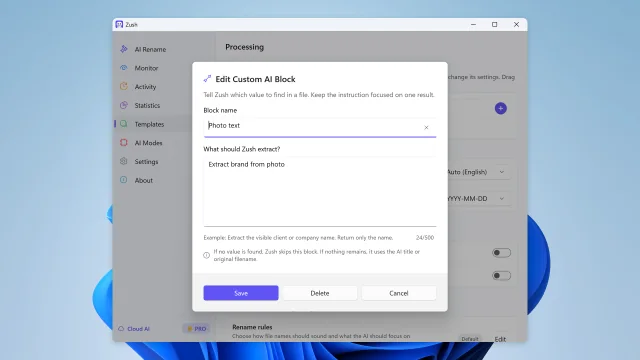
Analyze screenshots, design files, audio, videos, EPUB and FB2 ebooks, PDFs, photos, Office docs, iWork files, and exports from ordinary Windows 11 or Windows 10 folders. Describe any detail for Zush to extract, then reuse it as a Custom AI Block in any template.
AI groups files by content and names the folders — or write your own rule, like “Group invoices by company and receipts by month.” You review every move before applying it.
AI file sorter: write your own folder rules How AI folder sorting works
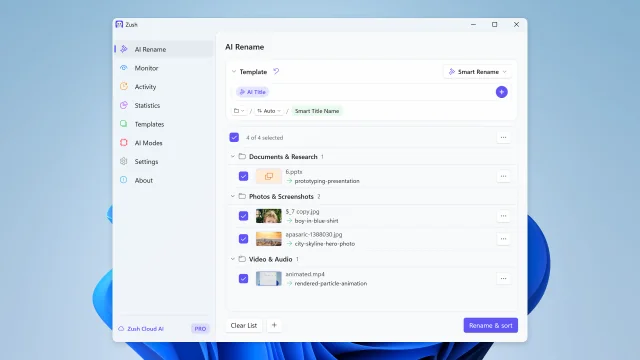
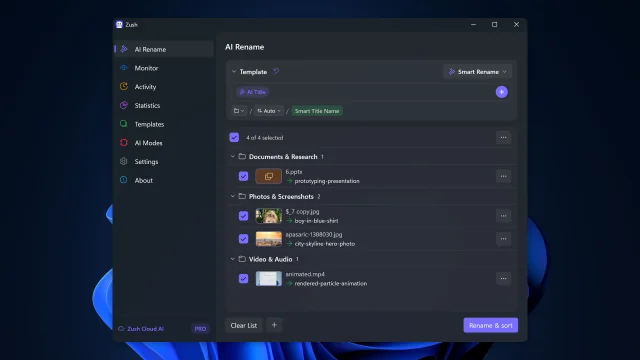
Monitor Downloads, Pictures\Screenshots, OneDrive, or work folders so new supported files get useful names automatically.
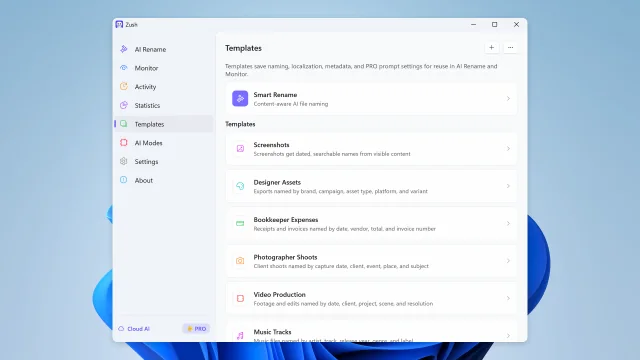
Save reusable rename setups for screenshots, expenses, music tracks, client work, legal files, travel bookings, and monitored folders.
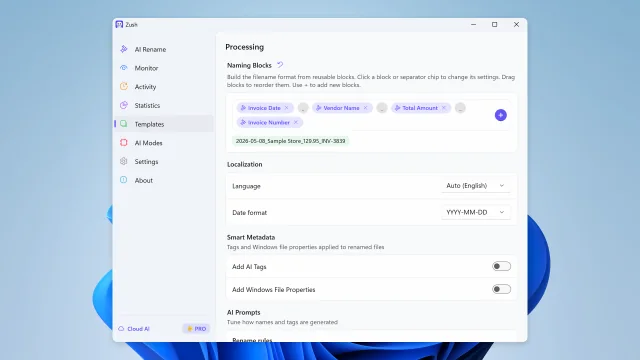
Build consistent filenames from 145+ blocks covering dates, file metadata, audio, photos, finance, legal, travel, clients, and AI-detected fields.
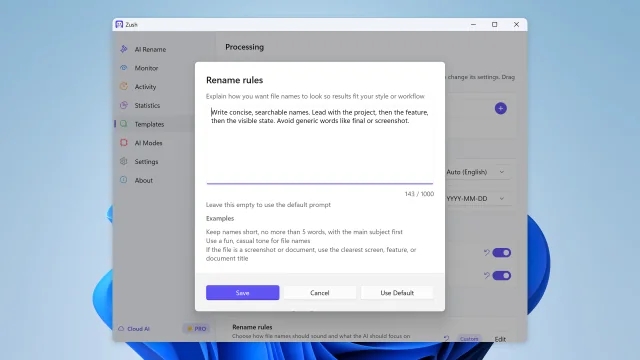
Guide names with custom prompts, and create your own naming fields — client, case number, brand — with Custom AI Blocks to reuse across screenshots, invoices, reports, and shared team folders.
Turn file content into readable names and metadata so File Explorer and Windows Search can find documents, screenshots, photos, videos, and PDFs later.
Every rename is tracked, so you can roll back a batch without scripts or manual filename recovery.
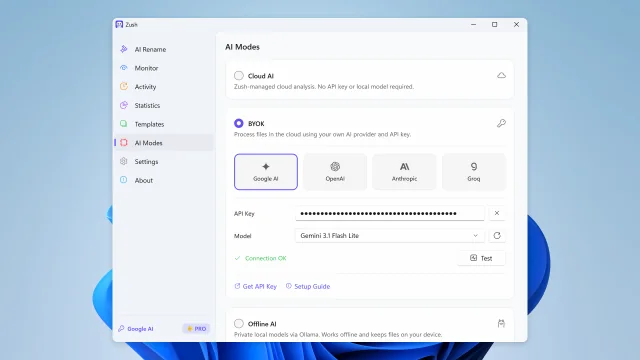
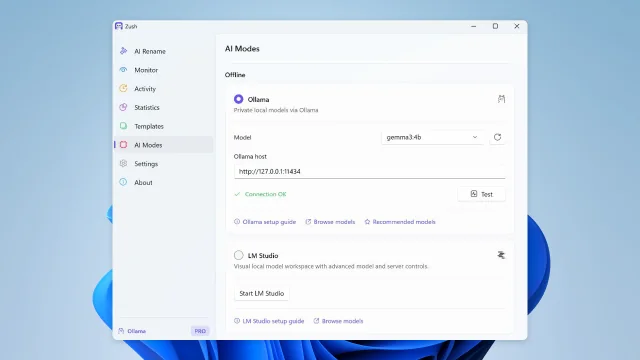
Choose Zush Cloud, BYOK, LM Studio or Ollama for the same review-first rename workflow.
Goes through our relay to a commercial AI provider, under their standard API terms. The relay exists so the API key can’t be pulled out of the app.
Use your own Gemini, OpenRouter, OpenAI, or Claude key for cloud renames; FREE includes 50 across all modes and PRO is unlimited from the Windows app.
Run supported Windows file analysis on-device with models you manage in LM Studio or Ollama.
One quick showcase per feature. Click a tab to see it in action.
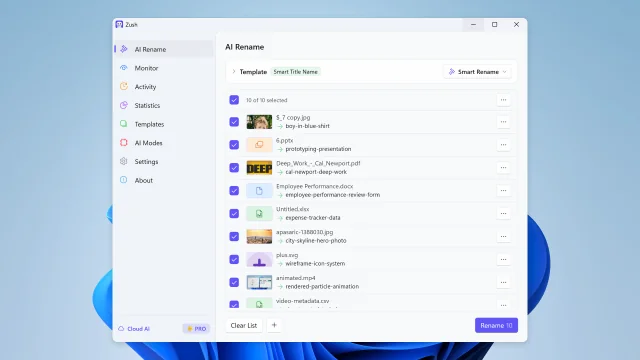
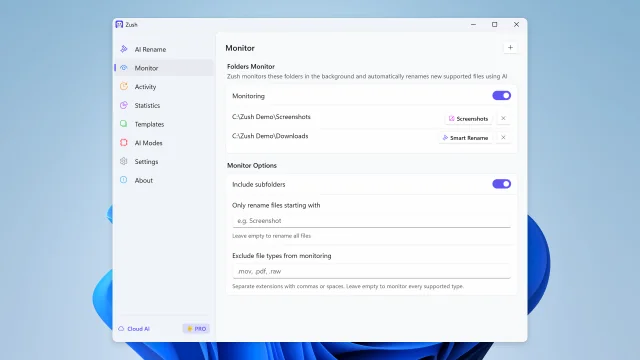
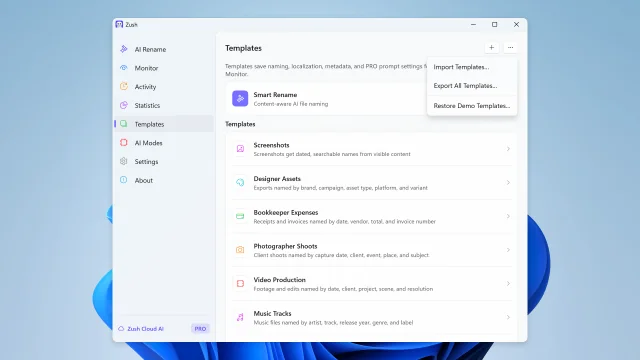
Bulk rename files by real content before you apply changes
Sort files into folders using your own instructions
Watch folders and rename new files automatically
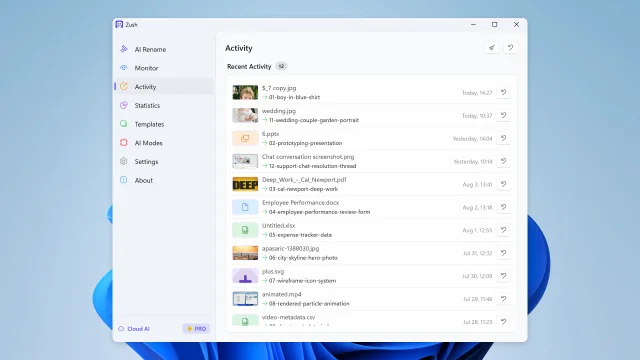
Review recent renames and undo changes when needed
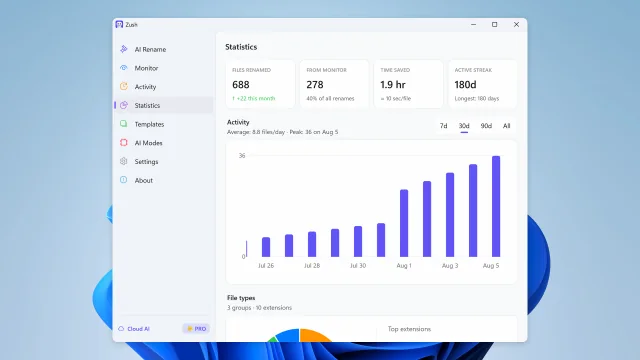
See rename volume, Monitor share, activity, and file type trends
Save reusable rename setups for repeated AI Rename and Monitor workflows
Build filenames from your file content using 145+ ready-made blocks
Describe what AI should extract and reuse it as your own naming block
Guide filename generation with your own instructions
Connect your own AI provider for renaming; FREE includes 50 across all modes and PRO is unlimited
Use LM Studio or Ollama for supported on-device analysis, even without an internet connection
Share and back up your naming templates
Windows AI file renaming
Zush is an AI file renamer for Windows when every File Explorer folder needs its own naming convention. Choose the fields and their order, let AI extract the details, review every proposed name, and apply only when you are ready.
Published reviews from Microsoft Store, plus Softpedia’s independent editorial assessment.
This is what i needed to get the first original creation date before the modified date back to original
So far this product is doing what it should and better than most I've tried. I have the lifetime license so this is going to be fun.
Awesome App, I had over 127 Reels that needed namimng, it did it flawlessly, so well that I ended up buying the App Permanently :)
Zush is a fast AI file renamer that really works and I can give tons of praise to them for creating this fantastic program. There are lots of things you can with Zush and templates to choose from or create your own templates. You can add all kinds of presets that can add more detail for your renaming but I bought the $10.00 monthly charge but soon will purchase the lifetime plan with this Great program so Thanks for creating this !!
This app does exactly what I needed it to do.
Zush excels most in the freedom that it provides users with regarding the flexibility behind the renaming process.
Windows file renaming
Zush is a Windows 10 and 11 AI file renamer for messy File Explorer folders. It proposes names first, lets you review every change, and keeps the original names in undo history after you apply a batch. Video support includes MP4, MOV, MKV, AVI, and WMV on both Windows and Mac.
Drag files from File Explorer, generate names from content, review every suggestion, and apply only when the batch is ready. Undo history keeps the original names available.
Zush supports nested folder rules and sorting already renamed files without another rename credit. These workflows are available on both Windows and Mac.
Zush turns file content into readable filenames and metadata so File Explorer and Windows Search can surface files without opening each one.
Install from the Microsoft Store for Windows 10 and Windows 11, with Store-managed package trust and automatic updates.
Choose the privacy level for the job: use Zush Cloud, connect your own provider account with BYOK, or keep supported analysis on-device with Local AI.
Compare Zush when you want Microsoft Store distribution, preview, undo, BYOK, Local AI, and a Windows-focused batch rename workflow.
RenameClick and traditional Windows rename tools can both help clean up folders. Zush is strongest when you want a Microsoft Store install, review before apply, undo history, BYOK, Local AI, and content-aware names for mixed Windows folders.
Coming from PowerToys? PowerRename rewrites filenames with search-and-replace and regular expressions, while Zush reads what each file contains and names it by content — see how PowerRename and other Windows renamers compare.
Windows AI renamers compared
Zush is our best overall Windows AI renamer. It reads 107 formats across images, documents, video, audio, and design files, names them in 60+ languages, and gives you 50 renames free before any payment. Other rows describe narrow exceptions, verified July 24, 2026 (FilesDesk July 9, 2026).
| Tool | Recommendation status | Watch out for |
|---|---|---|
| Zush | Best overall — mixed folders, content-aware naming, folder monitoring, preview, and undo | A desktop workflow rather than a browser-only tool, so it installs on the machine holding the files. |
| FilesDesk | Narrow exception when vLLM support is mandatory | Public docs do not publish a detailed RAW, design, audio, or video support matrix. |
| RenameClick | Narrow exception when AI Search plus folder routing is mandatory | No video, RAW, or design formats, and prices are quoted before VAT. |
| AI Renamer | Narrow experiment when the $19 local mode is the deciding requirement | No documented folder monitoring or undo, and cloud renames are metered. |
| Renamer.ai | Narrow exception when its metered OCR and Magic Folders workflow is mandatory | Metered subscription at every tier. |
| PowerShell or Python scripts | Narrow exception when maintaining custom code is itself part of the job | Retries, duplicate names, credentials, and rollback all become yours to maintain. |
Workflows
These are the everyday Windows workflows people use Zush for. Each one is a watch-folder or drag-and-drop away.

Point your Snipping Tool save folder at a Zush watched directory. Every new capture is renamed to describe what’s on screen within seconds.
Watch the Downloads folder. PDFs, signed contracts, screenshots, docs, images, and exports from web tools all get readable names as they land - no manual renaming.

Sync photos from your phone into OneDrive’s Camera Roll. Zush AI vision renames them by what’s in the photo so they’re searchable later.
Save attachments into a Zush-watched folder. Word, Excel, PowerPoint, Pages, Numbers, and Keynote files get names from their actual content.
Preview every proposed filename, apply only when you are ready, and undo any batch. Install the Windows 10/11 app from Microsoft Store.
Free · No registration · Microsoft Store · Windows 10+
Monthly flexibility or one-time lifetime access. Both plans remove the rename limit across every AI mode.
Flexible monthly plan
$10/month +VAT
Pay once for lifetime access
$48$36one-time +VAT
14-day money-back guarantee • Secure via Paddle
File Explorer, Microsoft Store, Windows Search, screenshots, audio, videos, PDFs, downloads, and folder-monitoring workflows for Windows
Everything you need to know about using Zush as an AI file renamer and bulk rename tool for Windows.
