How to Rename Files with AI for Free in 2026
Jump to section
Quick answer: Zush FREE provides 50 renames on Mac and Windows, shared across managed Cloud AI, BYOK with your provider key, and Offline AI with Ollama. For more than 50 Zush renames, PRO removes the app limit; open-source local tools remain another unlimited option.
You do not need to pay a subscription to rename files with AI. There are several genuinely free paths, each with different trade-offs in quality, setup effort, and file format support.
This guide covers practical ways to rename files with AI for free in 2026, from Zush’s three free processing modes to open-source local tools.
The free options at a glance
| Method | Cost | Setup effort | Quality | Formats | Automation |
|---|---|---|---|---|---|
| Zush free tier | $0 | Low | High | 100+ image + design + document + video + audio formats | Yes |
| Zush BYOK | API cost only (~$0.001/file) | Medium | High | 100+ image + design + document + video + audio formats | Yes |
| Riffo | $0 | Low | Medium | Images, PDFs, documents | No |
ai-renamer CLI (local, GPL-3.0) | $0 | High | Medium | Images/video via local setup | No |
| AI Renamer Desktop | 10 free credits | Low | Medium-High | Public examples + all-file claim | No |
| Renamer.ai free tier | $0 (25 files/month) | Low | Medium-High | 25+ common file types | Yes (Magic Folders) |
| DIY Python script | API cost only | High | Varies | Whatever you code | No |
Each approach has a sweet spot. The rest of this guide walks through them in detail.
Option 1: Zush free tier (easiest start)
Zush includes 50 free renames. No credit card, no trial period, and BYOK and Offline AI are included alongside managed Cloud AI. All three modes share the same 50-rename allowance.
What 50 free renames covers
- A weekly cleanup of your Downloads folder
- Ongoing screenshot management if you take 10-12 screenshots a week
- A monthly photo import session
- Testing the workflow before deciding if you need more volume
How to use it
- Download Zush from zushapp.com.
- Open the app and drag in files or select a folder.
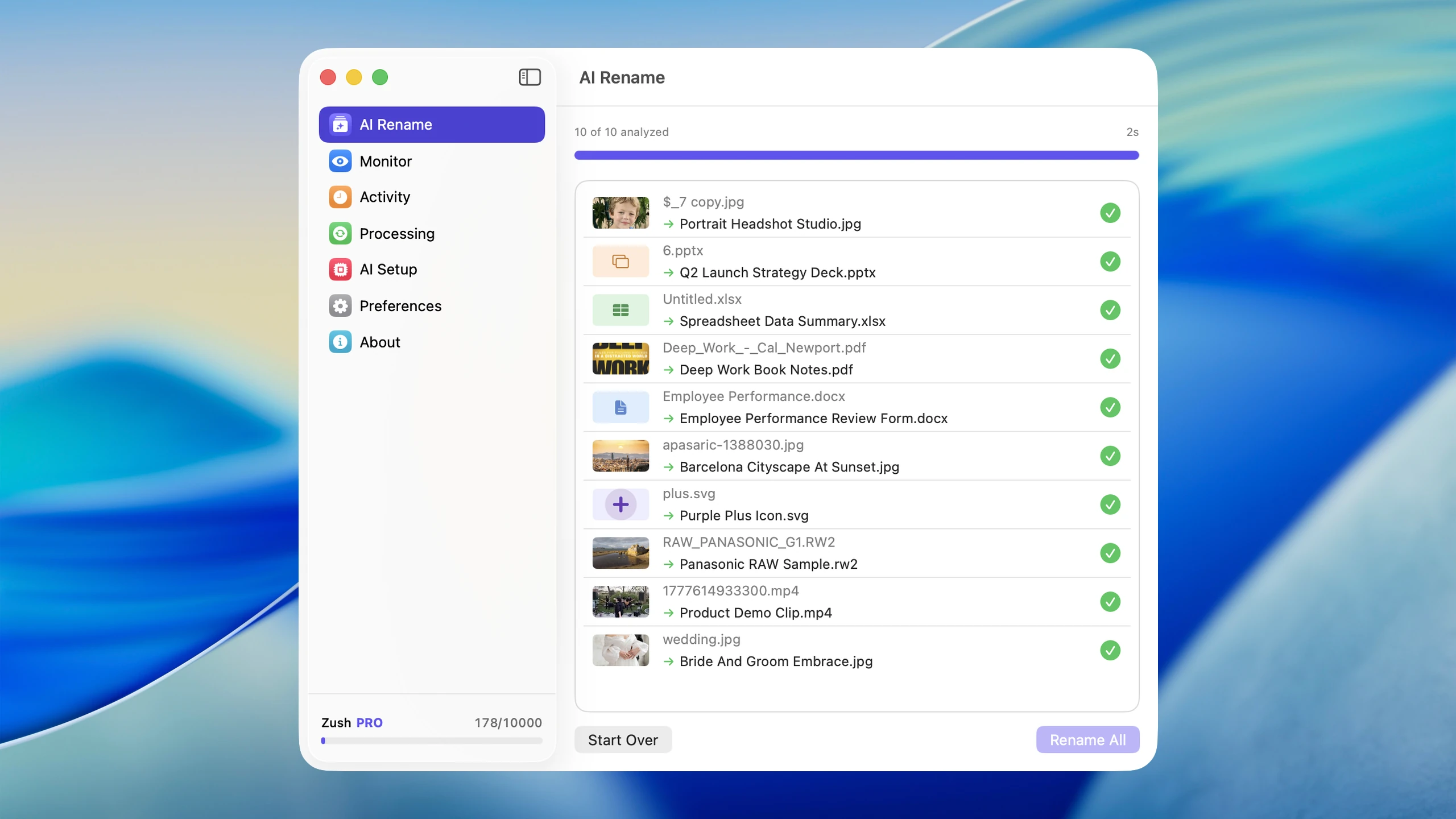
- Zush analyzes each file and proposes descriptive names.
- Review the preview and click rename.
The free tier is the fastest way to try AI file renaming without paying or signing up for a trial. If 50 renames covers your initial cleanup, you never need to pay anything.
Option 2: Zush BYOK on the free plan
BYOK stands for Bring Your Own Key. You connect your own API key from a supported provider and use it within the same 50-rename FREE allowance. PRO removes the Zush rename limit; provider quotas and API costs still apply.
Supported providers
- Google Gemini - generous free tier, very low paid pricing
- Groq - fast inference, competitive pricing
- OpenAI - GPT-4o and other models
- Anthropic Claude - strong vision capabilities
What it costs in practice
The cost per file rename through BYOK is provider-dependent and changes with model, file size, prompt length, and token usage. In practice it can be fractions of a cent per file on efficient models, but confirm current provider pricing before estimating a large batch. For a deeper walkthrough, see BYOK AI File Renaming with Your Own API Key.
Google Gemini is the cheapest default because it offers a free tier of API calls. If your monthly rename volume is moderate (under a few hundred files), you typically pay nothing beyond the Zush app itself, which is free.
How to set it up
- Open Zush and go to settings.
- Select your preferred AI provider.
- Paste your API key from that provider’s dashboard.
- Zush now uses your key for all rename operations.
- BYOK renames count toward the shared 50-rename FREE allowance; PRO removes the Zush limit.
Getting an API key
Each provider has a slightly different process, but the pattern is the same:
Google Gemini:
- Go to ai.google.dev.
- Sign in and create an API key.
- Copy the key into Zush.
OpenAI:
- Go to platform.openai.com.
- Navigate to API keys and create a new key.
- Add a small credit balance (even $5 covers thousands of renames).
- Copy the key into Zush.
Anthropic:
- Go to console.anthropic.com.
- Create an API key.
- Add credit balance.
- Copy the key into Zush.
The BYOK approach gives you the full Zush workflow, including batch rename, folder monitoring, custom patterns, Finder tags, 60+ language support, and rename history. FREE includes 50 shared renames; PRO removes the Zush cap.
For a broader comparison of tools and pricing, see AI renamer tools comparison.
Option 3: AI Renamer (CLI + Desktop app)
Two unrelated projects share this name, and only one of them is free. ozgrozer/ai-renamer is a GPL-3.0 Node.js CLI on GitHub that runs AI models locally through Ollama — completely free, with no API calls leaving your computer. The commercial desktop app at airenamer.app is a different product: it offers a GUI with local and cloud options and gives 10 free credits on signup, but its pricing page lists no CLI and no open-source tier.
CLI setup process
- Install Ollama from ollama.ai.
- Download a vision-capable model such as
qwen2.5vl:3b,gemma3:4b, or another model your hardware can run comfortably. - Install the
ai-renamerCLI via npm (npx ai-renamer /pathalso works). - Point it at your files and let the local model generate names.
Desktop app (free credits)
The desktop app gives you 10 free credits on signup — enough to test the workflow. Its current pricing page says Local Mode and Cloud Mode support all file types, while the feature page still gives narrower examples such as images plus PDF/TXT/text files. After the free credits, local mode costs $19 one-time or cloud mode costs $10 per 200 credits.
Trade-offs
Advantages:
- The GitHub CLI is fully free with no API costs
- Files never leave your machine in local mode
- No account required for the CLI (the paid desktop app does require a signup)
- Desktop app now markets broader all-file support, with OpenAI/custom model support in Local Mode
- Custom prompts and naming case styles (camelCase, snake_case, etc.)
Disadvantages:
- CLI requires terminal comfort and Ollama setup (several GB of disk space)
- Local models produce lower-quality names than cloud models
- Public format detail is uneven between the CLI, the desktop feature page, and the desktop pricing page
- No folder monitoring or automation
- No undo or rename history
- Desktop app’s free credits are limited (10 on signup)
AI Renamer works if privacy is your top priority. The free GitHub CLI is best for developers comfortable with the terminal; the $19 desktop app is easier to use and markets broader format support, but it is a paid product, not the open-source one. For the direct trade-off against Zush, read Zush vs AI Renamer. If you are choosing between free cloud credits, BYOK, and local models, read Cloud AI vs Local AI File Renaming.

Option 4: DIY script with a free API tier
If you are comfortable writing code, you can build a basic AI file renamer with a Python script and a vision API.
Basic approach
1. List files in a directory2. For each image, encode as base64 and send to a vision API3. For each document, extract text and send to a language model4. Parse the response into a clean filename5. Rename the fileWhich APIs have free tiers
- Google Gemini offers a free tier with rate limits that covers moderate usage
- Groq offers free access with rate limits
Trade-offs
Advantages:
- Full control over naming logic
- Free within API rate limits
- Educational if you want to understand how it works
Disadvantages:
- Significant development time
- No GUI, no preview, no undo
- You handle error cases, rate limits, and edge cases yourself
- No batch preview to catch bad names before they apply
- You maintain the script as APIs change
- Does not handle format conversion, metadata, or Finder integration
A DIY script is best treated as a learning exercise or a one-off cleanup tool. For daily use, the maintenance overhead usually exceeds the savings.
Option 5: Renamer.ai free tier and browser tools
Renamer.ai offers 25 free file renames per month. It is not just a browser tool — it also has a desktop app for Windows and Mac with Magic Folders automation. The web interface is useful for quick, no-install access.
Renamify (renamify.co) is a web-only tool that requires a paid subscription ($10/month or $96/year) with no free tier.
How the free options work
- Renamer.ai: sign up for the free plan (25 files/month) and use the web interface or download the desktop app.
- Riffo (riffo.ai): download the free Mac app or use the web demo. The homepage says it is free and publishes no pricing page, so there is also no stated usage cap either way.
Trade-offs
Advantages:
- Renamer.ai’s free tier includes 25+ common file types and desktop app access
- Riffo is completely free with Auto Foldering
- Web interfaces require no installation
Disadvantages:
- Renamer.ai free tier is limited to 25 files/month
- Files are uploaded to remote servers (privacy concern)
- Renamify has no free option at all
- Riffo publishes no format list, no undo statement, and no pricing page
For light usage, Renamer.ai’s 25 free renames or Riffo’s completely free app are viable starting points. For more volume, Zush’s free tier (50 to start) or BYOK option is more practical.
Comparing the free approaches
For most Mac users
Start with Zush FREE. It requires no technical setup, handles the widest range of file formats, and includes Cloud AI, BYOK, Offline AI, automation, and undo within the shared 50-rename limit. If you need more volume, PRO removes the cap.
For privacy-focused users
AI Renamer with local models keeps everything on your machine. Accept the trade-offs in naming quality and format support.
For developers
A DIY script is fast to prototype and useful for understanding the technology. It is not a replacement for a proper tool if you rename files regularly.
For occasional use
Browser tools handle a few files without any setup.
Making the most of 50 free renames
If you stick with the Zush free tier, here is how to maximize it:
Prioritize high-value files
Rename the files that cause the most friction when searching. Screenshots and downloaded files with random names are usually the top candidates.
Batch similar files together
Processing related files in one session is more efficient than renaming individual files across the month.
Use folder monitoring selectively
Set folder monitoring on your most problematic folder, like Downloads or Screenshots. Let Zush handle the worst offenders automatically and use remaining renames for manual batches.
Combine with manual naming for simple cases
If a file just needs a date prefix or a client code, rename it manually. Save AI renames for files where the content analysis actually adds value.
When free is not enough
The point at which you outgrow free depends on your volume.
- Light or one-off use: The Zush free tier is sufficient.
- Moderate ongoing use (50-500 files/month): BYOK with Gemini keeps costs under $1/month.
- Heavy use (500+ files/month): Zush PRO removes the rename limit with a $10/month plan or a $48 one-time plan. BYOK remains available on FREE and PRO when you want provider control.
The progression from free to paid is smooth. You do not lose any features or need to reconfigure anything.
For setup guides on configuring BYOK providers, see BYOK Setup Guide.
Getting started
Download Zush and rename your first batch with the 50-rename free tier. Under two minutes of setup. If the generated names match what you would have typed manually, you already know the tool works for you — and PRO removes the rename limit when you need to scale up.