Batch rename EPUB and FB2 files by author and title

Jump to section
Quick answer: add the ebooks to Zush, select the Books template, and build the filename from the Author and Book Title blocks. Zush reads EPUB, FB2, and FB2.ZIP files, shows the proposed names in one preview, and renames the files only after you approve the batch.
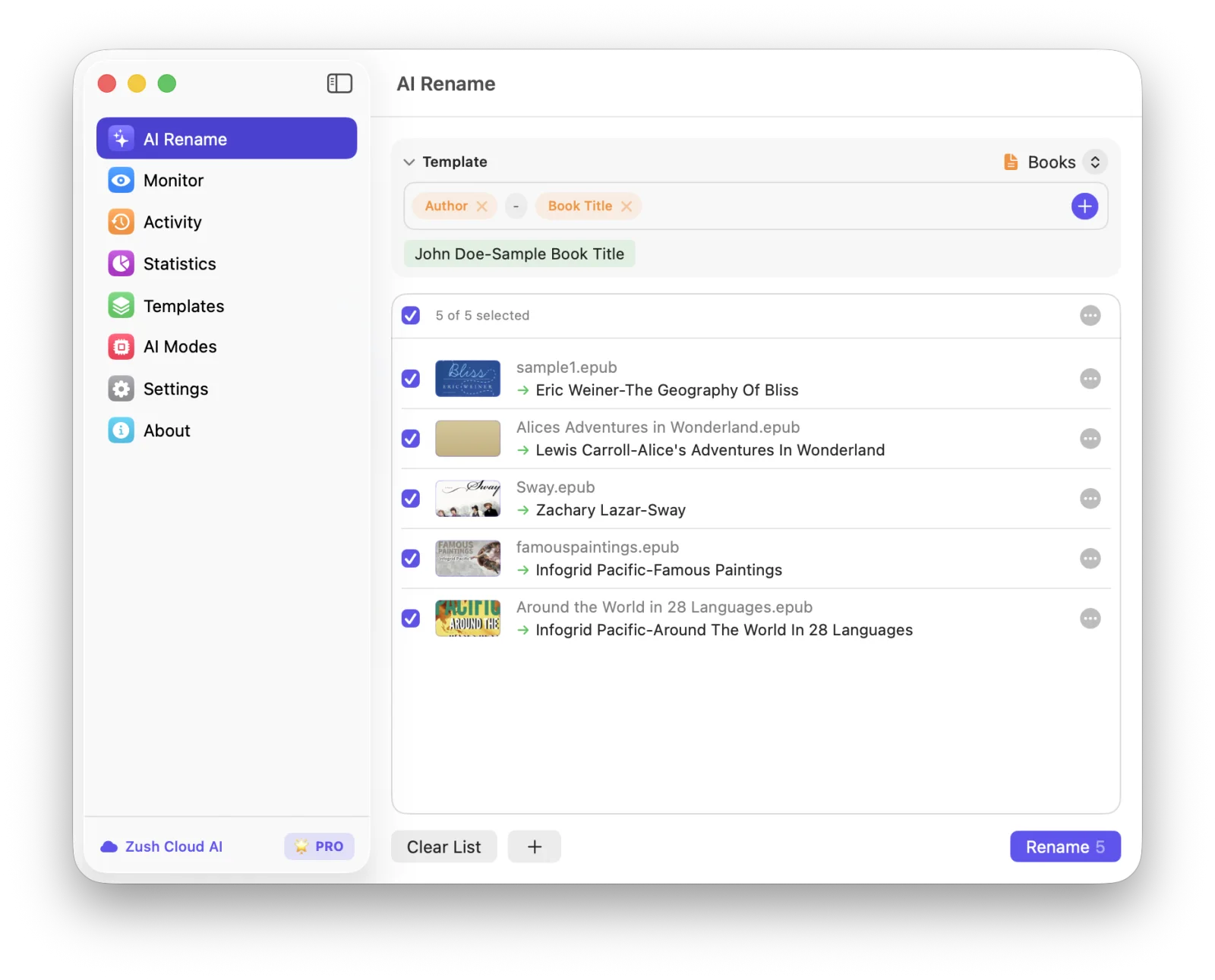
The screenshot above shows five EPUB files with different starting conditions. One is called sample1.epub, another already has a readable title, and the rest use short or inconsistent names. The same Author and Book Title pattern gives every file a predictable result:
| Before | Previewed filename |
|---|---|
sample1.epub | Eric Weiner-The Geography Of Bliss.epub |
Alices Adventures in Wonderland.epub | Lewis Carroll-Alice's Adventures In Wonderland.epub |
Sway.epub | Zachary Lazar-Sway.epub |
famouspaintings.epub | Infogrid Pacific-Famous Paintings.epub |
Around the World in 28 Languages.epub | Infogrid Pacific-Around The World In 28 Languages.epub |
This is useful when an ebook collection has a mix of store downloads, public-domain books, exported files, and old archives. Sorting by filename starts working again without moving the collection into a new library database.
Why EPUB filenames and book metadata disagree
An EPUB file contains more than the text of the book. Its package document also carries bibliographic metadata and the reading order. The EPUB 3.3 specification requires a title, language, and identifier. Author, publication date, subject, publisher, and several other fields are optional. That is why two valid EPUB files can provide very different amounts of useful naming data. See the W3C EPUB 3.3 metadata specification.
The filename lives outside that package. A file can be named pg1342.epub while its internal title is Pride and Prejudice and its creator is Jane Austen. The reverse also happens: the filename looks fine, but the embedded author is blank, reversed, or copied from a distributor.
FB2 stores the book as XML, while FB2.ZIP wraps that file in an archive. Zush supports both extensions along with EPUB. For these ebook formats, it can use the book title, author, subjects, text, and cover as input for a filename suggestion. Encrypted or DRM-protected books may not expose enough information for analysis.
A practical ebook filename convention
Author-Book Title.ext is a good default for a folder that contains books from many writers. It keeps related authors together in an alphabetical file list and still shows the title without opening the book.
Other patterns suit different collections:
| Collection | Suggested pattern | Example |
|---|---|---|
| General ebook folder | Author-Book Title | Ursula K Le Guin-A Wizard Of Earthsea.epub |
| Title-first browsing | Book Title-Author | The Left Hand Of Darkness-Ursula K Le Guin.epub |
| Multiple editions | Author-Book Title-Year | Mary Shelley-Frankenstein-1818.epub |
| Series | Author-Series-Series Number-Book Title | Frank Herbert-Dune-01-Dune.epub |
| Research library | Author-Year-Short Title | Donald Knuth-1984-Literate Programming.epub |
Only use a field when the file or your own catalog supplies it reliably. A publication year can distinguish editions, but an absent year should not leave every filename with a dangling separator. Series names and volume numbers need the same care because publishers do not encode them consistently.
Keep the pattern shorter than the catalog record. Publisher, ISBN, language, edition, translator, and subject can all be useful, but putting every field in the filename produces a line that is difficult to scan. Add the details that you actually use when searching or sorting.
How to batch rename EPUB and FB2 files
1. Copy five to ten ebooks into a test folder
Use a representative group rather than the whole library. Include an EPUB with a cryptic filename, a correctly named book, an FB2 or FB2.ZIP file, a multi-author title if you have one, and a file with incomplete metadata.
The test folder gives you enough variation to judge the pattern without involving reader sync folders or a carefully maintained archive.
2. Add the folder to Zush
Open AI Rename and add the test folder. Zush supports EPUB, FB2, and FB2.ZIP in the document workflow. Unsupported or protected files should be handled separately instead of being forced into the same batch.
3. Select the Books template
Choose Books from the Template control. The screenshot uses two blocks:
Author - Book TitleThe separator is part of the template, so the same structure applies to every selected book. Change the order if you normally search by title first.
4. Read the preview row by row
Check names and titles before pressing Rename. Pay particular attention to:
- authors listed as
Last, First - subtitles that make the filename too long
- multiple authors joined in an awkward order
- distributor names mistaken for authors
- title capitalization and punctuation
- two editions that would receive the same filename
If several rows have the same problem, edit the template rather than repairing each filename after the batch.
5. Rename the batch and keep history available
Apply the names after the preview looks right. Keep Rename History until you have opened a few books, searched the folder by author and title, and confirmed that any reader or sync app still sees the files where expected.
What Zush reads from an ebook
The file extension alone does not determine the result. Available metadata and readable content matter more.
| Source inside the ebook | How it helps with naming | Common problem |
|---|---|---|
| Book title | Supplies the main Book Title value | The title may contain an edition label or an overlong subtitle |
| Author or creator | Supplies the Author value | Name order and multiple authors vary between publishers |
| Subjects | Adds context when a generic title needs interpretation | Subjects may be absent or too broad |
| Book text | Helps identify the work when the stored metadata is weak | Front matter may contain several names and titles |
| Cover | Provides another clue for title and author recognition | A generic or image-only cover may add little information |
The table of contents and chapter text can help identify a book, but this workflow renames the ebook container. It does not rename the XHTML chapter files packaged inside an EPUB. Calibre’s editor has a separate bulk rename feature for internal HTML and image resources if that is the task you need. See the Calibre editing documentation.
Zush, Calibre, and metadata scripts
These tools overlap, but their main jobs are different.
| Tool | Best fit | What to expect |
|---|---|---|
| Zush | Renaming EPUB and FB2 files in ordinary desktop folders | Books template, Author and Book Title blocks, AI-assisted analysis, batch preview, and rename history |
| Calibre | Maintaining a full ebook library, editing metadata, converting formats, and sending books to devices | A library database plus template-based filenames when saving books to disk or a device |
| Metadata script | A repeatable technical workflow built around known tags | Full control, but you must handle missing tags, unsafe characters, duplicate names, and rollback yourself |
Calibre’s default save-to-disk structure uses author and title metadata, and its template language can build more complex paths. The Calibre template language documentation is the better reference when you want Calibre to own the library.
Zush fits a narrower job: rename the ebook files you already keep in Finder or File Explorer, review the proposed names together, and preserve the rest of the folder workflow.
Handling missing or unreliable ebook metadata
A batch is only as clean as its source information. Use these rules when the preview exposes a problem:
- Keep facts that appear clearly in the book. Do not invent a publication year, series number, or translator.
- Shorten subtitles when the complete title makes files hard to scan.
- Pick one author order for the collection.
First Lastis readable;Last, Firstsorts more predictably. - Decide how to handle multiple authors before processing a large folder.
- Add edition or year only when it prevents a collision between different files.
- Leave protected files unchanged when their contents cannot be read.
The safest fallback is a shorter filename, not a confident guess. You can fix one incomplete record later. A made-up field is harder to notice once it has been copied across backups and sync folders.
FAQ
Can I batch rename EPUB files by author and title?
Yes. Add the EPUB files to Zush, select the Books template, and use the Author and Book Title blocks. Review the proposed filenames before applying the batch because embedded author and title metadata can be incomplete or inconsistent.
Does Zush support FB2 and FB2.ZIP ebooks?
Yes. Zush supports EPUB, FB2, and FB2.ZIP files. It can use the title, author, subjects, text, and cover to suggest a filename when those inputs are available.
Can I include the publication year in an ebook filename?
Yes, when a reliable year is available in your chosen workflow. It works well for multiple editions and research libraries. Leave the year out when the source does not provide it rather than asking AI to guess.
What happens when the ebook metadata is wrong?
Check the preview against the title page and cover. Zush can use more than the filename, including ebook text and cover context, but ambiguous author names, editions, and series still need human review.
Does renaming an EPUB change its internal title or author metadata?
No. The workflow in this guide uses ebook information to change the filename. It is not an EPUB metadata editor. Use a library manager or ebook editor if you need to rewrite the metadata stored inside the book.
Can Zush rename chapters inside an EPUB?
No. Zush renames the .epub file as one book. Renaming the XHTML files packaged inside an EPUB is an ebook editing task, not a desktop filename task.
Will this work with DRM-protected ebooks?
Not always. Encrypted or DRM-protected books may hide the metadata, text, or cover required for analysis. Keep those files unchanged and manage them through the application or store that supplied them.
Start with the five-file test
Create one Books template, add five ebooks with different naming problems, and inspect every result. If Author and Book Title produce a folder you can search and sort naturally, reuse that template on the next small batch. The current format list is maintained in Supported file types.


