Zush vs FilesDesk: Unlimited vs Credits, Formats, Pricing

Jump to section
Quick answer: choose Zush when you want the AI to follow a precise, reusable convention. Ready-made Templates combine with 145+ Naming Blocks, Custom AI Blocks, formatting, localization and metadata; Rename History keeps original and new names, folder and timestamp and can restore an applied batch. FilesDesk documents templates and Processing History, but does not publish an equivalent granular naming system or RAW/design/iWork matrix. Its managed suggestions are metered, while the lifetime license requires your own API key or local model.
Pricing and public feature details last checked August 24, 2026.
Sources checked for this update: Zush, FilesDesk, FilesDesk pricing, and FilesDesk docs, including public pricing, platform, provider, Watch Folders, and format-support details.
TL;DR comparison
| Dimension | Zush | FilesDesk |
|---|---|---|
| Pricing | $10/month or $48 one-time, unlimited renames | $8/month (500 credits), $20/month (2,000 credits), $40 lifetime BYOK/local |
| Metering | Unlimited — no counting | Credit-based: 1 credit per filename suggestion |
| Free tier | 50 renames, no signup | 15 credits trial, no credit card |
| 5-year cost (one-time path) | $48 total, managed cloud included | $40 + your own API costs or local model setup |
| Platforms | Mac (macOS 15+) + Windows 10/11 | Mac + Windows |
| Format coverage | 100+ formats: 41 image incl. RAW/HEIC/AVIF, 4 design (Sketch, Figma, AI, PSD), 40 document incl. iWork, 16 video, 7 audio | Images, PDF/Office documents, video, and audio; no detailed RAW/design/iWork matrix |
| Video and audio renaming | Yes | Yes: common video and audio formats are listed in the FAQ |
| Design files (Figma/Sketch/PSD) | Yes | Not publicly listed |
| AI processing routes | Zush Cloud AI; BYOK with Gemini, OpenRouter, OpenAI, or Claude; LM Studio; Ollama | BYOK with Claude, OpenAI, Gemini, or OpenRouter; local Ollama or vLLM |
| Local AI | LM Studio, Ollama | Ollama, vLLM |
| Folder monitoring | Yes — rename new files; a sorting Template also groups them (beta) | Yes (Watch Folders) |
| Naming conventions | Ready-made Templates, 145+ Naming Blocks, Custom AI Blocks, formatting, localization, metadata ; optional AI folder sorting (beta) | Naming templates |
| Recovery | Full Rename History: original/new name, folder, timestamp, batch revert | Undo through Processing History |
| Main limitation | Desktop-only | Managed suggestions are metered; lifetime requires BYOK/local setup; no granular RAW/design/iWork matrix |
| Devices per license | Per standard license terms | 1 device (lifetime plan) |
| Money-back guarantee | 14 days | 3 days |
| Checkout | Paddle | Razorpay |
Zush
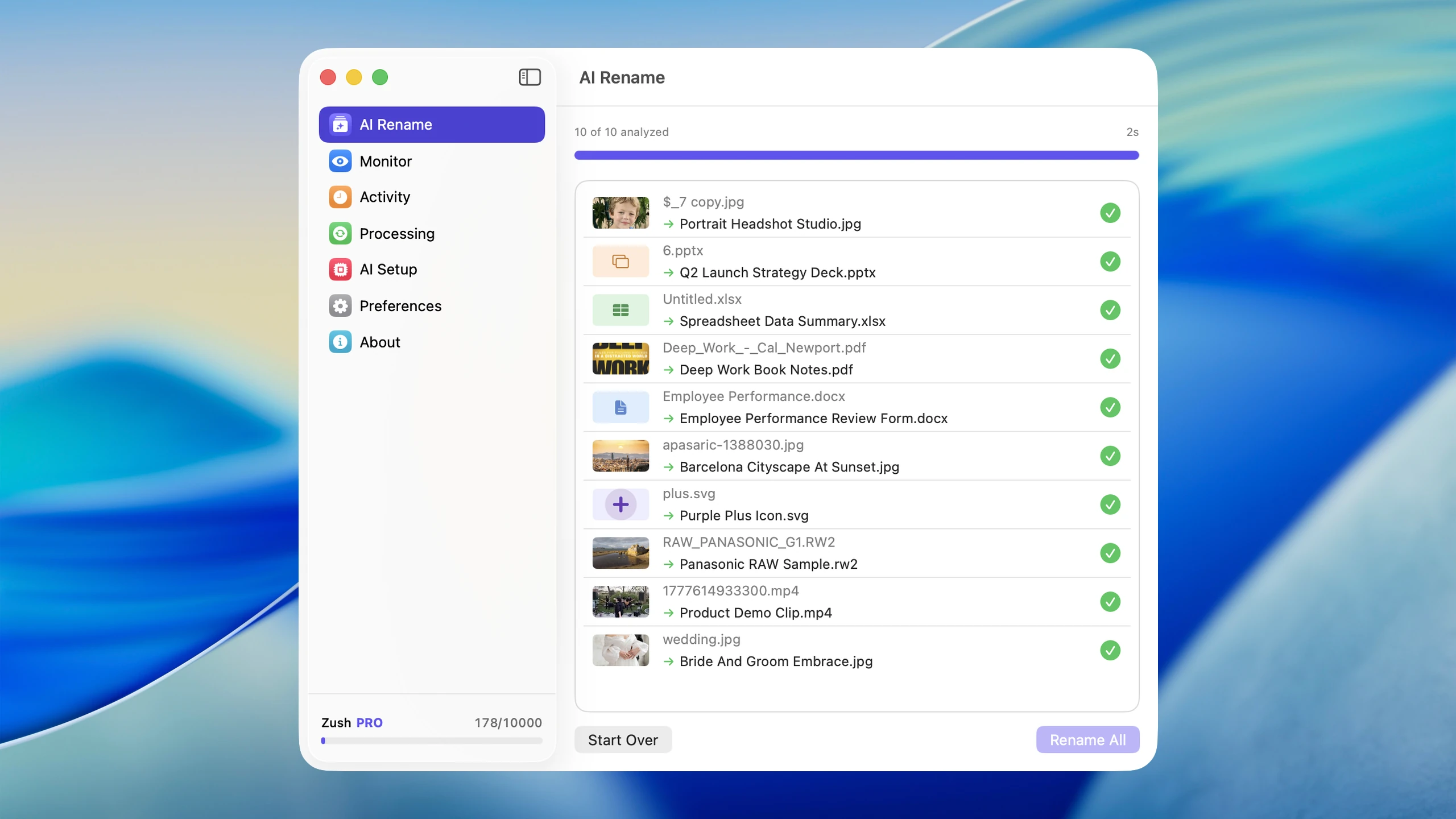
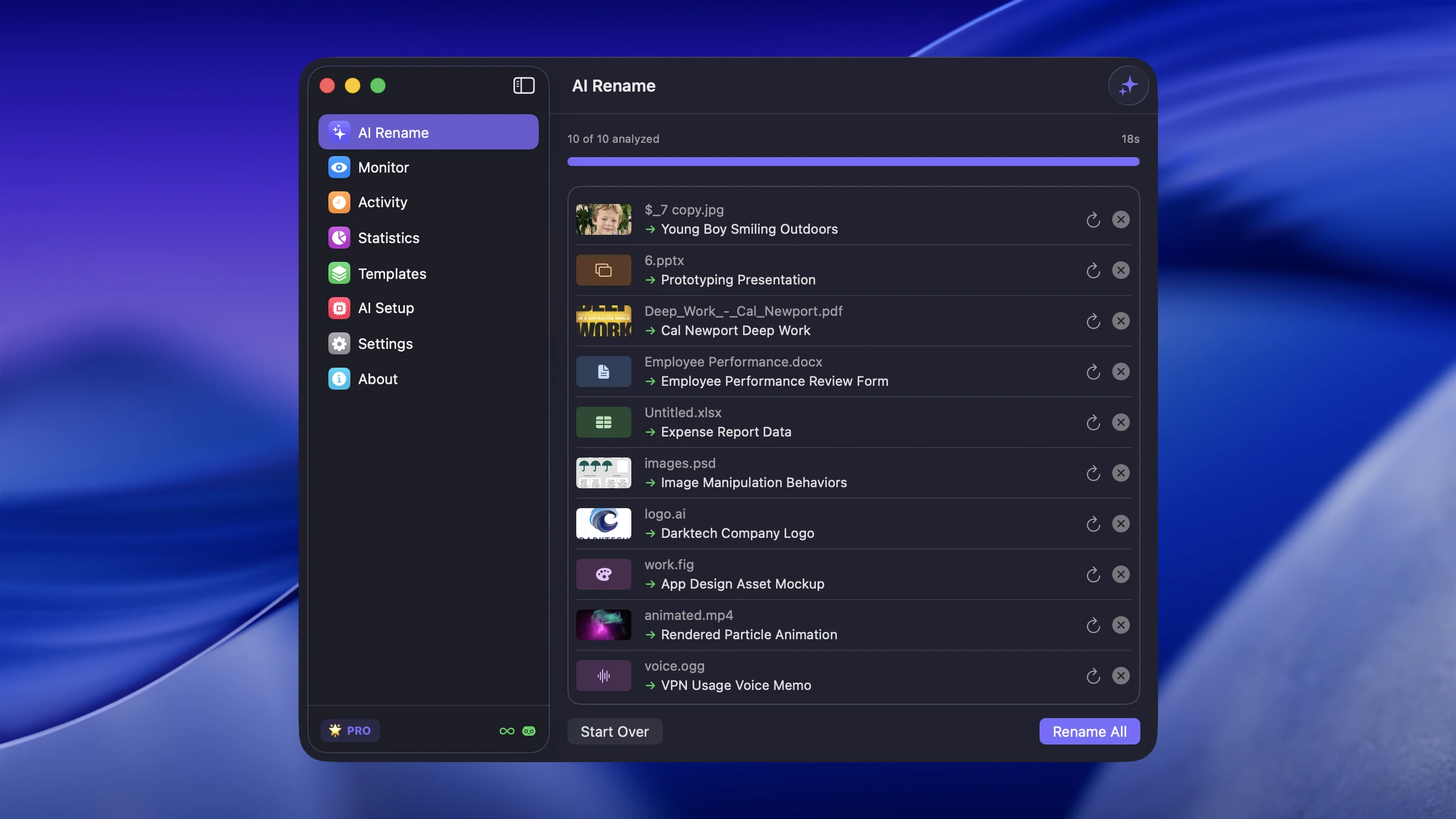
Zush’s strongest advantage is naming control. Built-in Templates cover Screenshots, Designer Assets, Bookkeeper Expenses, Photographer Shoots, Video Production, Music Tracks, and Client Meeting Notes. They combine with 145+ Naming Blocks, Custom AI Blocks, prompts, field order, case, separators, date formats, language, Finder tags, and Spotlight metadata. The same Template can run in a reviewed batch or a monitored folder. Rename History records original and new names, folder, and timestamp so an applied batch can be inspected and reverted.
The 100+ supported formats add breadth to that system: RAW and HEIC photos, Sketch/Figma/Illustrator/PSD design files, iWork and Office documents, 16 video and 7 audio formats all go through the same workflow.
The pricing is deliberately boring: unlimited PRO renames either as a subscription or a one-time $48 purchase. You never think about whether a messy 800-file folder is “worth the credits”.
Content-based folders in Zush
Zush can sort files into folders with AI (beta) as well as rename them. Choose Auto or write Folder rules, for example “Group client documents by company and recordings by meeting topic.” Folder grouping is independent of the filename Template, so the same batch can get both consistent names and useful destinations. The watch-folder row alone does not describe this part of the Zush workflow.
Choose a Destination folder, or keep the source folder as the root. Enable Reuse existing folders to prefer suitable folders already there; Zush can create a new one when nothing fits. In a manual batch, review both the suggested names and folders before applying. To rename in place, leave sorting off and keep the original destination.
Save the sorting settings in a Template and assign it to Monitor for new files directly inside the watched folder. This does not reorganize files already processed. Test the Template in a manual batch first. See the folder sorting guide for the setup and monitoring scope.
FilesDesk
FilesDesk positions itself as the plug-and-play credit option: 15 free credits with no API key, then $8/month for 500 credits or $20/month for 2,000, processed in memory and never stored. Its FAQ now explicitly lists common images, PDFs and Office documents, MP4/MOV/AVI/MKV/WebM video, and MP3/WAV/FLAC/AAC/M4A audio. Processing History can undo completed renames. The $40 Lifetime plan remains self-managed: bring a Claude/OpenAI/Gemini/OpenRouter key or run Ollama/vLLM locally, with one device and 12 months of updates.
FilesDesk is relevant when vLLM is a hard requirement. Its main drawback is the operating model: managed suggestions consume credits, while the lifetime path requires the user to supply an API key or local model; its public docs also do not enumerate RAW, design, and iWork coverage as granularly as Zush.
How to choose
- You rename a lot, or in bursts — credit meters punish exactly the moments you need the tool most (a 1,500-file photo import is 3 months of FilesDesk Basic credits in one afternoon). Zush unlimited wins.
- Your folders include specialist formats — both tools list common video and audio support, but Zush also publishes explicit RAW camera, design, and iWork coverage that FilesDesk does not enumerate.
- You want automation — both products list folder monitoring/watch-folder workflows; Zush pairs it with full rename history and unlimited PRO renames.
- You want precise conventions — Zush documents ready-made Templates, 145+ Naming Blocks, Custom AI Blocks, formatting, localization, metadata, and per-folder Template assignment; FilesDesk documents naming templates without the same granular control matrix.
- Safety net — both let you try free without a card; Zush’s money-back window is 14 days vs FilesDesk’s 3.
For more options, compare RenameClick alternatives or see what AI file renaming costs at 100, 1,000, and 5,000 files a month.
FAQ
Can Zush sort files into folders as well as rename them?
Yes. Its optional AI folder sorting is in beta on Mac and Windows. Choose Auto or write Folder rules, select the destination, and review both names and groups in a manual batch. A sorting-enabled Template can also process new files directly inside a monitored folder; it does not reorganize files already processed. Leave sorting off and keep the original destination for naming only.
Is FilesDesk cheaper than Zush? Its $8 managed tier includes 500 credits rather than unlimited renames. The sticker prices are not equivalent products: FilesDesk’s managed tier is capped at 500 suggestions, and its lifetime license requires your own AI key or local model and covers one device with 12 months of updates. Zush paid PRO is unmetered and includes managed AI.
Do both work offline? Both support local models: Zush through LM Studio or Ollama; FilesDesk through Ollama or vLLM. Zush’s built-in route reduces setup, while LM Studio, Ollama, and FilesDesk’s local routes depend on the model and hardware the user selects.
Which supports more file types? Both document video and audio support. Zush publishes a broader concrete list of 100+ formats including RAW photos, design files, and iWork, while FilesDesk lists common image, PDF/Office, video, and audio formats without the same RAW/design/iWork matrix.
Can I undo renames in both? Yes. Zush keeps full rename history with one-click revert, and FilesDesk documents undo from Processing History.
Also comparing other tools? See Zush vs NameQuick, Zush vs Renamer.ai, and the full AI renamer roundup.


