Duplicate Invoice Files: The Same Invoice, Filed Twice

Jump to section
Quick answer: a folder of invoices collects copies because the same document arrives through more than one channel. Content matching clears the exact duplicates, which is a filing job and costs nothing. It does not and cannot prevent duplicate payments, because the two invoices behind a double payment are usually two different files.
Keeping those apart saves a lot of disappointment with any tool you point at this problem.
Two problems that look alike
A duplicate invoice file is the same PDF sitting in your folder twice. It wastes storage, pads the count, and makes the folder harder to read. It is a housekeeping problem, and a computer can solve it exactly.
A duplicate invoice payment is the same obligation entering your ledger twice. It costs real money, and the two documents behind it are very often not identical files: a supplier resends an invoice with a new PDF timestamp, a scan replaces an email attachment, the same charge arrives once as INV-10234 and once as INV-10234-R1.
File-level matching cannot tell you anything about the second problem. Comparing the fields of an invoice against the invoices you already processed is the job of your accounts payable system or your accounting software, which has the vendor records and the payment history to do it. Nothing in a folder does.
What a folder cleanup does is stop you working from a pile where every third document is a copy, which is worth doing on its own.
Where invoice copies come from
Five sources account for most of them.
Two channels, one invoice. The supplier emails a PDF and also posts it to a portal. You save both, often weeks apart, and the files are usually identical because it is the same file on both ends.
A colleague forwards it. The invoice reaches the shared drive once from the inbox and once from whoever was chasing it.
A re-download. You could not find the file, so you saved it again. The browser helpfully named it invoice (1).pdf and you now have the pair.
A folder synced both ways. A client folder copied to a drive, worked on, and copied back. This produces whole directories of copies at once, which is why the count can go from tidy to hopeless in a single afternoon.
A re-scan. You scanned the same sheet twice because you were not sure the first one took.
The first four produce byte-identical files. The fifth does not, and that distinction decides what a cleanup will find.
What content matching catches, and what it misses
Matching by content compares the bytes of each file. Two invoices pair when they are exactly the same data, regardless of names, so invoice.pdf, invoice (1).pdf, and Acme_final_FINAL.pdf are recognized as one document in three places.
It will not pair these:
- Two scans of the same sheet. Each pass through the scanner produces a different image. The pages look identical; the files are not.
- A re-issued PDF. Many billing systems generate the document fresh on each download, embedding a new timestamp. Same invoice, different bytes.
- The email attachment and the scan of the printout. Different formats entirely.
- An invoice and its credit note, which often share most of their text.
Each of those needs a person, or a system that reads the fields rather than the file. That is the honest boundary, and it is worth knowing before you expect a folder tool to protect a payment run.
A workflow that keeps the folder usable
The aim is a folder where every file is there once and its name says what it is, so a search for a vendor or an invoice number finds it.
One intake folder per entity. Email saves, portal downloads, scanner output, and forwarded files all land in the same place. Copies cannot be detected across folders nobody is looking at together.
Detect the copies before anything else. In Zush, Detect duplicate files is a Template setting. Copies are matched by content, labelled in the list with the file they match, and never sent to the AI, so a folder that is a third duplicates costs nothing extra to process.
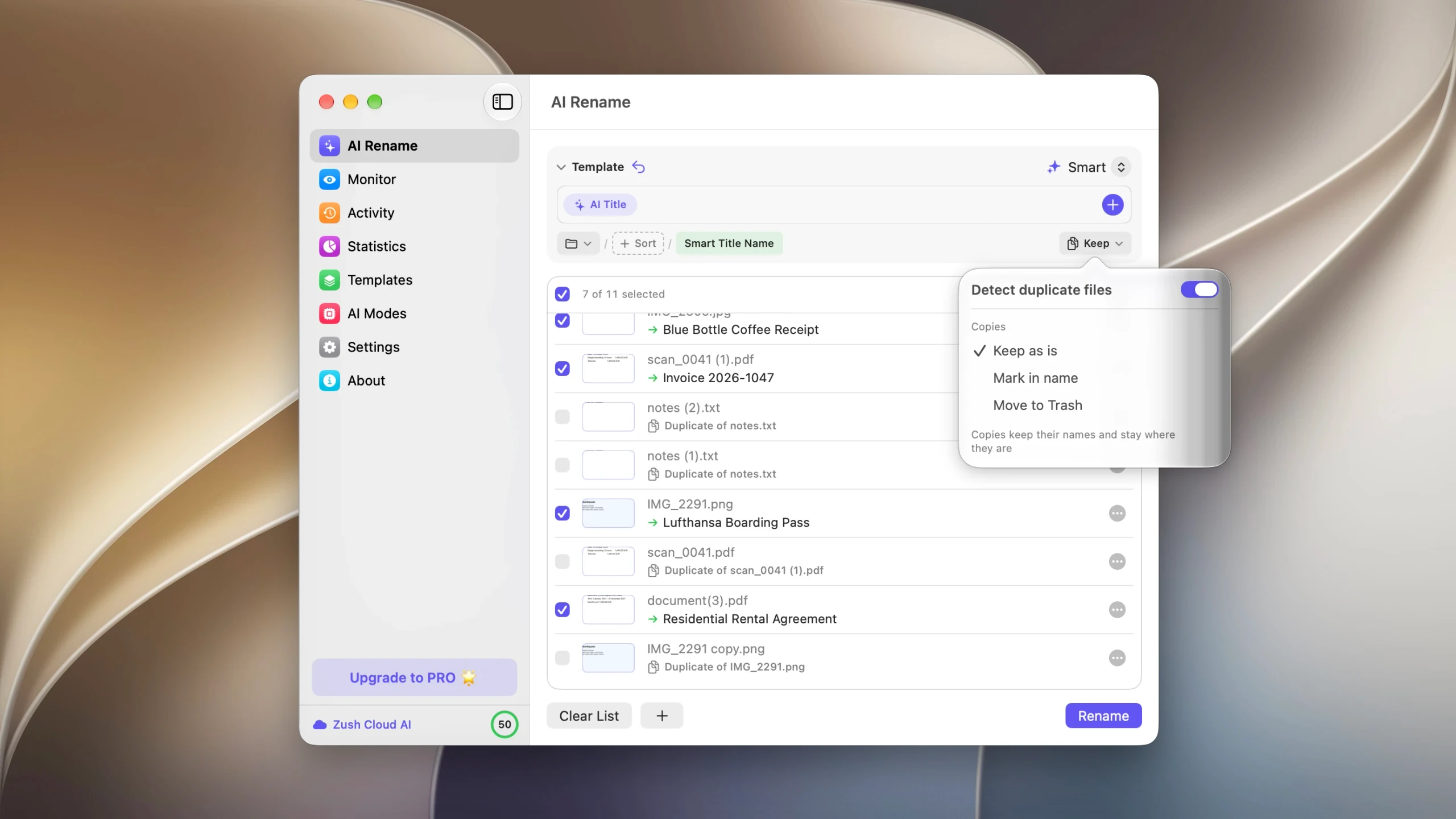
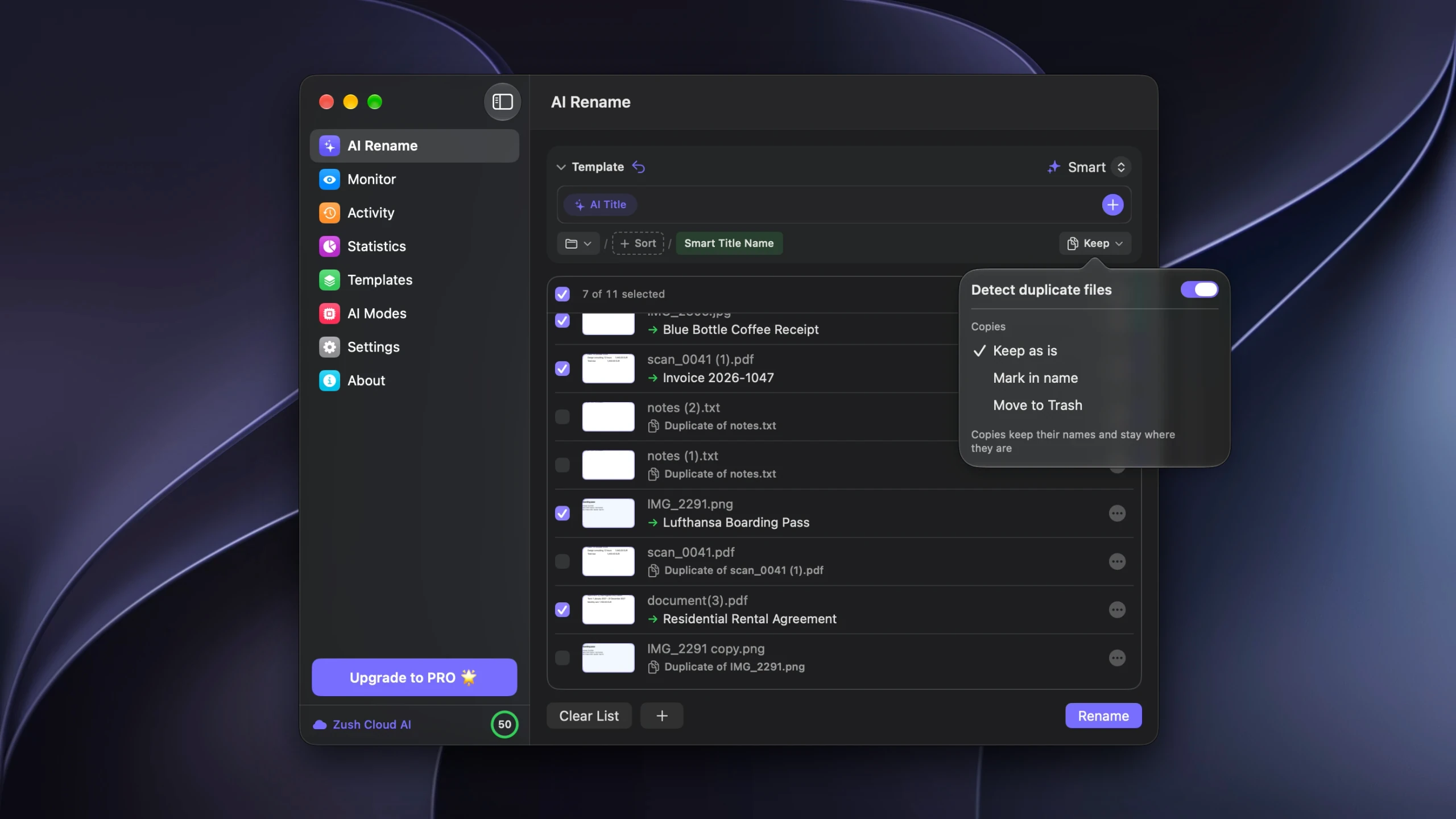
Start with Keep as is. The copies stay where they are and nothing is deleted, but you can read every pairing. For accounting folders this is the setting to run first, and to keep running until the pairings stop surprising you.
Then rename what is left. download (7).pdf becomes 2026-06-12 – Acme Supply – INV-10234 – 1,204 USD.pdf. The invoice naming convention guide covers the field order and why date-first sorts the way an accountant reads.
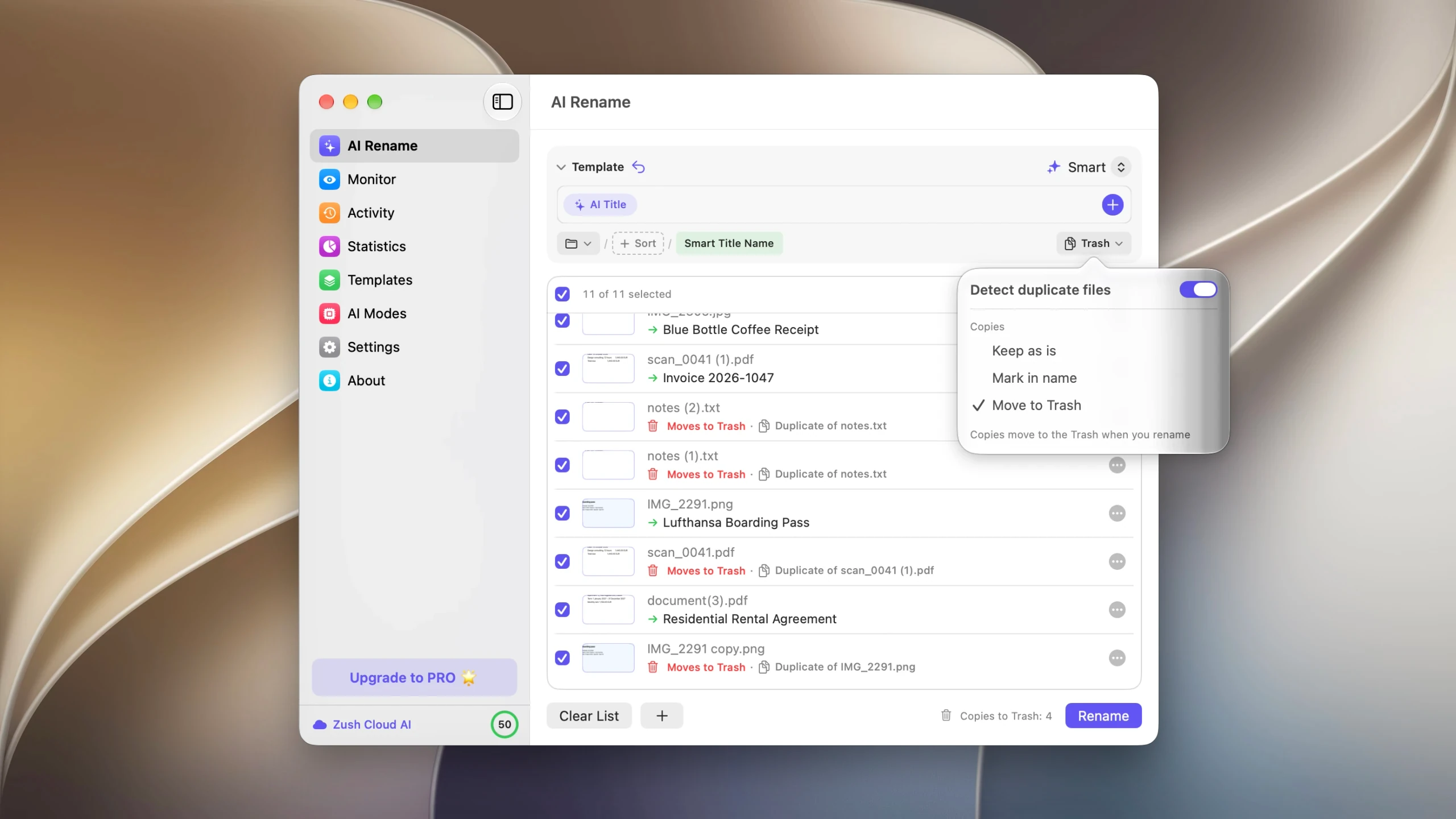
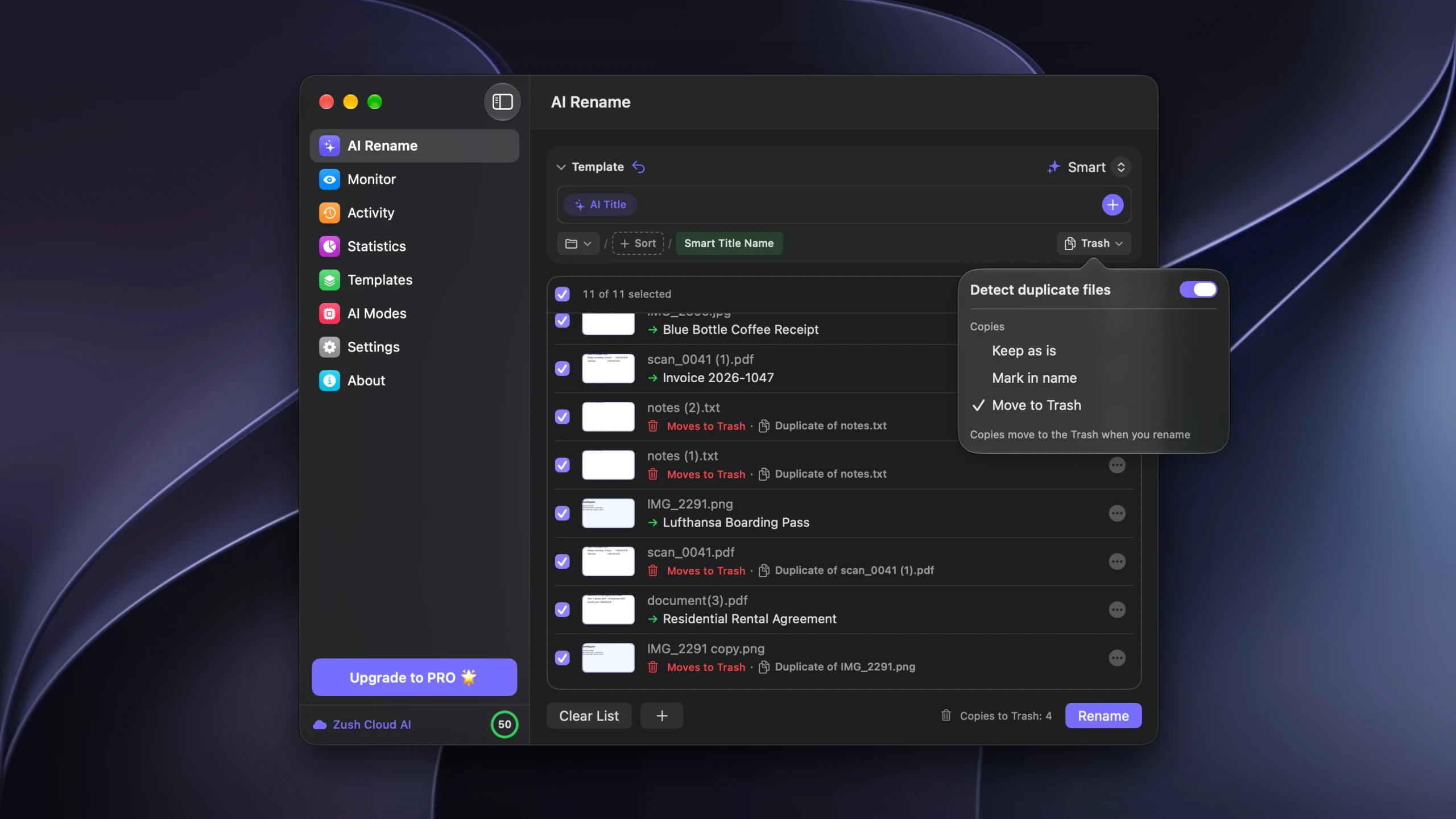
Once the pairings are predictable, switching the Template to Move to Trash turns the cleanup into one click. The removals appear in Activity next to the renames, and Undo restores the files to their original folders until the Trash is emptied.
Where to be careful
Shared folders. Deleting a file somebody else filed is not a decision to automate. Mark in name is the better setting there: each copy takes the original’s name with a Duplicate Mark appended, so it sorts next to its original and whoever owns the folder decides.
Deliberate copies. The same contract filed under two clients, or a working copy and an archived one, are both legitimate. Content matching will pair them because they are identical, and only you know that both should stay.
Monitored folders. A Template assigned to a watched folder applies without a preview. For a scanner output folder that is useful, because feeding the same page twice is a routine mistake. For a shared AP drop folder it is not, because the second copy may be the only one someone else has.
Retention rules. If your record keeping obligations cover the documents themselves, check whether removing a copy is allowed before you automate anything. The Trash is not an archive.
FAQ
Can a file cleanup prevent duplicate payments?
No. Duplicate payment prevention compares invoice fields such as vendor, invoice number, date, and amount against what has already been processed, which requires the payment history. A folder tool only compares files. Clearing duplicate files reduces the noise your process works through; it does not replace the control.
Will it catch an invoice I scanned twice?
No. Two scans of the same sheet are two different image files, even when the pages are identical. Only the exact copies pair, which in practice means files that were copied, downloaded twice, or synced.
Do duplicate invoice files cost extra to process?
No. Copies are identified before analysis and never sent to the AI, so the cost of a batch depends on the number of distinct documents in it.
What is the safest setting for a client folder?
Keep as is for the first few runs, so you can read the pairings without anything changing. Mark in name once you want the copies visibly flagged but not removed. Move to Trash only for folders you own and understand.
How do I keep invoices from duplicating in the first place?
Route them to a single intake folder, and rename them on arrival so the generic names are gone before they can collide. Folder monitoring applies a Template to new files as they land. The wider routine is in how to organize invoices and receipts.
Does this work for receipts too?
Yes, and receipts duplicate more often than invoices, because photographing the same receipt twice is easy. The same caveat applies: two photos of one receipt are two different files and will not pair. See rename receipts with AI for the naming side.


