Duplicate Scanned PDFs: Why the Same Page Scans Twice

Jump to section
Quick answer: scan the same page twice and you get two different files. The paper is in a slightly different position, the sensor noise differs, and the timestamp inside the PDF changes. Duplicate finders compare file contents, so they will not pair those two scans no matter how identical the pages look.
What does work: clearing the copies that really are copies, and naming scans by what they contain so repeats land next to each other and you can see them.
Why two scans never match
A duplicate finder computes a checksum: a fingerprint derived from every byte in the file. Two files pair when the fingerprints are equal, which requires the data to be identical down to the last byte.
A scan is a photograph of a sheet of paper. Between two passes through the feeder, several things change:
- The sheet sits a fraction of a millimetre differently, so every pixel shifts.
- Sensor noise differs on each pass, even in a plain white margin.
- Most scanner software embeds a creation timestamp in the PDF.
- Compression settings applied to slightly different pixel data produce different output sizes.
Any one of those changes the fingerprint completely. One flipped bit gives a hash with no resemblance to the original, which is what makes hashing reliable for exact matching and useless for “looks the same”.
The same reasoning explains two other cases people expect to be caught. A PDF opened in Preview and saved again is a different file. A PDF downloaded twice from a billing portal is often a different file, because many systems generate the document fresh on each request.
What a content check does catch
Plenty, as it happens. Most duplicate scans in a document folder are not re-scans at all:
- A scan copied into a client folder and left in the scanner output folder as well.
- The same PDF saved from an email and from a shared drive.
- A folder synced to a backup drive and copied back.
- The same file attached twice to a thread and saved on two different days.
All of those are copies in the strict sense, with different names and identical data. Scan_0042.pdf, Scan_0042 (1).pdf, and invoice acme.pdf can be one document in three places, and exact matching pairs them without being fooled by the names.
On macOS, this lists them without changing anything:
find ~/Documents/Scans -type f -print0 | xargs -0 shasum -a 256 | sort > /tmp/hashes.txtawk '{print $1}' /tmp/hashes.txt | uniq -d > /tmp/dupes.txtgrep -F -f /tmp/dupes.txt /tmp/hashes.txtThe hash comparison guide has the Windows equivalent and explains the output.
Making re-scans visible
Since no comparison will pair two scans, the practical move is to stop relying on the file and start relying on the name.
Scanner output is named by counter: Scan_0042.pdf, doc00421720260612103455.pdf, CCF_000135.pdf. Those names carry no information about the page, which is exactly why a re-scan is invisible. Two files numbered 0042 and 0071 in the same folder could be the same lease agreement and nothing in the folder would say so.
Name them by content and the repetition surfaces on its own. 2026-06-10 – Acme Supply – INV-10234.pdf sitting next to a second file describing the same invoice is obvious at a glance, because both land in the same place when the folder is sorted. You still decide which to keep, but you are deciding rather than discovering the problem a year later.
Zush reads each scan with AI vision, including image-only PDFs with no text layer, and names it by document type, party, and date. In the same batch, Detect duplicate files matches the exact copies by content and labels each with the file it matches.
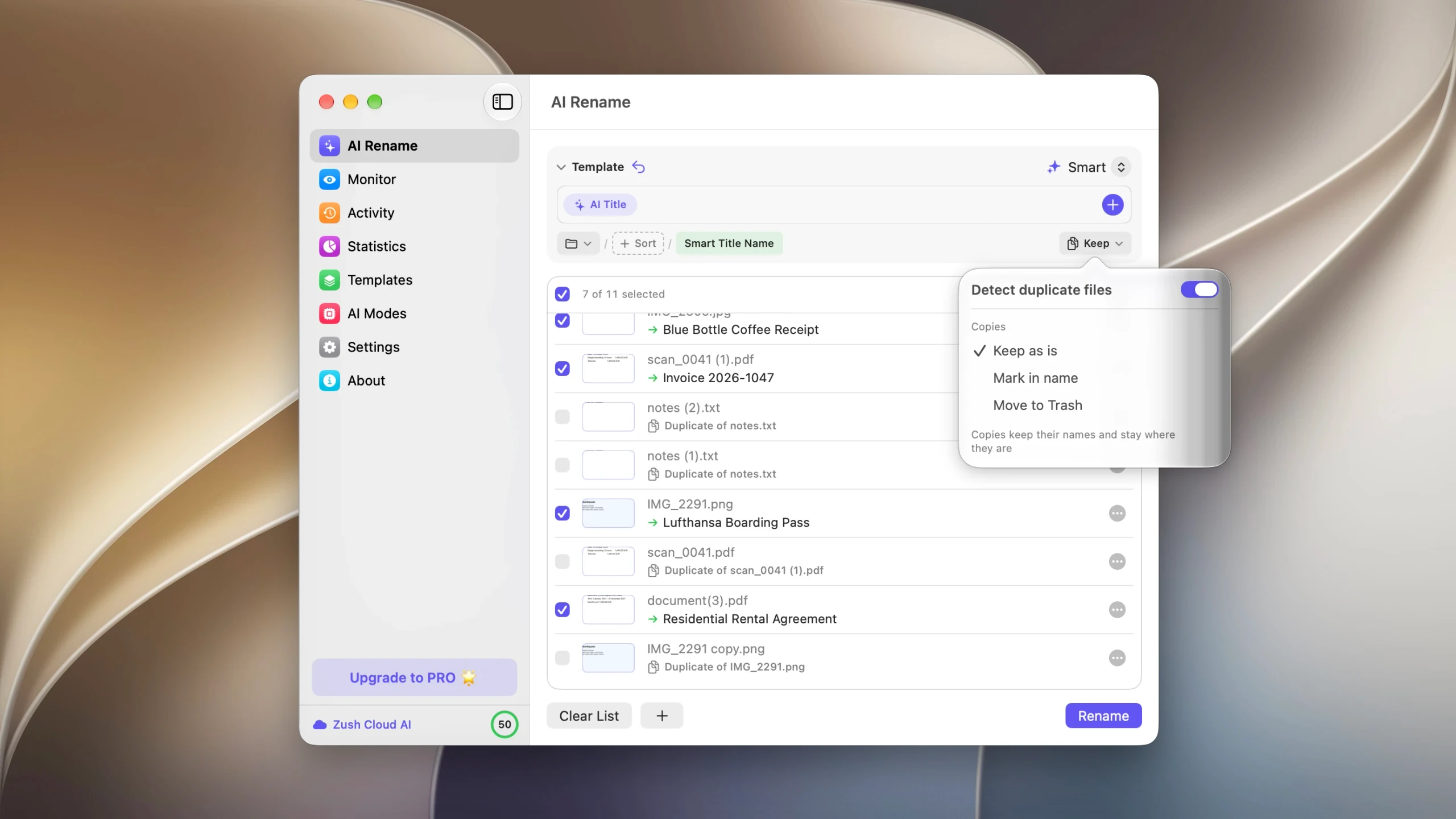
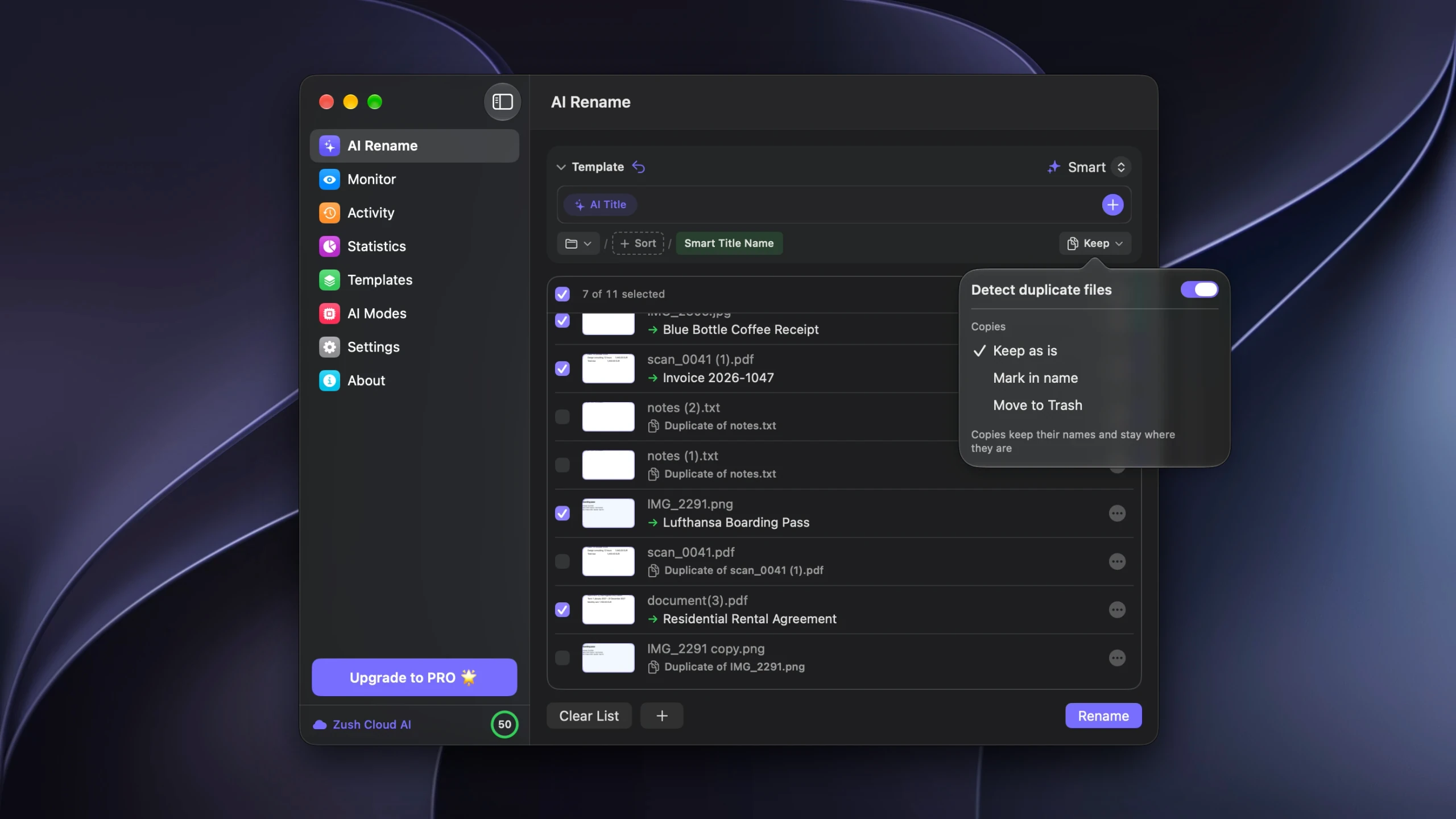
The copies can stay untouched, take the original’s name with a Duplicate Mark appended, or move to the Trash when you apply the batch. Removals are recorded in Activity, and Undo restores them to their original folders.
A scanner folder that stays clean
Three settings do most of the work.
One output folder. Point the scanner at a single folder and let every scan land there, rather than saving each one wherever the dialog last pointed. Copies can only be detected among files that are looked at together.
Rename on arrival. Folder monitoring applies a Template to new files as they land, so the counter name is replaced before the file is filed anywhere. A re-scan then arrives with a name that matches something already in the folder, which is the signal you wanted.
Duplicate handling on, for this folder specifically. Scanning the same page twice because you were not sure the first one took is a routine mistake, and the scanner output folder is one of the few places where automatic copy removal is reasonable: the files have just arrived, nothing else references them, and the originals are still on paper.
Shared folders are the opposite case. Deleting a file somebody else filed is not a decision to automate, so Mark in name is the better setting there.
What still needs a person
A re-scan and the original are two legitimate files holding the same information. Choosing between them means looking at both: one may be straighter, the other may have caught a page the feeder skipped.
Matching an invoice against invoices you have already processed is a different job again, and belongs to your accounting system, which has the vendor records and the payment history. Duplicate invoice files covers where that boundary falls.
FAQ
Why do two identical-looking scans have different file sizes?
Compression works on the pixel data, and the pixel data differs between passes. Paper position, sensor noise, and dust all change the image, so the compressed output changes size too.
Will OCR make two scans match?
No. OCR adds a text layer to the PDF; it does not make two files identical. It does make the text searchable, which helps you find a repeat by searching for the invoice number.
Can anything detect a re-scan automatically?
Comparing extracted text or fields can, which is what document management and accounts payable systems do. It is a different technique from file comparison and it needs the field data to work with.
Does a duplicate check waste AI credits on scans?
In Zush, no. Copies are matched before analysis and never sent to the AI, so a folder with copies in it costs the same as the folder without them.
What about the same document saved as PDF and as an image?
Different formats, different data, no match. That pairing is managed by naming and filing rather than by deduplication.


