How to Organize Tax Documents Digitally (2026 System)

Jump to section
Quick answer: keep one folder per tax year, name every document TaxYear – FormOrType – Issuer.pdf (for example 2025 – W-2 – Acme Corp.pdf, 2025 – 1099-NEC – Rivera Consulting.pdf), and maintain a short checklist of documents you expect each year. The naming is the part that automates: Zush reads each form, statement, or scanned receipt and applies the convention, so by filing season the folder is already an inventory.
Tax documents are a special case of document organization for one reason: they are assembled once a year under deadline, from documents that arrived over fourteen months through every possible channel. The cost of disorganization is concentrated into the worst week to pay it. The system below is designed backwards from that week.
It builds on the invoices-and-receipts system — if you run that year-round, tax season inherits most of its work for free. Accountants and bookkeepers who prepare returns for clients can run the same convention across every client folder with the AI file renamer for accountants and bookkeepers.
Sort tax documents into folders with AI
Zush can give supported files descriptive names and group them into real folders by content in the same batch. AI folder sorting works on Mac and Windows. Leave Folder rules empty for Auto grouping, or describe the groups in plain language. For tax documents, try:
Group documents by the tax year stated in the document. Put documents with no clear tax year in Review.
- Add a small copied batch in AI Rename and select a Template.
- Enable + Sort and choose the Destination folder, which is the root for the sorted subfolders. Without a separate destination, the source folder remains the root.
- Enter the grouping instruction in Folder rules. Naming Blocks set the filename format separately.
- Enable Reuse existing folders if suitable groups already exist inside the destination root. Zush can create a new folder when none fits.
- Review both the proposed names and folder groups. Correct folder names or file placement before applying the batch.
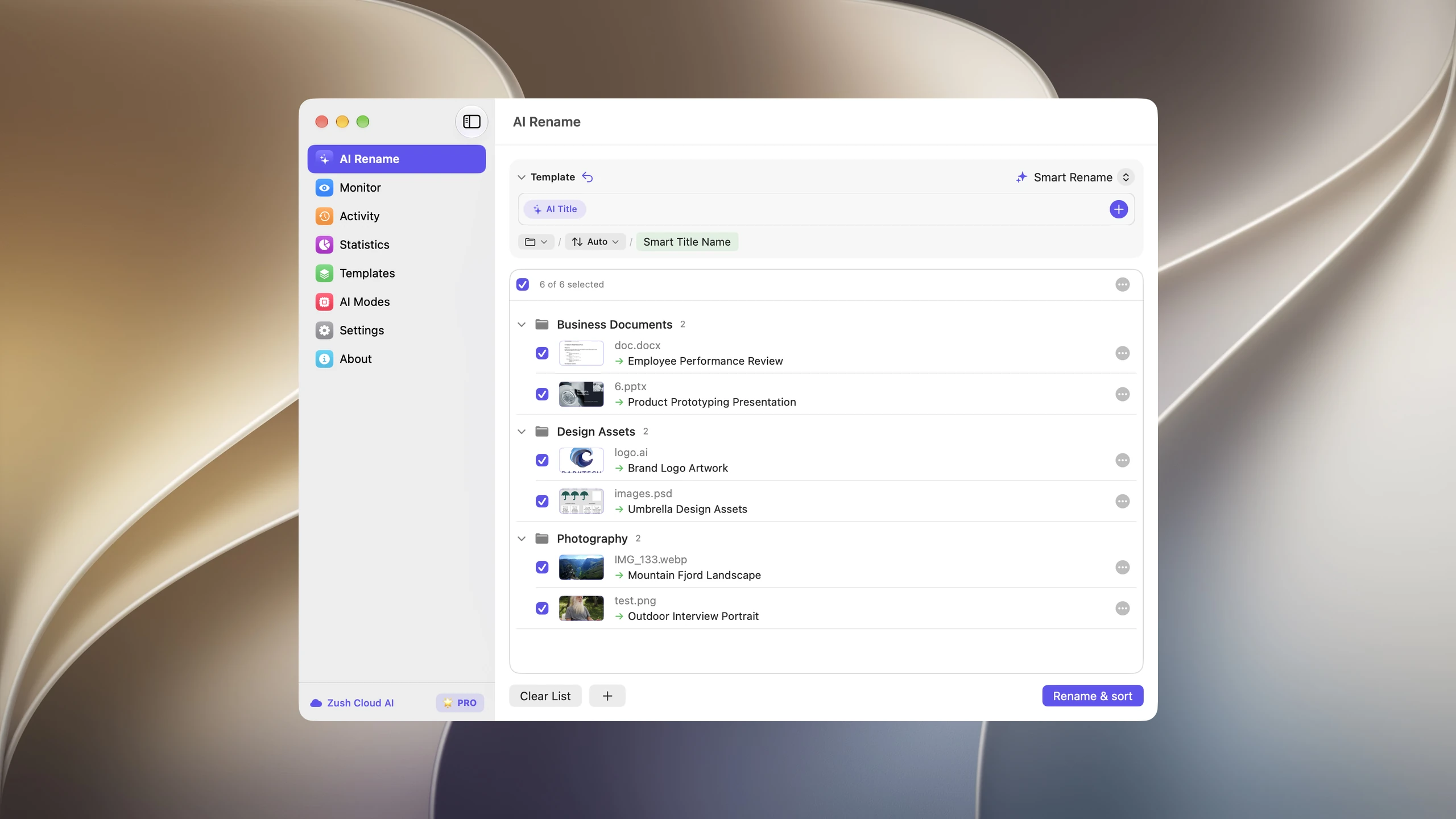

Save the tested destination and rules in the Template. Assign it to Monitor to rename and sort new files arriving directly inside the watched folder. This does not retroactively reorganize files already processed. With sorting off and the original destination selected, files keep their current folder.
Follow the step-by-step Mac sorting guide or see the folder sorting documentation and 30 example Folder rules.
The structure: tax year beats calendar year
Taxes/ 2025/ ← the return you file in 2026 2025 – W-2 – Acme Corp.pdf 2025 – 1099-NEC – Rivera Consulting.pdf 2025 – 1099-INT – First National.pdf 2025 – Donation – Red Cross – 500 USD.pdf 2025 – Property Tax – County – 4,120 USD.pdf Return/ 2025 – Federal Return – as-filed.pdf 2025 – State Return – as-filed.pdf 2026/ ← filling up now checklist.mdTwo design points:
- The tax year leads every filename, even inside the year folder. Documents escape folders — they get emailed to accountants, downloaded to other machines — and a self-identifying name survives that. A January-arriving W-2 for the prior year files itself correctly by name, which a date-first convention would get wrong.
- The filed return gets its own subfolder with an
as-filedmarker, separated from source documents. When a question arrives years later, the distinction between “what we filed” and “what we filed it from” is the first thing you need.
The checklist: organize against expectations
A tax folder has a property most folders lack: you know in advance what should be in it. Write it down once — employers, banks, brokerages, expected 1099 issuers, mortgage servicer, charities, estimated-payment confirmations — and reconcile against it in February:
# Tax docs expected — 2025- [x] W-2 — Acme Corp- [x] 1099-NEC — Rivera Consulting- [ ] 1099-INT — First National ← missing, portal- [x] 1098 Mortgage — Servicer Co- [ ] Donation letter — Red CrossWith consistently named files, the reconciliation is a glance: the folder listing sorted by name is the received-so-far list. The checklist marks the gap between it and reality — which is precisely the information that otherwise surfaces in April.
The intake: where documents actually come from
Tax documents arrive as portal PDFs with names like TaxForm_2025_FINAL(2).pdf, employer-mail scans, IMG_3011.jpg donation-receipt photos, and broker statements named by internal IDs. Route them all through one monitored intake folder (the same one as your invoice system, or a dedicated one) and let the naming pass normalize them:
- The AI PDF renamer reads each document and extracts the tax year, the form type (
W-2,1099-NEC,1098,Donation,Property Tax), and the issuer — the three fields the convention needs. - Scanned paper works without an OCR pass: AI vision reads the page image, so the shoebox-of-paper backlog is a scan-then-batch job, not a data-entry job.
- Each batch is previewed and reversible — worth its weight during season, when a mis-sorted 1099 costs real money.
A note on sensitivity: tax documents carry SSNs and account numbers. Zush’s Offline AI mode analyzes supported files with local models on Mac or Windows so nothing leaves the machine, and BYOK keeps analysis under your own API account — pick the posture that fits. Filenames should follow the same hygiene: form type and issuer, never an SSN or full account number. Medical teams can apply the same local-or-BYOK choice in the dedicated medical records workflow.
The backlog: seven years in one afternoon
Retention rules commonly reach six or seven years back, and most people’s older tax records are the least organized. The same system retrofits cheaply:
- Gather everything into one staging folder (drive dumps, old
Tax stufffolders, scans of paper). - Run one Zush batch to apply the tax-year-first filename convention. This orders a folder listing by tax year; moving files into year folders requires enabling Folder sorting separately and specifying a grouping rule.
- Review the preview, apply, and distribute into year folders — with names carrying the year, this is mechanical.
An afternoon, once, and the archive answers audit questions by search. For other tools that read and file tax paperwork, compare the best AI document organizers.
FAQ
What is the best way to organize tax documents digitally?
One folder per tax year, filenames leading with the tax year, form type, and issuer (2025 – W-2 – Acme Corp.pdf), a checklist of expected documents, and automatic content-based renaming for everything that arrives. The folder becomes a self-auditing inventory.
Should tax documents be organized by calendar year or tax year?
Tax year. Documents for a tax year arrive across two calendar years — W-2s and 1099s land in January and February after the year ends — and filing them by arrival date splits one return’s documents across folders.
How long should I keep tax documents?
Commonly at least three years after filing, and six or seven for many situations — self-employment, underreporting windows, property records can run longer. Rules vary by country; check yours. Year-based folders make whatever rule applies mechanical to enforce.
Can AI safely rename documents with SSNs on them?
Use a local or self-controlled mode: Zush’s Offline AI analyzes files with local models so content never leaves the machine, and BYOK uses your own API account. Keep identifiers out of the filenames themselves — form type plus issuer is enough to find anything.
How do I handle a shoebox of old paper receipts and forms?
Scan everything into one folder without worrying about scanner filenames, then run one AI renaming batch — the content, not the scan order, determines each document’s year and type. See the scanned documents guide.


