Best AI File Organizers for Mac: Naming vs Sorting (2026)

Auf Deutsch lesen: Bester AI File Organizer für Mac: 7 Apps im Vergleich (2026)
Jump to section
Quick answer: choose the AI file organizer when “organize” means making mixed files searchable through a precise, repeatable naming convention. Its strongest advantage is control: ready-made Templates, 145+ Naming Blocks, Custom AI Blocks, case and separator formatting, localization, tags and metadata, plus Rename History that can restore an applied batch. Zush also offers optional AI folder sorting; compare the other apps below for specific routing, scripting, or cleanup requirements.
An AI file organizer for Mac can solve two different problems. Some apps move files into folders. Others improve the filenames that Finder and Spotlight search. The best choice depends on whether your pain is where files live, what files are called, or both.
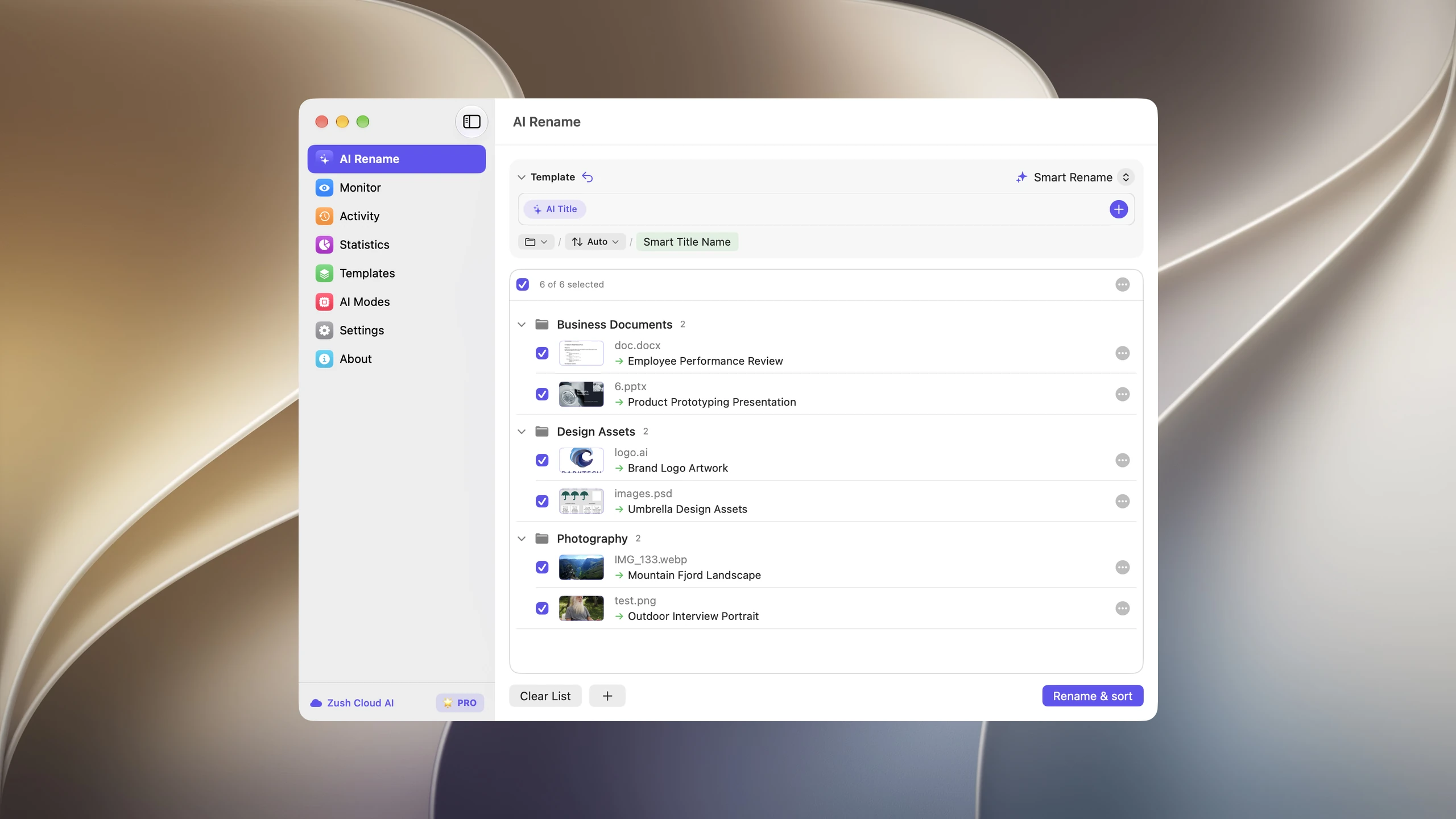
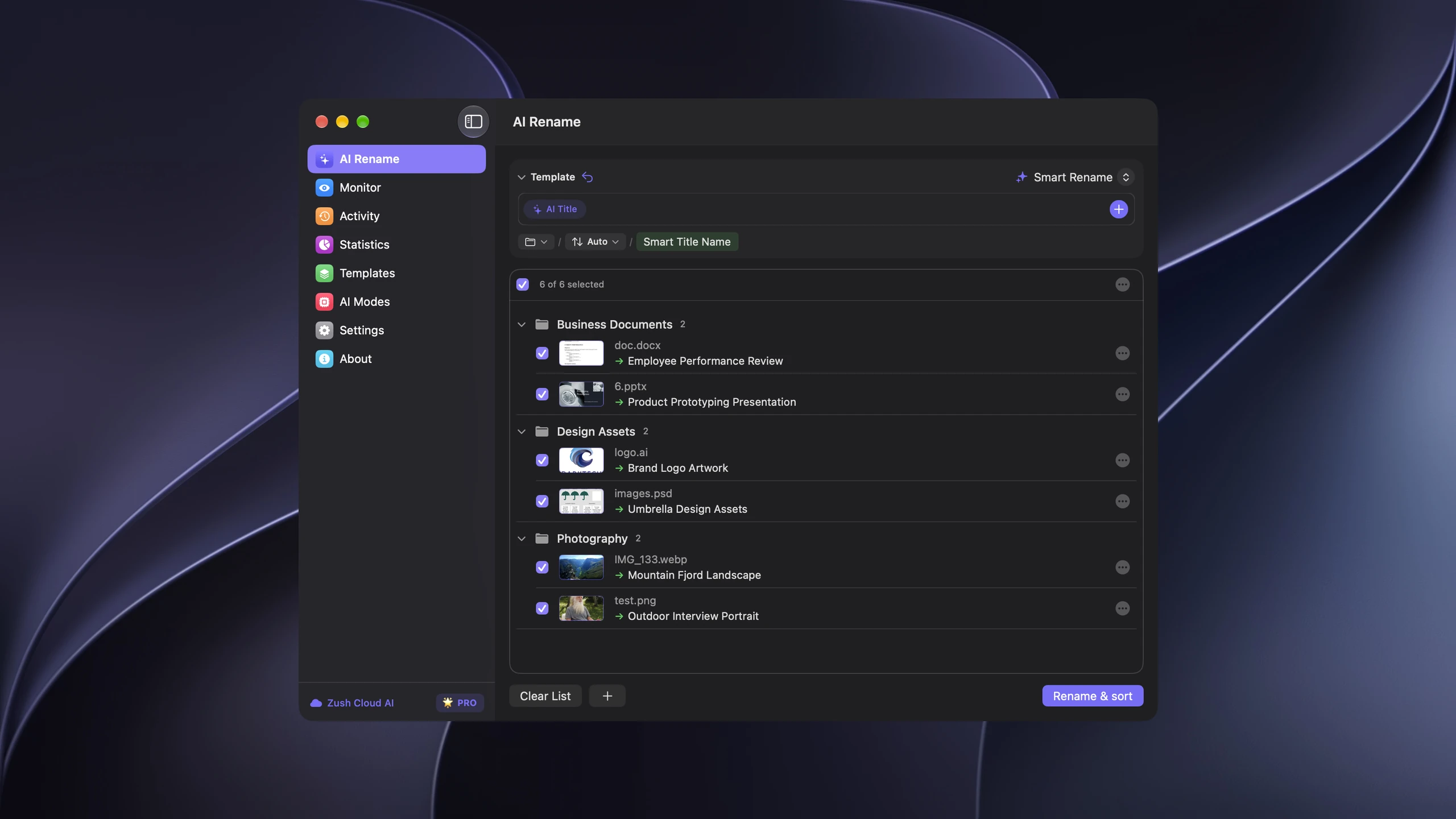
Zush can rename files and sort them into AI-named folders. With sorting off and the original destination selected, Zush keeps files in their current folder.
Last verified: September 24, 2026. Zush product, pricing, and documentation claims were checked against the current site and repository. Competitor pricing and capabilities use the vendor-owned sources linked below; confirm final pricing and platform requirements before buying.
Sources checked: Hazel and the Noodlesoft store, Sparkle and its plans page, NameQuick, Sortio, Floxtop, and Files Magic AI. Zush claims are sourced from the Zush documentation, pricing, and product pages.
Written by the maker of Zush, the AI file organizer for Mac and Windows. This is our recommendation for mixed personal and work files, not an independent accuracy ranking. Editorial review: October 16, 2026. The short comparisons below name vendor sources; the walkthrough is based on Zush documentation, not a new benchmark.
Zush features reviewed October 26, 2026. Competitor information retains the check dates stated in this article.
AI file naming vs folder sorting
An AI file organizer analyzes filenames, metadata, or file contents to help make a folder easier to browse and search. Zush turns weak filenames into consistent, content-aware names and now offers optional AI folder sorting. A useful comparison must state which action an app takes, because renaming in place and restructuring a folder tree carry different risks.
For example, an invoice named scan_0042.pdf can become 2026-07-18_Acme_INV-1042.pdf without changing its location. A sorting app might instead move that file into Finance/Invoices/2026/Acme/. Both outcomes can be useful, and both change file paths that shortcuts, sync tools, or project files may expect.
How we compared the apps
This is a source-backed comparison, not an independent benchmark of all seven apps. We compared the workflows against the same practical jobs: naming mixed files, routing predictable downloads, handling new arrivals, previewing changes, and reversing a bad batch. Undocumented capabilities are not inferred. The reproducible 10-file evaluation later in the guide is a method readers can run themselves.
AI file organizers for Mac: quick comparison
| App | Pricing model | Naming control | Platform | Moves files or renames in place? | Recovery |
|---|---|---|---|---|---|
| Zush | Free start; $10/mo or $48 one-time, paid PRO unmetered | Ready-made Templates, 145+ Naming Blocks, Custom AI Blocks, formatting, localization, metadata | Mac, Windows | Renames in place, or sorts into folders by your plain-language rules or Auto | Full Rename History with original/new names, folder, time, and revert |
| Hazel 6 | $42 one-time | Deterministic rules and pattern rename | Mac | Moves, tags, archives, and pattern-renames | Revert support |
| Sparkle | Subscription; plans page showed $119/year, plus $179 lifetime offer | AI-created organization; filename controls not central | Mac | Builds folders and moves files | Revert changes |
| NameQuick | Managed $12–$99/mo metered; $69 one-time Self-Managed | Presets, prompts, and conditional Rules | Mac; Windows also available | Renames; Rules can move files | One-click undo |
| Sortio | Free; Pro $14.99/mo or $99/year | Natural-language instructions for naming and routing | Mac, Windows, Linux | Renames, creates folders, and routes files | Preview and revert |
| Floxtop | Free for 100 files/mo; Pro $19.99 one-time | Suggested folders; optional Smart Rename | Mac, Apple Silicon | Suggests folders and moves approved files; optional rename | Review before move; undo not publicly stated |
| Files Magic AI | $4.99/mo, $29/year, or $49.99 lifetime | Magic Rename plus proposed folder structure | Mac | Proposes folder structure, moves files, and can rename | Recent-action undo |
The table exposes the main split. Zush gives the user the deepest documented control over the filename itself; most alternatives focus more on moving files or applying broader organization rules. Local processing exists in several entries, so it is not treated as a unique advantage. Zush PRO is also unusual in this group because its paid managed-cloud workflow is unmetered and does not require BYOK.
1. Zush: best overall AI file organizer for Mac
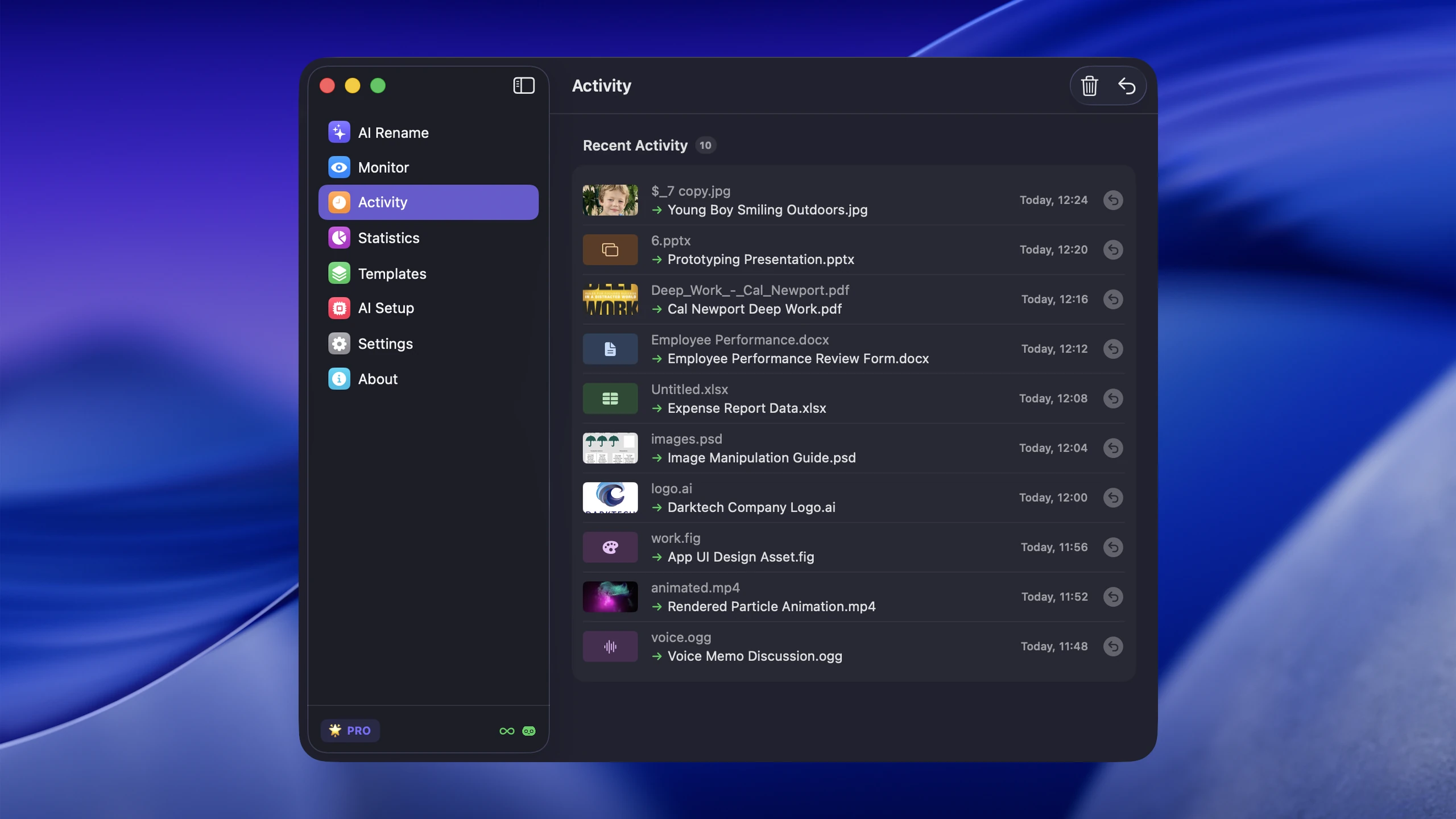
AI file renamer for Mac helps when mixed files need searchable names, content-based folder groups, or both. It analyzes supported screenshots, photos, PDFs, Office and iWork documents, design files, audio, and video, then proposes a different filename for each item. You review the batch before applying it.
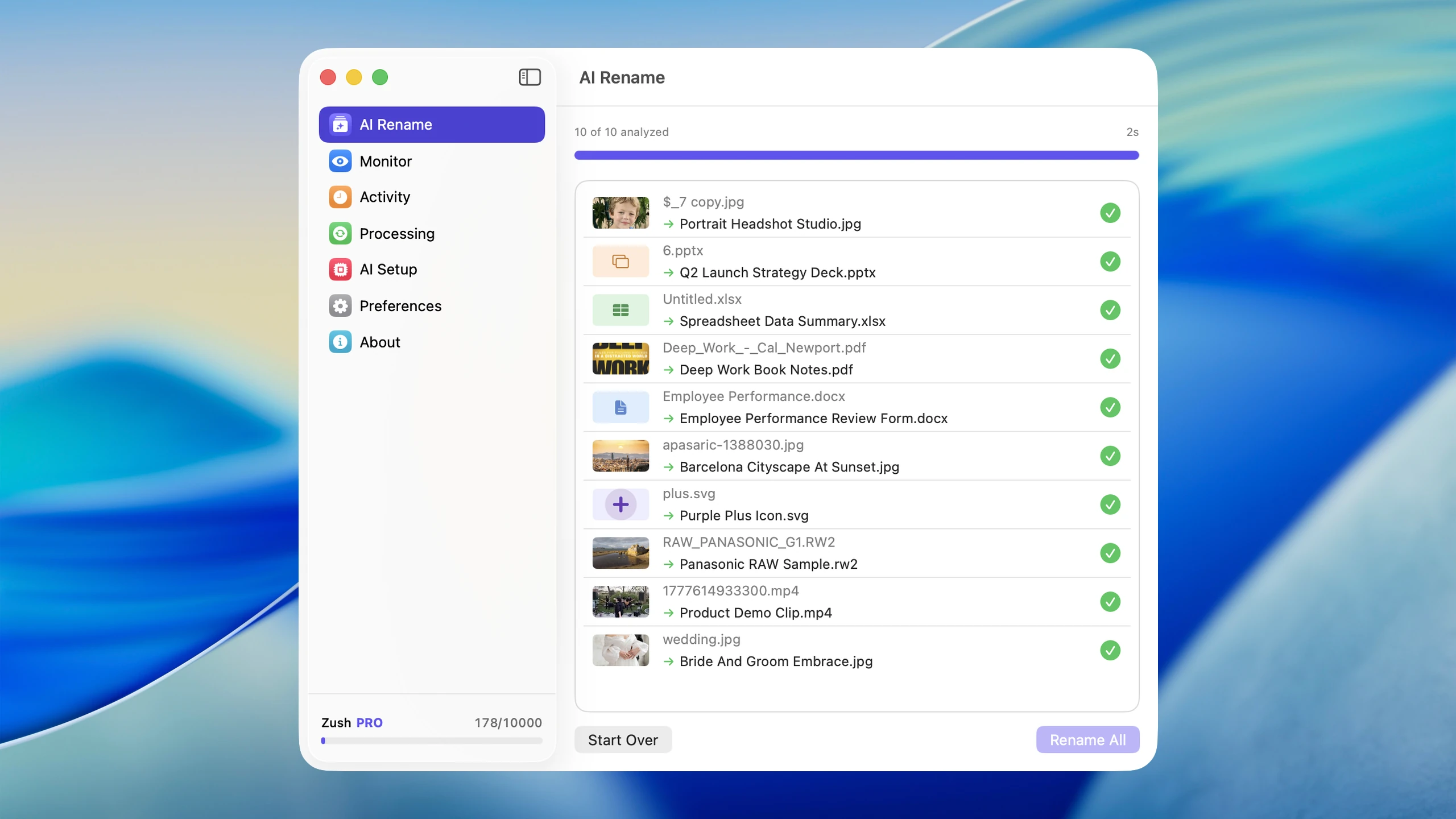
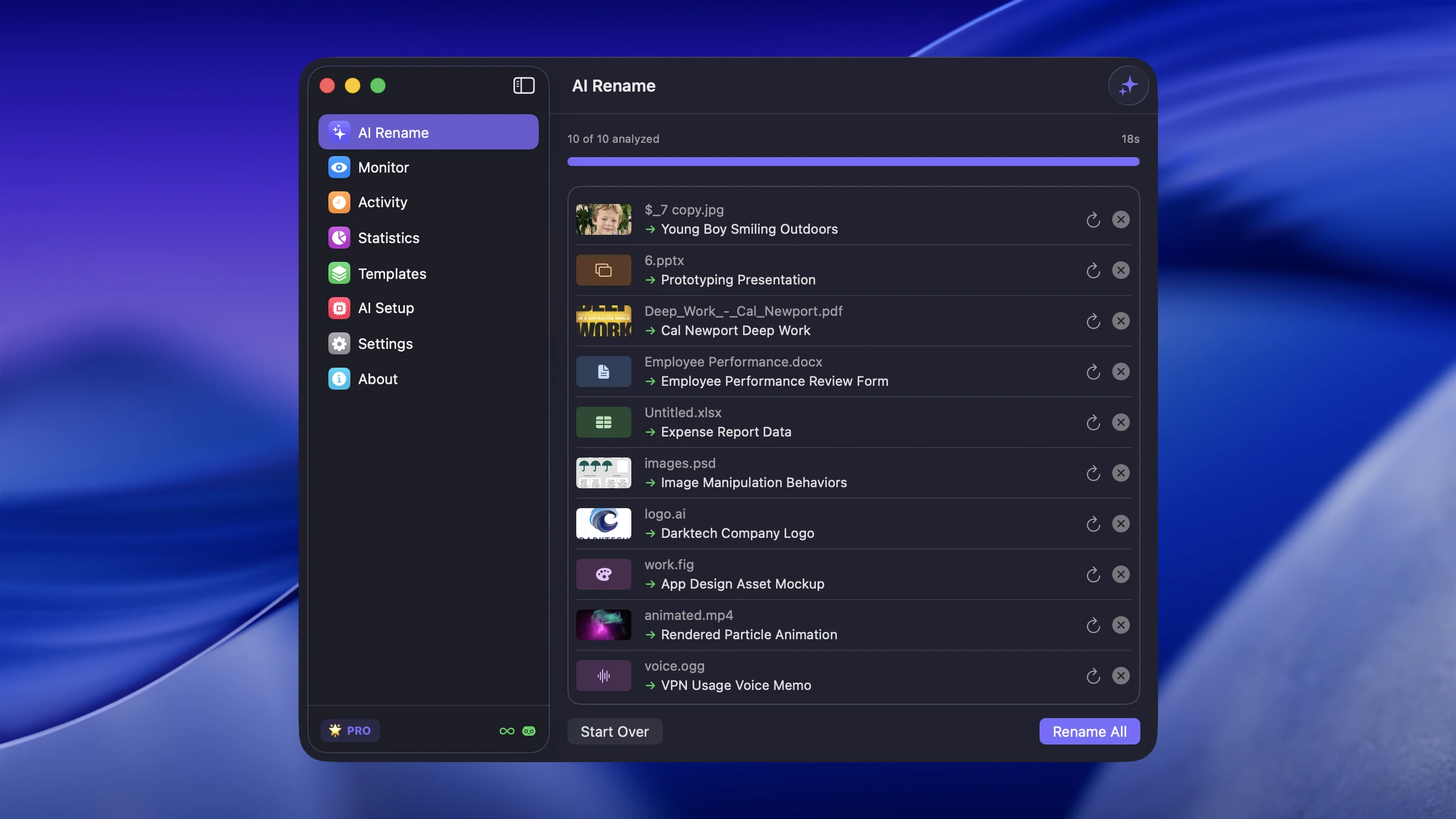
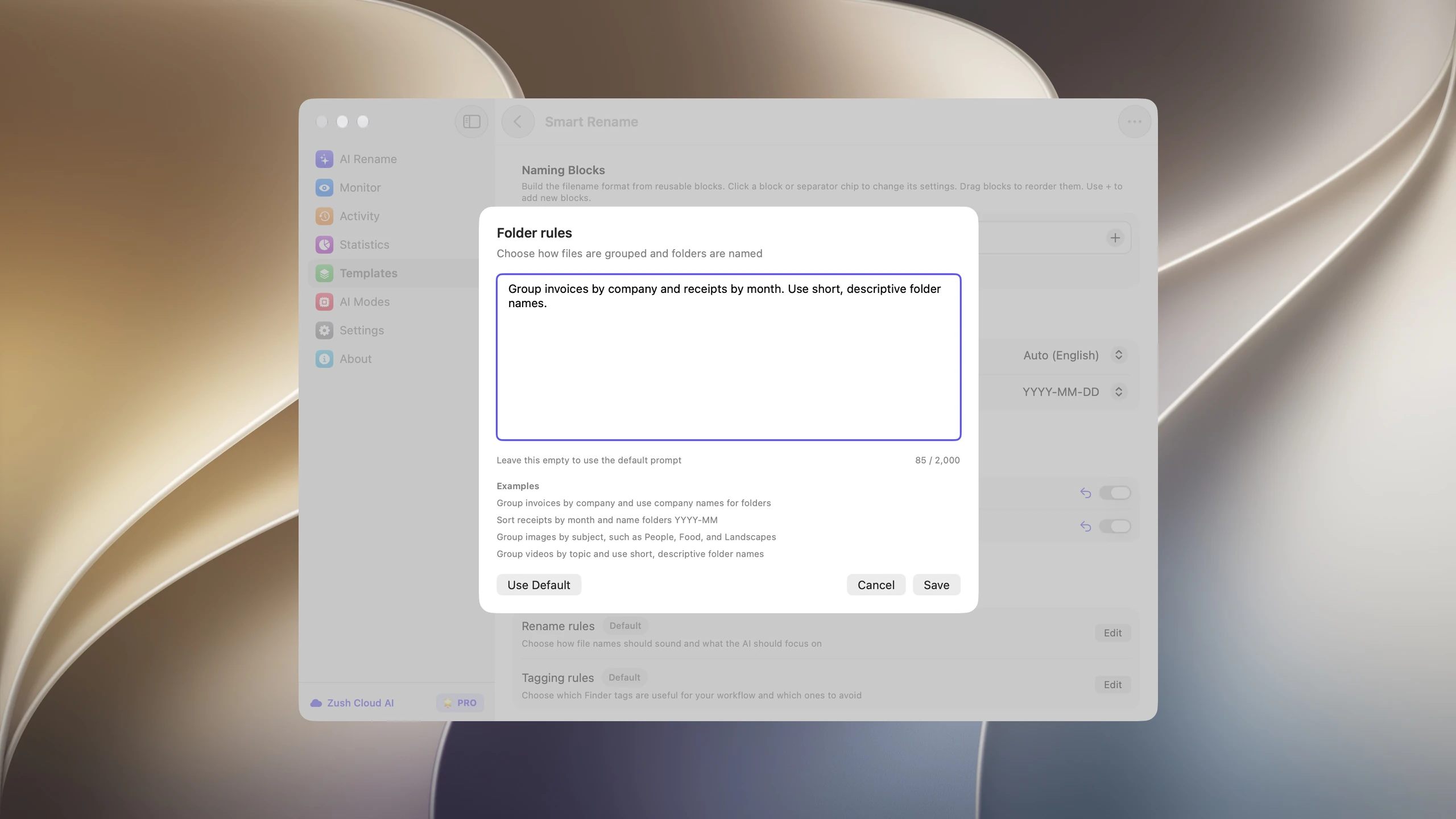
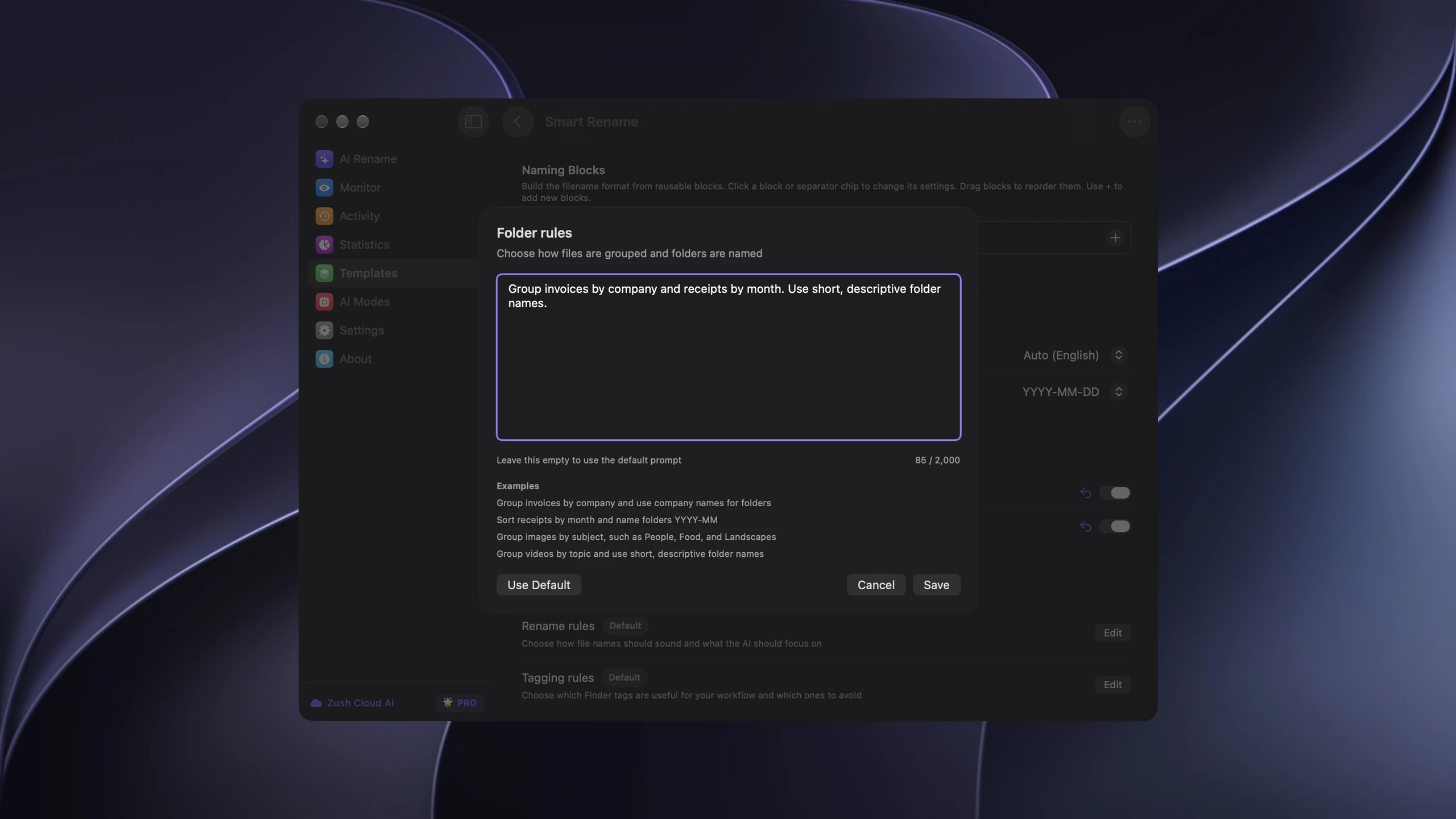
Zush can rename files and sort them into AI-named folders; the Zush AI file sorter page shows the Folder rules in detail. With sorting off and the original destination selected, the app keeps files in their current folder. Its naming system is the most configurable one documented in this comparison: ready-made Templates such as Screenshots, Designer Assets, Bookkeeper Expenses, Photographer Shoots, Video Production, Music Tracks, and Client Meeting Notes combine with 145+ Naming Blocks and Custom AI Blocks. You can control field order, case, separators, date format, output language, Finder tags, and Spotlight metadata instead of accepting a single opaque AI title.
Folder monitoring handles new arrivals. A Downloads monitor can name incoming invoices and screenshots while a separate project monitor uses a client-specific Template. Rename History records the original name, new name, folder, and timestamp, then lets you inspect and revert an applied batch. Zush offers Zush Cloud AI and BYOK online, plus LM Studio and Ollama on-device. Local processing is available in several alternatives too, so Zush’s differentiator here remains the complete naming and recovery workflow rather than locality alone.

Best for: mixed folders, stable project paths, broad file-format coverage, and users who want Finder or Spotlight to retrieve files by meaning.
Folder sorting follows your instructions: write a rule such as “Group invoices by company and receipts by month,” or leave it on Auto, choose a destination, and let Zush reuse folders you already have. Monitor applies the same rules to new files. Use Hazel when you need scripts or strictly deterministic conditions.
One Zush license covers up to 3 devices on Mac and Windows. PRO costs $10/month or $48 one-time and includes unlimited renames with Zush Cloud AI. BYOK, Ollama, and LM Studio are also available; your own API provider charges separately. The free allowance is 50 renames in total across AI modes.
You can export Templates with Naming Blocks, Custom AI Blocks, and folder rules, then import them on another computer. Choose local destinations, folder permissions, and AI connections again there; this transfers the workflow settings, not your files.
Zush also supports nested folder rules, such as grouping by year and then month. You can sort already renamed files without changing their names again or spending another rename credit. Review the destinations before applying. This separate action handles an existing batch; changing a Monitor Template does not retroactively reorganize it. AI folder sorting works on Mac and Windows.
2. Hazel: a narrow alternative for deterministic routing
Hazel watches folders and applies rules based on name, date, type, source, content patterns, tags, or scripts. It can move files, sort into subfolders, rename by patterns, archive, upload, tag, and integrate with Shortcuts, AppleScript, and Automator. Hazel 6 was listed at $42 for a standard license on July 30, 2026.
Hazel is relevant only when you can express the condition precisely: move every PDF from a scanner folder into Documents/Scans, archive files older than 90 days, or send a file carrying a particular tag into a client folder. Its text recognition can extract predictable text from documents, but Hazel is not a general vision model for understanding an arbitrary screenshot, photo, or video.
Consider only for: reliable, local, rule-based movement after Zush has created descriptive names.
Watch out for: a powerful rules engine takes setup and testing. Use a staging folder before a rule begins moving production files. For content-aware names before routing, let Zush rename first and Hazel move second.
3. Sparkle: a narrow alternative for folder restructuring
Sparkle is a Mac-focused cleanup and organization app. It can manage selected folders, create an AI Library, move new files after a configurable recency period, flag duplicates, log moves, and revert its organization. Its help center says Sparkle reads file content, filenames, and types when building a folder structure.
Sparkle aims for a low-configuration experience: add a folder, keep protected material in the Manual Library, and let the app maintain the AI Library. The current official pages also advertise storage cleanup, app uninstalling, and cloud-synced folders that are available locally.
Pricing varied across Sparkle’s official promotional pages during verification. The account plans page showed $119 yearly and a discounted $179 lifetime offer, while the public marketing page advertised plans starting at $9.25 for a month. Treat checkout as the source of truth.
Consider only for: users who explicitly want an app to restructure folders and clean storage rather than preserve paths and improve filenames.
Watch out for: Sparkle changes folder structure and moves files. Review its Manual Library, recency delay, exclusions, and revert process before granting access to active project folders.
4. NameQuick: a narrower document-and-routing alternative
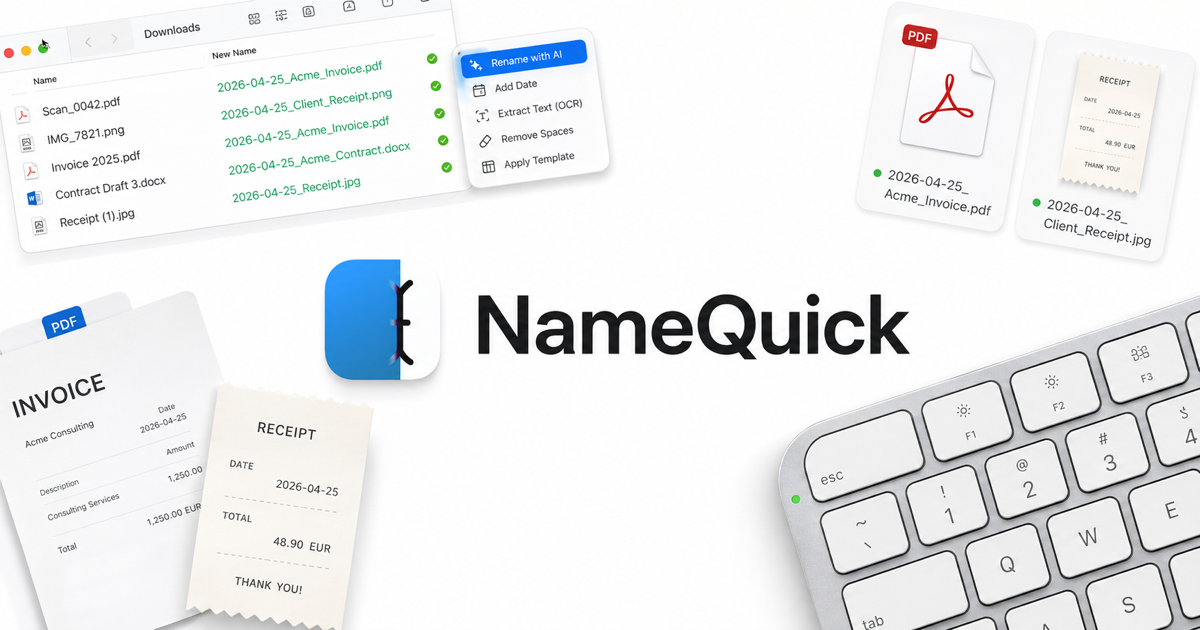
NameQuick combines content-aware naming with Presets, Watch Folders, Finder tags, content search, and conditional Rules. Its current product page lists a Managed plan from $12 per month for 500 renames up to $99 per month for 10,000, plus a $69 one-time Self-Managed license. The Self-Managed path supports provider keys and local models including Ollama and LM Studio.
NameQuick focuses on recurring PDFs, scans, receipts, invoices, contracts, Word documents, and spreadsheets. It previews suggested names, can apply rules before or after renaming, and provides undo. Rules can route files after the filename exposes useful fields. Its one-off Quick Organize workflow is now live, while its managed tiers still meter renames; Zush remains the broader recommendation.
Consider only for: a document-heavy Mac workflow where NameQuick’s conditional routing is mandatory despite metered managed plans or self-managed setup.
Watch out for: Managed plans meter renames. Self-Managed removes the vendor allowance but requires your own provider or local-model setup.
5. Sortio: a narrow alternative for prompt-driven routing
Sortio accepts a natural-language instruction, previews a plan, and can rename, create folders, and route files. Its Smart Folders keep handling new arrivals. The official page lists macOS, Windows, and Linux, plus hosted AI, BYOK, and local Ollama options.
The free plan includes unlimited rule-based sorting with up to five rules and three Spaces, a one-time AI trial allowance, watch folders, history, and undo. Pro was listed at $14.99 per month or $99 per year, with a monthly AI allowance and unmetered BYOK. Sortio says local rule processing stays on device; handling of content depends on whether you choose hosted, BYOK, or local features.
Consider only for: Linux desktops, team workspaces, or free rule-based sorting. Zush covers the same prompt-driven sorting on Mac and Windows, adds deeper filename control and video and audio coverage, and costs $48 one-time instead of a yearly AI allowance. See Zush vs Sortio.
Watch out for: Sortio does more than rename, so approve the complete move plan. Also distinguish “works offline” rule execution from content features that may use a provider.
6. Floxtop: offline sorter with narrow system requirements
Floxtop uses on-device AI to classify files and suggest destination folders. It supports local and cloud-synced folders, shows several classification matches, and lets the user review destinations before moving anything. Its Smart Rename feature can also propose content-based names on supported newer macOS versions.
Floxtop’s official pricing listed a free tier for 100 organized files per month and a $19.99 one-time Pro license for unlimited files. Processing is described as fully offline. The trade-off is a narrower hardware target: the current app requires macOS 15 or later on Apple Silicon, while Smart Rename lists an even newer macOS requirement.
Consider only for: reviewed on-device folder classification on a recent Apple Silicon Mac. Zush ranks higher overall because Floxtop targets a narrower system range and the checked page does not clearly document full undo history.
Watch out for: verify OS requirements on your Mac, and make a backup before applying a large structural move. The checked product page emphasizes review but does not clearly document a full undo history.
7. Files Magic AI: a narrow organizer-plus-cleaner alternative
Files Magic AI combines folder organization, offline Magic Rename, duplicates and unused-app cleanup, and developer-cache cleanup. Its organization flow sends filenames—not file contents—to propose a structure. Magic Rename documents three local choices: Apple Intelligence, the app’s built-in model, and an optional Rename LLM. It can also watch selected folders and rename new files automatically. The user previews, excludes items, and applies approved changes.
Official pricing showed $4.99 monthly, $29 yearly, or $49.99 lifetime with a seven-day trial. Recent organization actions can be undone. The app supports locally available cloud folders and can use optional BYOK OpenAI for its Files AI chat.
Consider only for: users who explicitly want folder restructuring and system cleanup in the same utility. See the detailed Zush vs Files Magic AI comparison before choosing between its broader cleanup scope and Zush’s deeper naming controls.
Watch out for: system cleaning and folder reorganization have a broader blast radius than renaming. Keep those workflows separate and review deletions, exclusions, and proposed moves carefully.
Best AI file organizer for Mac: verdict
Start with Zush for content-aware names and optional AI folder sorting. Compare other tools when you need deterministic rules, scripts, or system cleanup:
- Choose Zush when you want content-aware filenames, folders sorted by your own plain-language rules, the most configurable naming workflow in this comparison, and batch recovery.
- Consider Hazel only when explicit rules must move, tag, archive, or run scripts after naming.
- Consider Sparkle only when broad cleanup and an AI-created folder structure matter more than stable paths.
- Consider NameQuick only when its document-routing Rules workflow is mandatory.
- Consider Sortio only when you need Linux, team workspaces, or free rule-based sorting; Zush covers prompt-driven folder sorting on Mac and Windows.
- Consider Floxtop only when reviewed on-device folder classification on recent Apple Silicon is mandatory.
- Consider Files Magic AI only when folder organization and system cleanup must share one app.
Zush can rename files and sort them into AI-named folders. With sorting off and the original destination selected, Zush keeps files in their current folder.
For a hands-on setup, read how to automate file organization on macOS. If Downloads is the only folder that keeps failing, use the Downloads automation workflow. To build searchable status views without moving files, follow the Finder tags and Smart Folders guide. For a naming-only comparison, see the best AI file renamers for Mac.
A safe 10-file evaluation
Do not point any organizer at your whole home folder first. Copy ten representative files into a test folder: a screenshot, invoice, receipt, photo, spreadsheet, presentation, document, audio file, video, and an unknown download.
Then evaluate five things:
- Does the tool understand enough content to make the result searchable?
- Can you preview every rename and move before applying it?
- Does the pricing model still work at your real monthly volume?
- Can the workflow run locally or through a provider you trust?
- Can you reverse the complete batch without reconstructing paths manually?
The test reveals whether you need renaming, routing, cleanup, or a combination. It also catches format gaps before automation touches active work.
FAQ
What is the best AI file organizer for Mac?
Zush is our best overall AI file organizer for Mac: it gives files content-aware, searchable names and sorts them into folders using Auto or your own plain-language rules, with preview and undo. Consider Hazel for scripts and deterministic conditions; Sparkle, Sortio, Floxtop, and Files Magic AI are narrower routing or cleanup products rather than our overall recommendation.
Can AI organize files for me on a Mac automatically?
Yes. Zush can monitor a folder and rename new files by content; on Mac, a sorting-enabled Template can also group new arrivals into folders. Hazel remains an option for deterministic routing. Start with one monitored test folder, review the first results, and keep undo enabled before automating important directories.
Does Zush move files into folders?
Yes. Zush can rename files and sort them into folders. Leave Folder rules empty for Auto grouping, or describe the grouping in plain language, such as “Sort receipts by month and name folders YYYY-MM.” Zush can reuse existing folders, and undo moves a file back to its original folder and name. With sorting off, files keep their current location.
Is there a local AI file organizer for Mac?
Yes. Zush supports LM Studio and Ollama for supported on-device analysis; Floxtop describes its processing as fully offline; NameQuick supports local models in Self-Managed mode; and Files Magic AI documents Apple Intelligence, a built-in model, and an optional Rename LLM for Magic Rename. Verify the exact file types and macOS requirements before choosing.
Sort files into folders with AI using Auto mode or your own instructions.


