Zush vs Files Magic AI (2026): Renaming, Sorting & Price

Jump to section
Zush is the better fit for renaming and sorting mixed files across Mac and Windows. It combines content-based folder grouping, 145+ Naming Blocks, and support for documents, RAW photos, design files, video, and audio. Its $48 one-time PRO plan includes unlimited renames across cloud and local AI modes.
Files Magic AI is worth considering for Mac cleanup or an older Mac. Both apps offer content-aware renaming, templates, folder automation, and local AI. Zush’s advantages are the platforms, file workflows, and purchase terms described below.
Reviewed October 18, 2026. Written by the maker of Zush, the AI file renamer for Mac and Windows. This is a comparison of documented features and current advertised prices, not a hands-on benchmark. Sources: Files Magic AI, its Magic Rename guide, and the linked Zush documentation.
Zush vs Files Magic AI at a glance
| Zush | Files Magic AI | |
|---|---|---|
| Platforms | macOS 15+ and Windows 10/11 | macOS 12+ |
| Devices per license | Up to 3 devices | Not specified on the cited product page |
| Folder organization | Groups by file content; optional folder sorting | Builds folder plans from filenames |
| Naming control | 145+ Naming Blocks, Custom AI Blocks, reusable Templates | Templates and custom fields |
| File coverage | 100+ formats, including RAW, design, video, audio, and documents | Documents, spreadsheets, presentations, text, and OCR images; video unsupported |
| AI choices | Zush Cloud AI, BYOK, Ollama, LM Studio | Local or Cloud AI for renaming |
| New arrivals | Monitor uses saved Templates | Magic Folders automate renaming |
| Recovery | Rename History and batch undo | Revert to Original and rename history |
| Cleanup | Focuses on renaming and sorting | Duplicate and system cleanup |
| One-time price | $48 | $59.99 |
Why choose Zush?
Use one workflow on Mac and Windows
Zush runs on Mac and Windows. You can reuse the same naming conventions across both systems and export Templates rather than rebuild them by hand. Choose the destination folder and grant folder access again on the receiving computer.
One Zush license covers up to 3 devices. If you work on a MacBook and a Windows desktop, you can use both under one license and keep the same filename structure and folder rules.
Group files by what they contain
Zush’s folder sorting can group invoices by company, receipts by month, or photos by subject. It supports nested folders and can sort already renamed files without another rename credit. You review proposed names and destinations before applying the batch.
The distinction matters when a folder contains names such as scan_0042.pdf: the company or document topic may only be available inside the file. Zush can use that content for the folder plan as well as the filename.
Name creative files alongside documents
Zush supports 100+ file formats, including RAW photos, HEIC, Office and iWork documents, PSD, Figma, Sketch, Illustrator, video, and audio. For a project containing paperwork, design assets, and clips, this coverage is a reason to start with Zush.
The following are illustrative naming patterns, not measured test results:
scan_0042.pdf→2026-09-12_acme_invoice_1042_1250usd.pdfScreenshot 2026-09-18 at 14.12.03.png→stripe-revenue-dashboard-september.pngDSC01877.ARW→2026-06-14_wedding_first_dance.ARW
Build a naming convention you can reuse
Zush’s Naming Blocks cover dates, document fields, subjects, and metadata. Combine them in a Template, set case, separators, and language, then add a Custom AI Block for a field specific to your work. For example, a bookkeeper can keep supplier, invoice number, date, and amount in a fixed order.
Files Magic AI also supports reusable templates. Zush’s appeal is its library of 145+ blocks and the ability to save naming and sorting settings together. Assign a Template to Monitor to apply it to new arrivals, and use Rename History to review and undo changes.
Sort mixed files into folders with AI
Zush can give supported files descriptive names and group them into real folders by content in the same batch. AI folder sorting works on Mac and Windows. Leave Folder rules empty for Auto grouping, or describe the groups in plain language. For mixed files, try:
Group invoices by company and receipts by month.
- Add a small copied batch in AI Rename and select a Template.
- Enable + Sort and choose the Destination folder, which is the root for the sorted subfolders. Without a separate destination, the source folder remains the root.
- Enter the grouping instruction in Folder rules. Naming Blocks set the filename format separately.
- Enable Reuse existing folders if suitable groups already exist inside the destination root. Zush can create a new folder when none fits.
- Review both the proposed names and folder groups. Correct folder names or file placement before applying the batch.
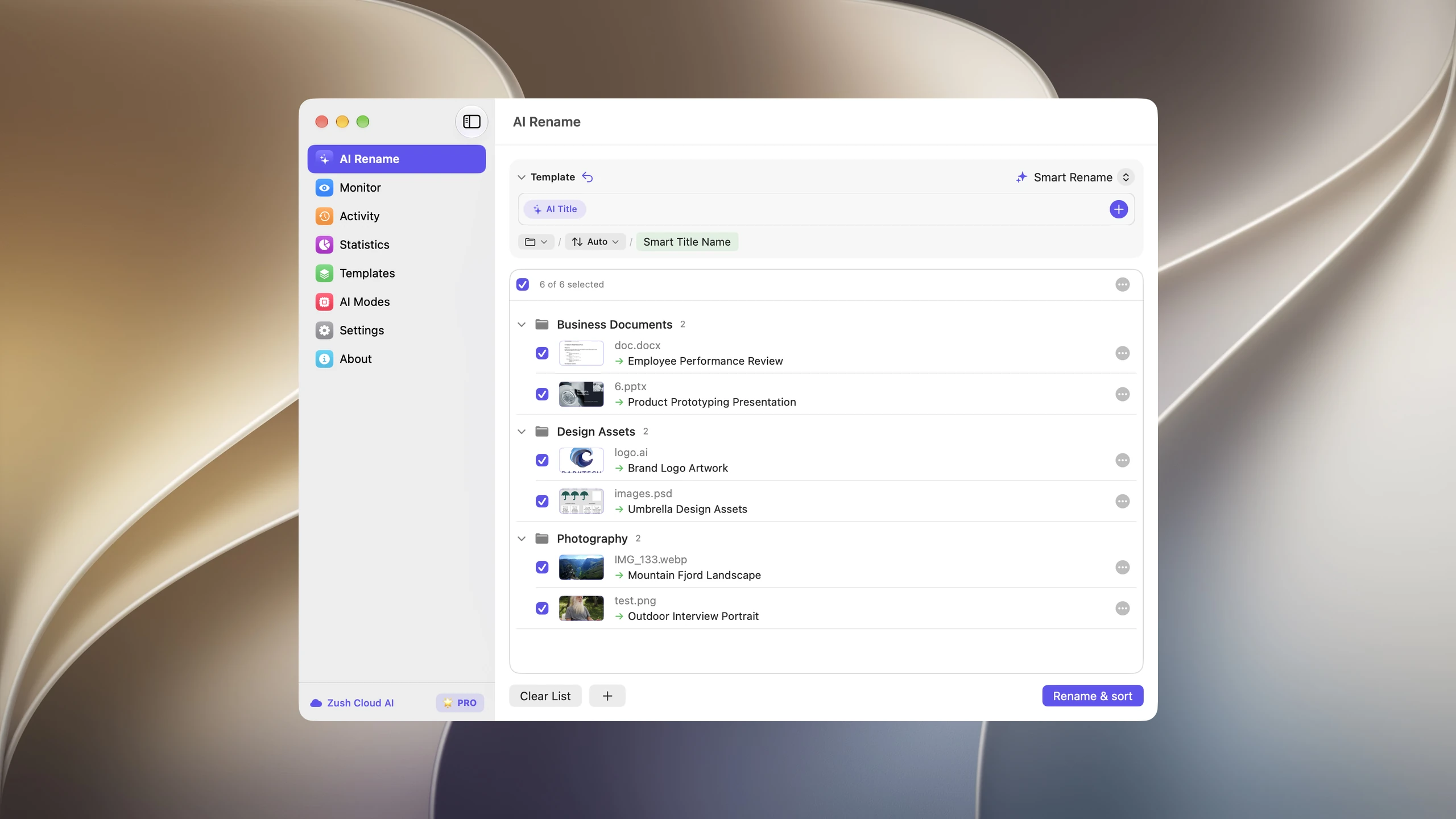

Save the destination and rules in the Template. Assign it to Monitor to rename and sort new files arriving directly inside the watched folder. This does not retroactively reorganize files already processed. With sorting off and the original destination selected, files keep their current folder.
Follow the step-by-step Mac sorting guide or see the folder sorting documentation and 30 example Folder rules.
Privacy: choose the processing mode deliberately
Zush lets you choose Zush Cloud AI, your own provider key, or a local model through Ollama or LM Studio. Local analysis stays on your computer and does not silently fall back to the cloud. You install and run the compatible model yourself. Cloud AI and BYOK send content needed for analysis to the selected provider; BYOK usage can incur separate provider charges.
Files Magic AI’s main page now offers local and Cloud AI renaming. Cloud mode sends extracted text; folder organization sends filenames. Its separate Magic Rename guide still describes an entirely local workflow. We use the main page’s explicit engine choices here, so readers should not assume every mode is offline.
Both apps offer local processing. Choose Zush if you want to manage local models on either Mac or Windows.
Price: Zush costs less as a one-time purchase
Advertised USD prices checked October 18, 2026. Discounts and checkout totals can change.
| Plan | Zush | Files Magic AI |
|---|---|---|
| Free allowance | 50 AI renames | 25 Smart Renames; organize one folder |
| Monthly | $10 | $4.99, with a $2.49 first-month offer |
| Annual | No separate annual plan | $34.99 |
| One-time | $48 | $59.99 |
| Subscription trial | Start with the free allowance | 3 days on monthly and annual plans |
| Paid rename allowance | Unlimited PRO renames across AI modes | Lifetime includes 1,000 cloud renames/month and unlimited local renames |
Zush’s one-time plan is $11.99 less. One license covers up to 3 devices. Its PRO plan removes the rename limit across Zush Cloud AI, BYOK, and local models. That makes it a useful choice for recurring batches without a monthly cloud-rename allowance. Provider charges still apply when you use BYOK.
Files Magic AI has the lower monthly price. Its lifetime cloud allowance is a separate consideration from the purchase price. See the current vendor pricing before buying.
Which should you choose?
Choose Zush when you need searchable, consistent filenames and content-based folder sorting across Mac and Windows. It is especially useful for mixed document and media batches, custom naming conventions, and ongoing use on the $48 one-time plan.
Choose Files Magic AI if duplicate removal and system cleanup are central to the job, or you need support for macOS 12, 13, or 14. Zush requires macOS 15 or later and does not include a system cleaner.
Start with Zush’s 50 free renames on files you actually work with. Review the proposed names and folder groups before applying them.
FAQ
Is Zush a good Files Magic AI alternative?
Yes. Zush is a strong alternative for AI file renaming and content-based folder sorting, particularly if you use Windows, handle RAW photos and media files, or want 145+ Naming Blocks. Its one-time PRO plan costs $48 and includes unlimited renames across AI modes.
Can Zush organize files that already have good names?
Yes. Zush can sort already renamed files into folders without renaming them again or using another rename credit. Review the destination and proposed groups before moving them.
Can I keep file analysis offline with Zush?
Yes. Connect Zush to a compatible local model in Ollama or LM Studio. Local analysis stays on your Mac or Windows PC, with no silent cloud fallback. Cloud AI and BYOK are separate choices.
Does Zush replace a Mac cleanup app?
Zush handles file naming and organization. It does not remove duplicate files, uninstall apps, or clear developer caches. Use a cleanup utility when reclaiming disk space is the main task.


