Zush vs RenameClick: Naming, Formats, Recovery (2026)

Auf Deutsch lesen: „Zush“ vs. „RenameClick“: Benennung, Formate, Wiederherstellung (2026)
Jump to section
Quick answer: choose Zush when the filename convention itself matters. Ready-made Templates combine with 145+ Naming Blocks, Custom AI Blocks, formatting, localization, tags and metadata; Rename History stores original and new names, folder and timestamp and can restore an applied batch. Its 100+ formats include RAW, design, iWork, audio, and video. Both apps can now sort files into folders: Zush follows plain-language Folder rules or Auto, while RenameClick picks from preset categories. RenameClick is relevant mainly when its AI Search workspace is mandatory, and it gives up RAW, design, iWork, and video coverage.
Last verified: September 24, 2026, against Zush’s current documentation and rename.click’s own pricing page and documentation.
Sources checked for this update: Zush and RenameClick, including public pricing, offline/local AI, Auto Flow, AI Search, undo, and its supported file types documentation.
If you are searching for RenameClick itself, its official site is rename.click. This page is an independent feature comparison, not RenameClick documentation.
Both products ship desktop apps for Mac and Windows, support local AI, monitor folders, sort files into folders, keep undo history, and offer one-time pricing. Those are parity features. Zush pulls ahead on naming control, recovery detail, mixed-file breadth, and sorting by plain-language rules instead of a preset category list. RenameClick’s specific use case is its AI Search workspace, with a narrower supported-format matrix.
RenameClick vs Zush: quick verdict
| Dimension | Zush | RenameClick |
|---|---|---|
| Pricing | $10/month or $48 one-time | $8+ VAT/month or $36+ VAT lifetime |
| Free tier | 50 renames to start | Unlimited AI analysis, 100 successful renames or moves/month |
| 5-year cost (one-time path) | $48 total | $36+ VAT total at the price checked September 24, 2026 |
| Platforms | Mac + Windows | Mac + Windows |
| Local model bundled | No; connect LM Studio or Ollama | Yes, Qwen3-VL local model after download |
| AI providers | BYOK: Gemini, OpenRouter, OpenAI, Claude; local: LM Studio, Ollama | Built-in local, OpenAI, Gemini, Alibaba Cloud Qwen, LM Studio, Ollama |
| Image/design formats | 41 image formats + 4 design formats, including RAW, HEIC, AVIF, Sketch, Figma, AI, PSD | JPEG, PNG, GIF, WebP, AVIF, BMP, SVG, HEIC, HEIF, TIFF; no design files |
| RAW support | Yes (CR2, CR3, NEF, ARW, DNG, ORF, RAF, RW2, PEF, SRW, SR2) | Not listed publicly |
| Document formats | 40 document/PDF formats, including iWork | PDF, DOC/DOCX, TXT, MD, CSV, RTF, ODT, JSON, XML, YAML, HTML, logs, SQL, SRT/VTT, ICS/VCF |
| Video formats | 16 common formats | Not supported per docs |
| Audio formats | MP3, M4A, WAV, FLAC, OGG, WebM, MPGA | MP3, WAV, FLAC, M4A, AAC with local speech transcription |
| Folder monitoring | Yes | Yes, Auto Flow |
| Sorting / moving files | AI folder sorting (beta): plain-language Folder rules or Auto, destination folder, reuse existing folders | AI Categories from a preset list, Metadata Folders, or Match Folders (up to 50 existing top-level folders) |
| AI Search by content | No dedicated AI Search; Finder tags + Spotlight metadata | Dedicated AI Search workspace |
| Recovery | Full Rename History: original/new name, folder, timestamp, batch revert | Full undo/redo per docs |
| Naming controls | Ready-made Templates, 145+ Naming Blocks, Custom AI Blocks, formatting, localization, metadata | Format patterns, EXIF placeholders, custom instructions |
| Languages | 60+ | Multilingual; docs say 14 output languages |
| Main limitation | Desktop-only | No RAW, design, iWork, or video support; local model requires multi-GB download and memory |
Zush
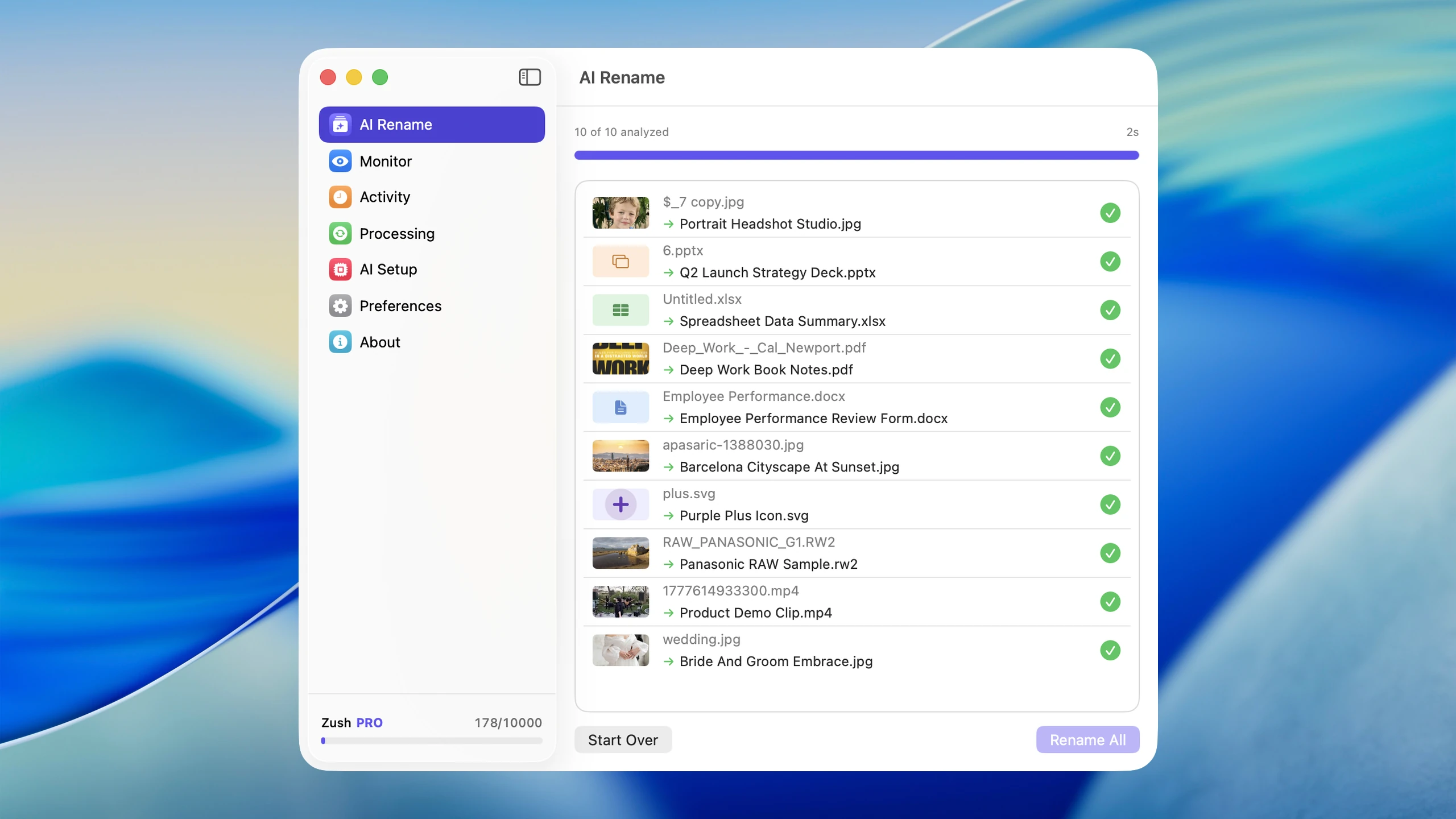
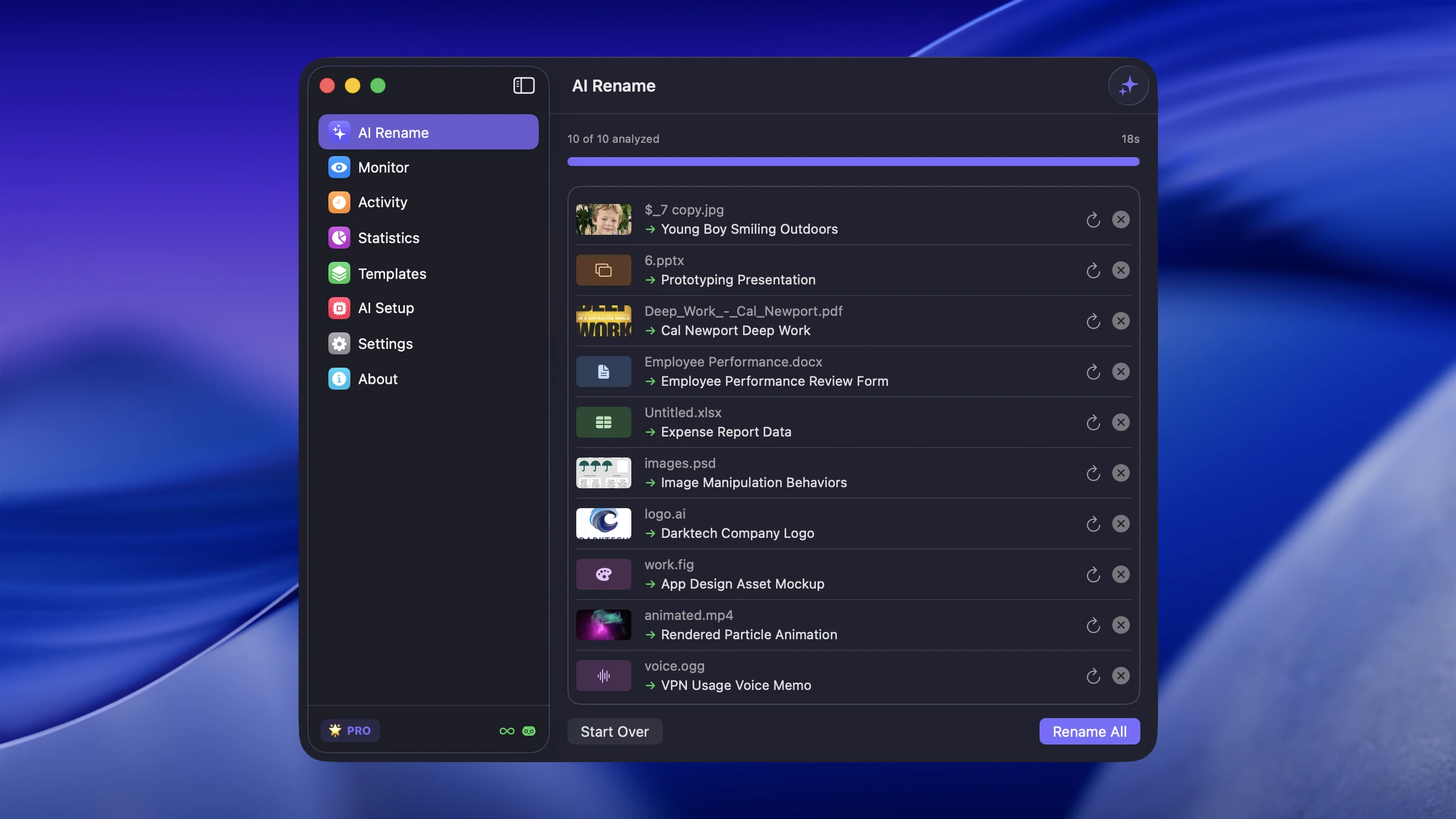
Zush is a desktop AI file renamer for mixed folders. Its strongest advantage is the naming system: built-in Templates for common workflows, 145+ Naming Blocks, Custom AI Blocks, prompts, field order, case, separators, date formats, language, Finder tags, Spotlight metadata, and per-folder Template assignments. Rename History stores original and new names, folder, and timestamp and can revert an applied batch. Its 100+ formats span images, RAW, design, documents, iWork, subtitles, video, and audio.
The important part in this comparison is that Zush does not force a file-type silo. A folder with IMG_4821.HEIC, _DSC0019.NEF, checkout-flow.fig, voice-memo.m4a, client-brief.pages, recording.mov, and invoice.pdf can stay in one workflow.
Pricing is simple: $10/month or $48 one-time for PRO. Both paid plans remove the rename limit across all four modes: Zush Cloud AI, BYOK, LM Studio, and Ollama. Templates, Naming Blocks, and custom prompts are included free.
RenameClick
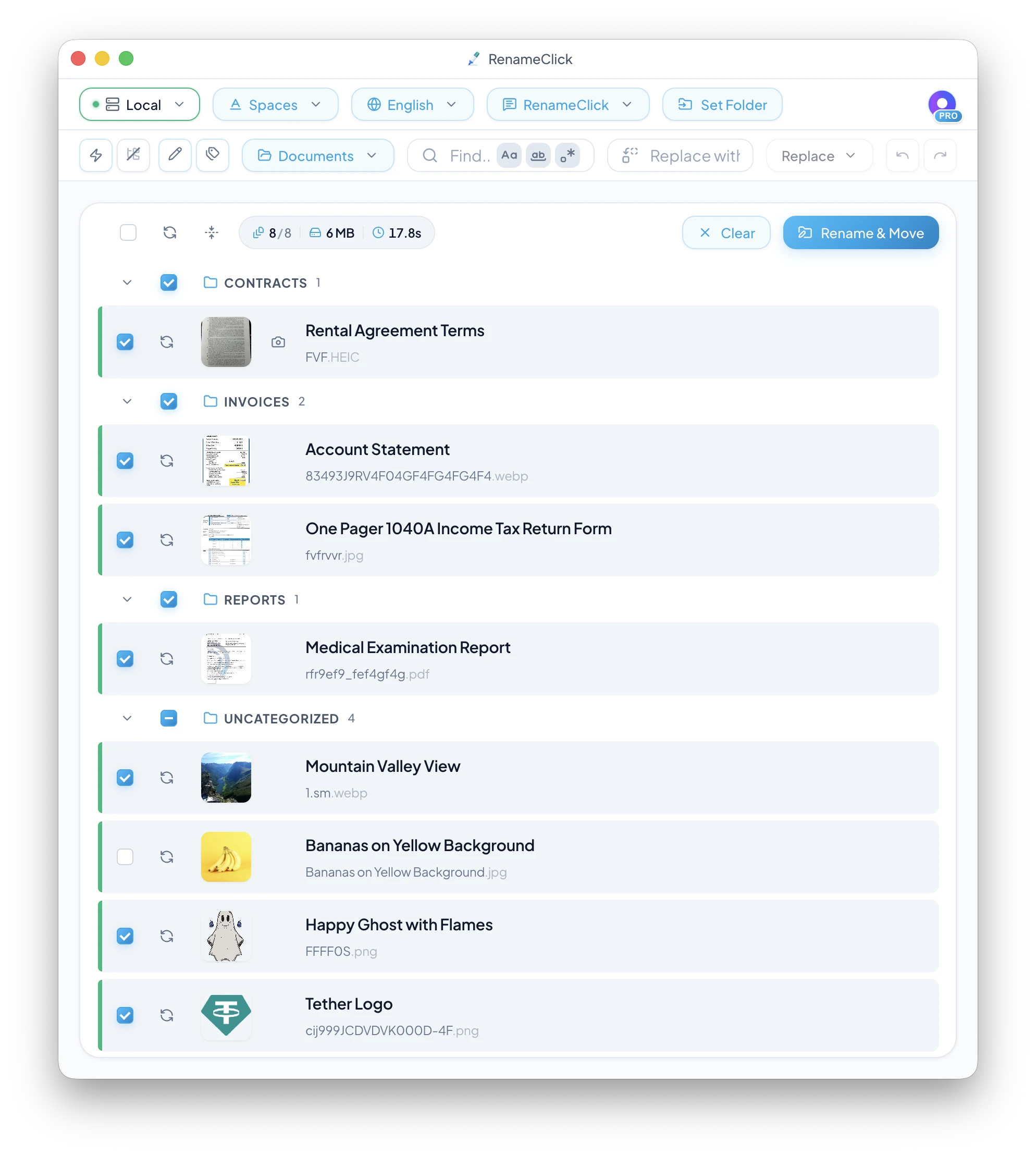
RenameClick is a local-first desktop app for macOS and Windows. Its core pitch is privacy: after the one-time local model download, its built-in Qwen3-VL provider can process files on the device without an API key or internet connection. It also supports LM Studio and Ollama for local server workflows, plus OpenAI, Google Gemini, and Alibaba Cloud Qwen when you explicitly connect cloud API keys. RenameClick notes that cloud providers are not available in the Mac App Store version; use the direct download if those providers matter.
RenameClick is not only a renamer. It is closer to a file organizer: it can rename files, categorize them, move them into folders, run Auto Flow watch rules, search by content with AI Search, and build names from EXIF/date placeholders. Its supported-files documentation now covers three categories: common images (JPEG, PNG, GIF, WebP, AVIF, BMP, SVG, HEIC, HEIF, TIFF), a long document list (PDF, DOC/DOCX, TXT, MD, CSV, RTF, ODT, JSON, XML, YAML, HTML, logs, SQL, SRT/VTT, ICS/VCF), and audio (MP3, WAV, FLAC, M4A, AAC) with local speech transcription. Video files, other audio codecs, archives, and executables are explicitly listed as unsupported.
Pricing reality
The one-time plans are close enough that price alone should not decide the whole comparison:
| Path | Year 1 | 3 years | 5 years |
|---|---|---|---|
| Zush Pro One-Time | $48 | $48 | $48 |
| Zush Pro Monthly | $120 | $360 | $600 |
| RenameClick Pro Lifetime | $36+ VAT | $36+ VAT | $36+ VAT |
| RenameClick Pro Monthly | $96+ VAT | $288+ VAT | $480+ VAT |
Free allowances differ: Zush includes 50 renames in total across all AI modes, with no monthly reset. RenameClick includes 100 successful renames or moves each month.
Zush is $10/month or $48 lifetime. RenameClick is $8 plus VAT/month or $36 plus VAT lifetime. The existing ZUSH25 promotion brings Zush’s $48 lifetime price to $36 before applicable tax; this is a promotional price. Check both checkouts and compare format support, naming control, and recovery as well as cost.
Format support
Zush is broader for real mixed folders
Zush supports RAW photo formats, design files, audio, videos, iWork files, Office files, subtitles, and data/text formats. That is the practical advantage if your folders are messy because they are real: screenshots beside phone photos, camera RAWs beside PDFs, Figma/Sketch/PSD files beside Keynote/Pages documents, and video files beside meeting notes. Audio is no longer part of that gap — RenameClick handles common audio formats now — but RAW, design files, iWork, and video still are.
RenameClick covers common images, a wide document list, and now audio
RenameClick covers common image and document workflows well — JPEG, PNG, GIF, WebP, AVIF, BMP, SVG, HEIC, HEIF, TIFF, plus PDF, DOC/DOCX, TXT, Markdown, CSV, RTF, ODT, JSON, XML, YAML, HTML, logs, SQL, subtitles, and calendar/contact files — and it has added audio (MP3, WAV, FLAC, M4A, AAC) with local speech transcription. It also has useful document processing details: text extraction for text PDFs and Office documents, vision fallback for scanned PDFs, and configurable document text trim limits.
The gap is around media and design formats. RenameClick’s docs do not list camera RAW formats or design files like Sketch/Figma/PSD, and they explicitly call video files, archives, and executables unsupported. If those formats matter, Zush is safer.
Local AI is parity; naming control is not
Both products can run local models, so offline processing is not a unique advantage. Zush connects to LM Studio or Ollama; RenameClick bundles Qwen3-VL after a multi-GB download and also supports LM Studio and Ollama. The more important difference is the rest of the workflow: Zush documents ready-made Templates, 145+ Naming Blocks, Custom AI Blocks, richer localization and metadata controls, and persistent Rename History.
Zush wins if you care more about cloud-provider choice and high-volume BYOK. Zush supports Gemini, OpenRouter, OpenAI, and Claude through BYOK, with keys stored locally, and offers LM Studio and Ollama when local processing is the priority. OpenRouter and Claude are notable Zush-side options; Alibaba Cloud Qwen remains a RenameClick-side option.
The practical trade-off is simple: choose Zush for naming depth, recovery detail, mixed-file breadth, and prompt-based folder sorting. Consider RenameClick only when its AI Search workspace outweighs the missing RAW, design, iWork, and video coverage.
Automation and organization
Both tools can watch folders, but they emphasize different outcomes.
Zush folder monitoring is built around automatic AI renaming with reusable templates and Naming Blocks. A sorting-enabled Template also moves each new file into a folder chosen by your plain-language Folder rules or Auto, and Monitor keeps reusing the folders it created. It fits Downloads cleanup, scanner folders, screenshots, and recurring client folders.
RenameClick Auto Flow is more of a rule-row system. Each row can have its own source folder, destination folder, naming format, custom instructions, language, sorting preset, recursive setting, and Auto Apply setting. It can run multiple rows at the same time, wait for files to become stable before processing, avoid looped processing inside destination folders, and pause when free-plan credits run out.
If your automation goal is to rename files consistently and file them by rules you describe in your own words, Zush is the stronger documented system. Consider RenameClick when a fixed category list or matching against existing top-level folders is all you need; its narrower format coverage remains the cost of that choice.
Search, metadata, and retrieval
Zush helps retrieval by generating meaningful filenames, adding Finder tags, and writing Spotlight-friendly metadata. That fits Mac users who already search through Finder/Spotlight and want filenames to carry the most important context.
RenameClick adds a separate AI Search workspace. It lets you search by content meaning, not just filename keywords. For example, a search for invoices can match PDF scans even if the original filename is scan_001.pdf. AI Search is read-only for rename/move purposes, but it can reveal files, exclude results, or move items to trash.
For discovery inside chaotic folders, RenameClick’s AI Search is a meaningful differentiator. For turning files into long-term searchable assets across the OS, Zush’s filename + tag + metadata workflow is the better everyday layer.
Pick by use case
Pick Zush if:
- You need the broadest format coverage, especially RAW photos, design files, videos, iWork, and subtitles
- You want ready-made Templates, 145+ Naming Blocks, Custom AI Blocks, formatting, localization, metadata, and full Rename History
- You want BYOK with Gemini, OpenRouter, OpenAI, or Claude available on every plan
- You need 60+ output languages
- You want templates and 145+ Naming Blocks for repeatable filename structures
- You want one rename workflow across Mac and Windows without thinking about local model hardware first
- You want files sorted into folders by your own plain-language rules, such as “Group invoices by company and receipts by month”
Consider RenameClick only if:
- You need AI Search by file content
- You prefer sorting into a fixed list of preset categories
- You rely on EXIF-heavy photo naming patterns
- You specifically need Alibaba Cloud Qwen or RenameClick’s AI Search workspace
- You accept no documented RAW, design, iWork, or video support and the local model’s multi-GB hardware footprint
Before buying, copy the same ten representative files into a test folder and run them through both free workflows. Compare name quality, preview clarity, processing time, unsupported formats, and the ability to reverse the complete batch.
Migration tip
If you are coming from RenameClick to Zush, test the files that RenameClick does not publicly cover first: RAW photos, design files, videos, and iWork documents. If those are the reason you are switching, the difference will be obvious quickly. If you already use a cloud provider key, add it in Zush BYOK and keep provider costs separate from the desktop app.
We do not recommend moving from Zush to RenameClick for the general workflow: you would give up documented RAW, design, iWork, and video coverage and plain-language folder rules while taking on a multi-GB local model and higher published hardware guidance. Consider that move only when AI Search is mandatory and has been verified on copied representative files.
FAQ
Is RenameClick cheaper than Zush?
Zush is $10/month or $48 lifetime. RenameClick is $8 plus VAT/month or $36 plus VAT lifetime.
Does RenameClick work offline?
Yes. RenameClick is local-first. After the local model is downloaded, the built-in local provider can run without internet, without an API key, and without API costs. Cloud providers require internet and your own provider key.
Does Zush work offline?
Yes. Zush supports LM Studio and Ollama for users who want to choose and manage compatible local models. Both local routes are available on Mac and Windows.
Does RenameClick support RAW photos?
RenameClick’s public supported-file list does not include camera RAW formats like CR2, CR3, NEF, ARW, DNG, ORF, RAF, RW2, PEF, SRW, or SR2. Zush explicitly supports those RAW formats.
Does RenameClick support video or audio files?
Audio yes, video no. Its docs now list MP3, WAV, FLAC, M4A, and AAC with local speech transcription, while video files (.mp4, .mov, .mkv, .webm), other audio codecs, archives, and executables are explicitly unsupported. Zush supports 16 video formats alongside its audio list.
Which has better folder automation?
Zush, for most folders. Both apps can rename new files and move them into folders. Zush sorts by plain-language Folder rules or Auto, reuses existing folders, and names files with Templates and Naming Blocks. RenameClick’s Auto Flow sorts into preset categories or up to 50 existing top-level folders and can copy instead of move.
Verdict
Both products are serious, and the overlap is real: Mac + Windows, AI batch rename, folder monitoring, local AI, provider choice, undo, and one-time pricing.
Choose Zush for the most configurable and recoverable workflow in this comparison: ready-made Templates, 145+ Naming Blocks, Custom AI Blocks, formatting, localization, metadata, full Rename History, and 100+ formats.
Consider RenameClick only if its AI Search workspace or a fixed category list is mandatory. Local AI, undo, and folder sorting are available in both products; RenameClick’s drawback is the missing RAW, design, iWork, and video coverage plus the bundled model’s hardware footprint.
For the broader market view, see Mac AI renamer comparison, AI renamer market comparison, and Zush vs NameQuick.


